Private pages: build your own views, no admin required
Port users can now build their own views on top of the data they already have access to.



.png)
What changed
Until now, only admins could create pages in Port. If you wanted a dashboard for your team or a personal view to track your work, you had to ask an admin to build it or to set the permissions for you.
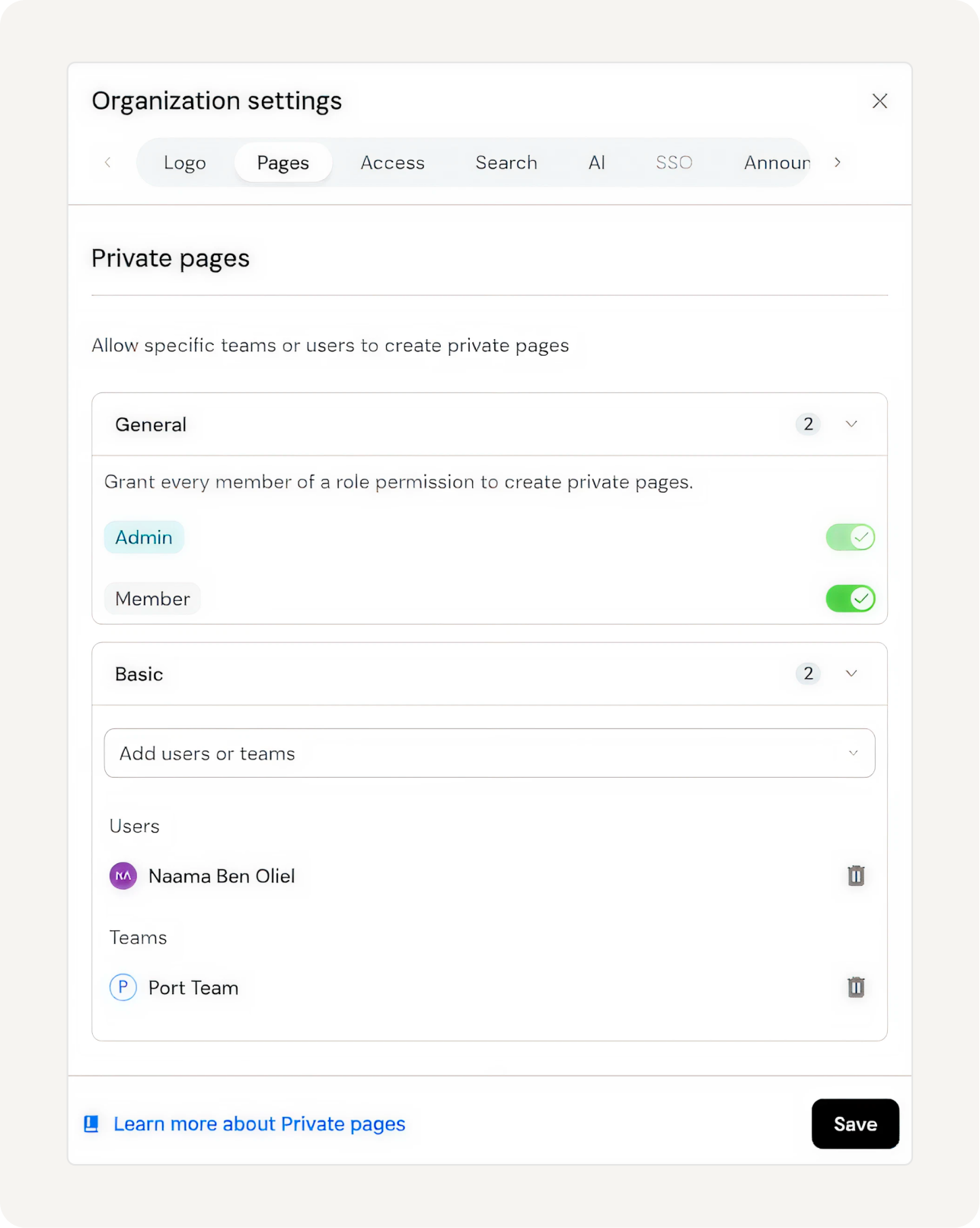
Private Pages change that. Admins can now grant members the create:private-pages permission, letting them build and run their own pages. Members' pages are private by default - visible only to the creator - until promoted org-wide. From the Organization Settings tab, admins control who gets the create:private-pages permission, by role, user, or team. Promotion to org-wide is controlled separately, per page: only an admin can flip a page from private to org-wide. Admins control what surfaces org-wide. Members only see and interact with the data they already have access to, based on the RBAC.
The problem it solves
The feature request for private/personal pages sits at 97 upvotes, one of the most consistent asks we've had.
The friction was real. With admins being the only ones who could create pages, they became the bottleneck as more team members wanted to get visibility into their own domain. A platform engineer who wanted to track deployment frequency, or an engineering manager who needed a live view of their department's health before a planning meeting, had two options: ask an admin to build it and configure the permissions, or pull the data somewhere else, like Port MCP. Both make the user leave Port to get a view of their own work, then maintain it by hand. While users can ask Port AI and Port MCP to answer an ad-hoc question, a GUI and constant page were still missing. For example, a manager can ask Port AI “what’s my team’s deployment frequency in the last month” and get an answer based on Port's context lake. But the answer isn't a dashboard. There's no persistent surface to return to, to share with others for collaboration, no page to open on Monday morning before the weekly sync. Private pages fill that gap.
{{from_manual_to_autonomous_engineering}}
How it works
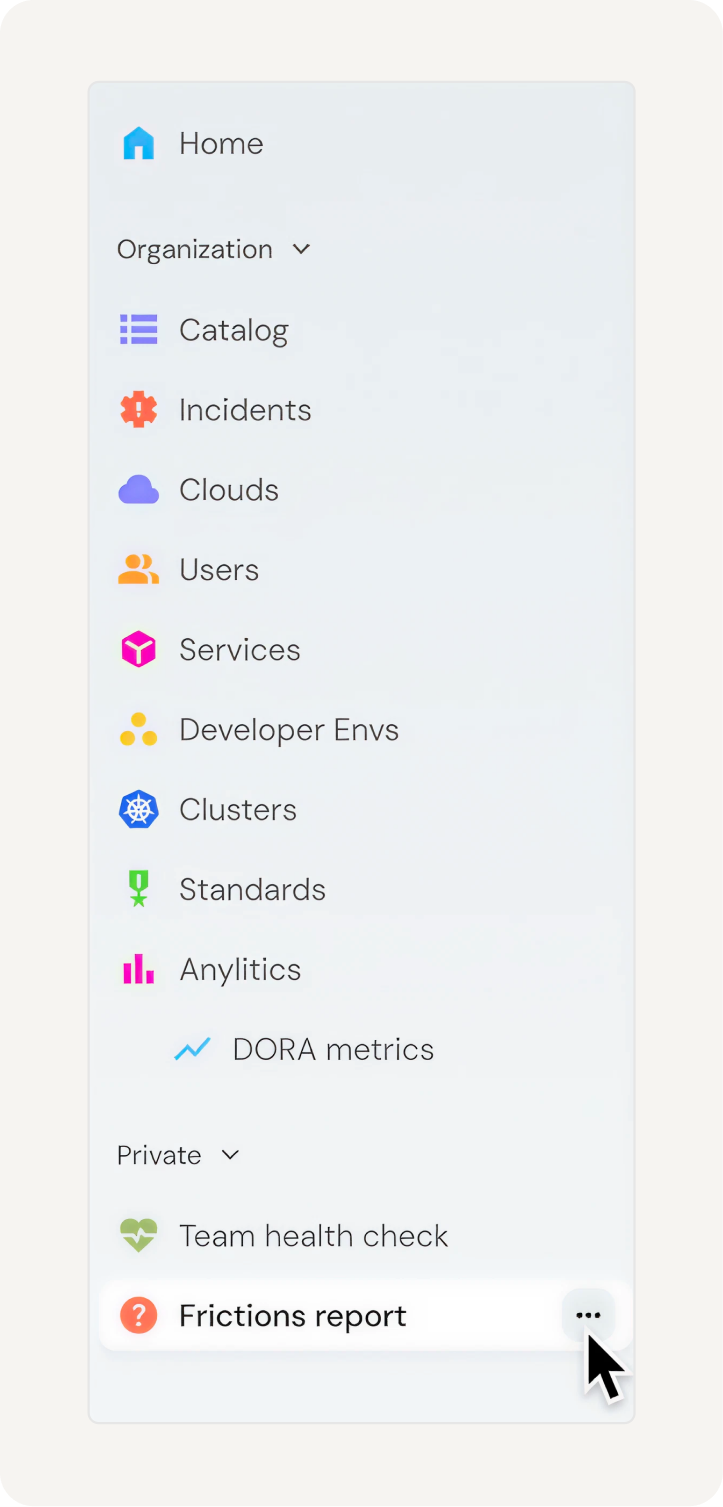
When an admin grants a member the create:private-pages permission scope, that member can build pages only they can see. Private pages appear in the Private section of the sidebar, below the org-wide navigation.
To collaborate, a user grants view or edit access to specific users or teams via page permissions, then sends them the link. For now, the link is how they reach it; a "Shared with me" section in the sidebar is coming (see What's next). Admins can reach any private page (via the API, or via the link if someone shares it), so they don't need to be granted permission separately.
To make a page available org-wide, a member sends the link to an admin. Only admins can change a page's visibility from private to org-wide. A few distinctions to keep in mind:
Visibility is a property, not a separate page type. Every page now has a visibility field: private or org. All existing page features, widgets, filters, entity tables, custom components, work on private pages without changes.
Private pages are excluded from GET /pages by default. When a machine user or Terraform calls GET /pages, the response only includes org-wide pages. Private pages are returned only when you pass includePrivate: true. This keeps your IaC state clean so Terraform won’t flag pages it didn't declare as drift.
Identifiers stay stable across visibility changes. When a page moves from private to org-wide (or back), its identifier is preserved. Links don't break.
What you can build
A manager's team health view. An engineering manager can build a private dashboard with scorecard results, recent incidents, and deployment frequency for their team. They open it every Monday before the weekly sync. No admin involved, no waiting.
A personal deployment tracker. A developer can build a private dashboard with a table filtered to their services and a line chart showing deployment frequency over the last 30 days. Nobody else sees it. It pulls live from Port's context lake.
An experimentation/canvas space. A platform engineer can build a new custom widget layout privately, iterate on it, then share the link with an admin to promote it to the entire org.
Access without discovery: It’s worthwhile to share a bit of context on one of our design decisions: Admin access without discovery. When we designed private pages, we rejected the obvious approach: admins seeing all private pages by default would eliminate genuine privacy. Members need a space to experiment without visibility. So admins have full access - they can read, edit, delete - but don't auto-discover pages in their sidebar. The link needs to be shared with them - and this is where the privacy comes from.
The complete permissions model
- Members see their own private pages and any private pages shared with them in Spotlight search.
- Members with edit access to a shared private page can edit but not delete it, consistent with how org page permissions work.
- Admins can always read, edit, and delete any page, regardless of visibility.
- Only admins can move a page between private and org-wide. When an admin moves an org page to private, they become the page owner.
- The API returns private pages only when
includePrivate: trueis passed, to avoid IaC drift.
What's next
- Shared with me: a dedicated area in the sidebar for private pages others have shared with you.
- Discoverability via Spotlight search.
- Folders inside the private section, to organize your personal workspace.
- Ordering: control the sort order of your private pages.


Get your survey template today
%201.svg)


Download your survey template today


Free Roadmap planner for Platform Engineering teams
Set Clear Goals for Your Portal
Define Features and Milestones
Stay Aligned and Keep Moving Forward
Create your Roadmap


Free RFP template for Internal Developer Portal
Creating an RFP for an internal developer portal doesn’t have to be complex. Our template gives you a streamlined path to start strong and ensure you’re covering all the key details.
Get the RFP template


Leverage AI to generate optimized JQ commands
test them in real-time, and refine your approach instantly. This powerful tool lets you experiment, troubleshoot, and fine-tune your queries—taking your development workflow to the next level.
Explore now
Check out Port's pre-populated demo and see what it's all about.
No email required
LIVE WEBINAR, Aug 18, 2026:
Context-aware Vibe Coding for Platform Engineering
Thursday, October 22 12:00pm EDT⋅6:00pm CET
To learn more about the new capability and to see a live demo, join our upcoming community session with GitHub
Move fast while staying in control
Build governed agentic workflows on one central platform.
See it in action:
Watch this video on generating Terraform with Port, or explore our public demo.
.png)
Check out the 2025 State of Internal Developer Portals report
No email required
Minimize engineering chaos. Port serves as one central platform for all your needs.
Act on every part of your SDLC in Port.
Your team needs the right info at the right time. With Port's software catalog, they'll have it.
Learn more about Port's agentic engineering platform
Read the launch blog
Contact sales for a technical walkthrough of Port
Every team is different. Port lets you design a developer experience that truly fits your org.
As your org grows, so does complexity. Port scales your catalog, orchestration, and workflows seamlessly.
Port × n8n Boost AI Workflows with Context, Guardrails, and Control
Port Builders Session: A Single, Governed Interface for All MCP Servers
Book a demo right now to check out Port's developer portal yourself
Apply to join the Beta for Port's new Backstage plugin


n8n + Port templates you can use today
walkthrough of ready-to-use workflows you can clone
From manual to autonomous engineering
One platform to build, govern, and operate the Agentic SDLC.
Port is open for you to try it
build your first agentic workflow today