What Is Harness Engineering? Definition, Types, and Examples in AI SDLC
See how harness engineering enables engineering at scale with many teams and AI agents working faster, more consistently, and with better control.


.png)
The biggest open question in AI right now is about control: how do you get a model to do exactly what you want it to do? The practice that answers it has a name: harness engineering. It is the difference between an AI model that occasionally does something impressive and an agent you can actually put to work.
This piece covers what harness engineering means, the types of harnesses you will run into, the components that make one up, when you need one, common mistakes, and the economics that make it worth building.
{{from_manual_to_autonomous_engineering}}
What Is harness engineering?
Harness engineering is the practice of building everything around a model that the model cannot do on its own: tools, state, execution, context, and the controls that keep its output in check.
The shorthand the field has settled on is simple. An agent is a model plus a harness. On its own, a model only takes in text and returns text. It cannot hold state across steps, execute code, reach live data, or enforce a permission. Every useful thing an agent does, the harness is doing the heavy lifting, through code, configuration, and execution logic wrapped around the model.
The model brings the intelligence. The harness turns it into something useful. Two teams can run the exact same model and get very different results, and the gap between them is almost always the harness, not the model.
Types of harnesses
Harness is a broad term so it's helpful to split them up into levels.
The first split is coding harness versus user harness. The coding harness is the inner runtime built into the coding agent itself, things like the Claude Agent SDK or Codex's app server, handling tool use, system prompt, orchestration, sub-agents, and code search out of the box. The user harness sits around that: your own convention files, your MCP server connections, your custom skills and review agents. Both layers are harnesses but you don't control the coding harness's release cycle but you fully control your own.
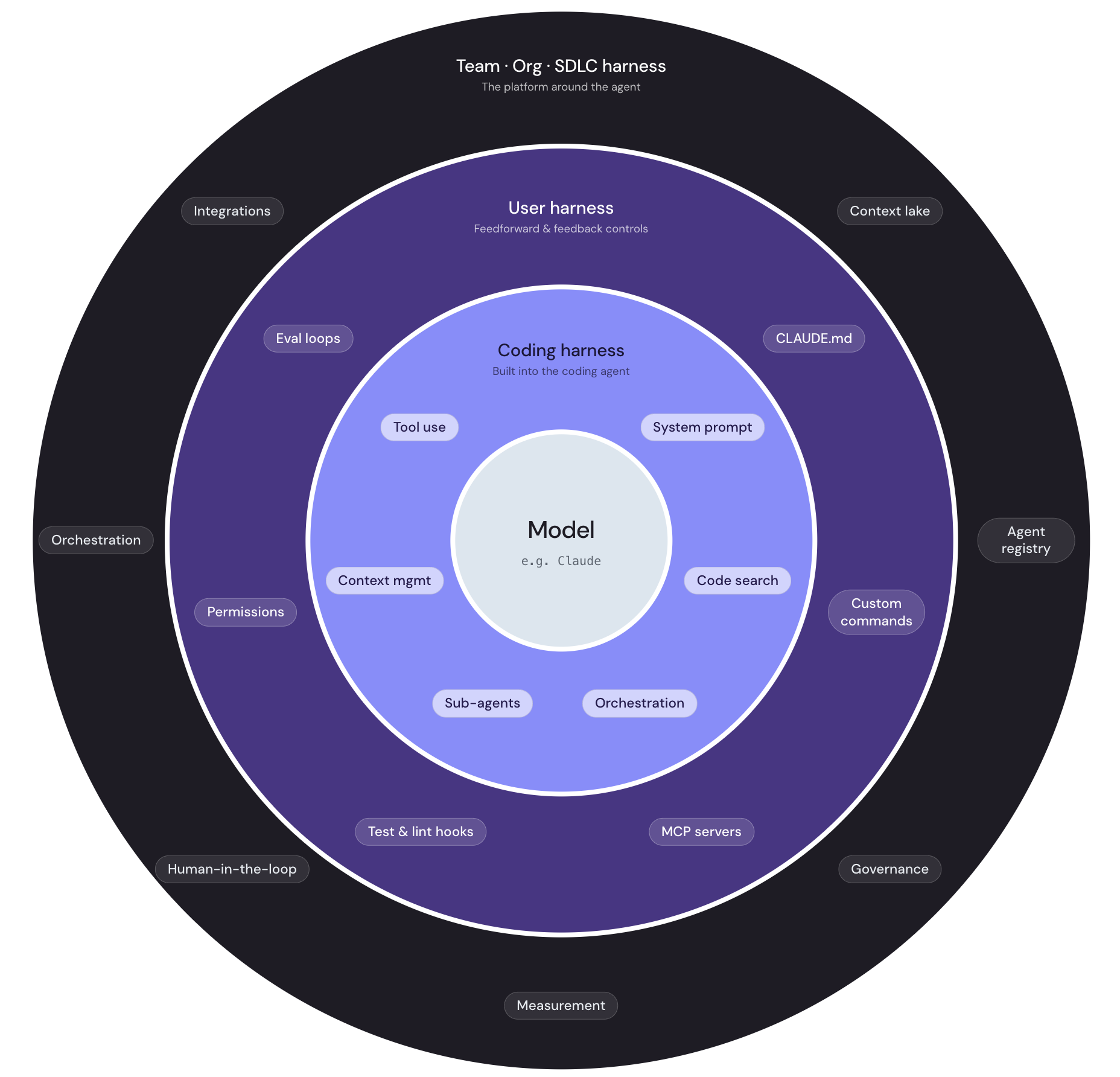
The diagram above shows all of this nested together: the model at the core, the coding harness immediately around it, and the user harness one layer out. There is a fourth ring worth noting here too, the team, org, and SDLC harness that sits outside a single agent entirely. That outer layer is where harness engineering connects to the AI SDLC, covered in its own section below.
Examples of harness components
A harness is made of a handful of recurring pieces. System prompts and skills are the standing instructions an agent works from. Tools and MCPs are connections to external systems, each with a schema the model can reason about, so the agent can call GitHub or query a database instead of just describing what it would do. Orchestration logic handles planning, routing, and failure handling, including when to stop and hand back to a human. Context management decides what goes into the model's context window, what gets compressed, and what gets retrieved on demand instead of loaded up front. Hooks and guardrails are deterministic checks that run no matter what the model decides. State and memory let an agent reference what it did in a previous session instead of starting from zero.
Most of these components fall into one of two categories, based on when they act. Guides act before the agent does anything, steering it toward the right behavior: a system prompt, an architecture note, a bootstrap script. Sensors act after, catching problems and feeding them back: a linter, a test suite, a review agent. A well-built harness uses both, since guides raise the odds the agent gets it right the first time and sensors catch what slips through.
None of these do much alone. A tool without orchestration is just an API the model might call correctly. A guardrail without a guide is a rule the agent keeps tripping instead of learning to avoid. The components work as a system, and that system is the harness.
When to use harness engineering
Not every use of a model needs a full harness. A single-turn chat assistant that answers questions and holds no state is fine with a good prompt and not much else. The moment an agent starts to act, and not just answer, the calculus changes.
The clearest signal is what happens if the agent gets it wrong. If a wrong answer is mildly annoying, invest lightly. If a wrong action deletes data, ships broken code, or pages the wrong person at 3 a.m., a real harness needs to exist before that agent goes anywhere near production.
The pattern holds regardless of the specific task: the more autonomy an agent has and the more irreversible its actions are, the more of the harness you need before you let it run unsupervised.
Where harness engineering fits in the AI SDLC
Harness engineering is not a separate discipline off to the side of software delivery. It lives inside the AI SDLC, the lifecycle governing how AI-assisted software gets planned, built, and shipped. Some teams call this the agentic SDLC when agents do the execution and humans govern the checkpoints, but the stages are the ones software delivery has always had: work comes in, gets planned, gets built, gets reviewed, and ships.
What changes in an AI SDLC is that AI now sits inside several of those stages, and the harness is what makes that safe at each one.
The harness at the team, org, and agentic SDLC level
The single-agent harness described so far is necessary but not sufficient once more than one person is building agents. At the team and org level, the harness stops being a property of one agent and becomes a property of the platform everyone builds on. The components below are what fill out that outer layer.
A context lake is the shared, queryable layer of organizational knowledge, service ownership, deployments, dependencies, incidents, and on-call schedules, that every agent draws from instead of guessing or rebuilding its own view of the org. Without it, each team's agent operates on a partial, stale, or simply wrong picture of what exists.
Integrations are the connections to external systems, GitHub, PagerDuty, Jira, the cloud provider, cleared once by a platform team and inherited by every agent afterward. Without shared integrations, every team repeats the same security reviews and rebuilds the same connection five different ways.
Access controls and permissions define what any actor, human or agent, is allowed to touch. At the org level this has to be centrally defined rather than left to each team's own judgment, since inconsistent permissions are exactly what let one team's agent do something another team would never have allowed.
An agent registry is the catalog of the agents themselves, every agent deployed across the org, tracked by platform, status, model, and owner. It is what lets a team discover an agent that already exists instead of building a duplicate from scratch, the same problem a skill registry solves for individual capabilities, just one level up.
A workflow orchestrator sequences the steps a task moves through, plan, build, review, deploy, and decides where an agent hands off to a human. At the org level, orchestration is what turns individual agent actions into an auditable, repeatable process rather than an ad hoc script.
Scorecards act as gates between stages, deterministic rules that a piece of work has to satisfy before it advances, whether that is a security review, a test suite, or a human sign-off. This is governance made enforceable rather than governance as a written policy nobody checks.
Human-in-the-loop checkpoints are the points explicitly carved out for human judgment, typically at approvals for production changes or anything irreversible. The org-level harness makes these checkpoints structural, not optional, so no individual agent or team can quietly route around them.
Measurement closes the loop: monitoring for what happened, evals for whether an agent still performs after a change, and scorecards again for whether the work is actually delivering business value. Without measurement, leadership has no way to know whether the fleet of agents across the org is working or just busy.
How not to do it: Common harness mistakes
Most harness failures are not exotic. They are a handful of predictable shortcuts that feel fine until the agent's scope grows past what the shortcut can handle.
The most common mistake is treating the system prompt as the entire harness. A system prompt is a guide, one piece of a larger system, and careful prompt writing does not substitute for an actual tool schema, permission boundary, or test suite. A close second is skipping verification entirely, trusting whatever the agent produces without a sensor to check it. A third is granting broad permissions for convenience, giving an agent standing access to production because scoping it down takes extra setup, until the day it uses that access in a way nobody intended. A fourth is having no persistent memory, so a mistake the team caught last month recurs this month because nothing encoded the fix anywhere the agent would see it again. A fifth is building the harness once at launch and never revisiting it as the agent's scope quietly expands from drafting text to touching real systems.
Why it's worth investing in: The token economics of agentic engineering
The case for harness engineering is not only about reliability. It is also about cost, and the cost argument is where the difference between vibe coding and agentic engineering becomes concrete.
Vibe coding looks cheap because its upfront cost is close to zero: a subscription and a prompt. The real cost shows up later and compounds. Without a harness, a developer dumps a large, unstructured file into the context window and asks the model to fix something, and when the fix is wrong, they paste in more context and try again. Every retry burns tokens, and a retry loop deep into a long session costs far more than the same loop earlier on, because the model is carrying tens of thousands of tokens of accumulated context by that point: the system prompt, retrieved files, and the full transcript so far. Vibe coding has almost no capex and a large, unpredictable, ongoing opex bill made of retries, wasted generations, and human time re-reviewing output that looked right and wasn't.
Agentic engineering with a real harness inverts that shape. Building the harness is a capex investment: writing guides, defining tool schemas, setting up context pipelines that load only what a task needs instead of everything at once. That upfront cost buys down the marginal cost of every run after it. Well-scoped, on-demand context keeps token spend down because the model isn't re-reading the same large files on every call. Guardrails and sensors catch errors before they compound into a ten-turn retry loop instead of a one-turn fix. And because a harness encodes fixes permanently, the same mistake doesn't get re-debugged by every developer who hits it.
FAQ
What is harness engineering?
Harness engineering is the practice of building the tools, controls, and context management around an AI model that let it act reliably as an agent, since the model on its own can only take in text and return text.
What is the difference between a model and a harness?
The model provides reasoning: it reads input and generates output. The harness provides everything else an agent needs to act, including tools, state, permissions, and verification, and it is usually the deciding factor in how reliable an agent turns out to be.
What are examples of an agent harness?
Common harness components include system prompts and skills, tool and MCP connections, orchestration logic, context management, guardrails, and persistent memory, usually combined rather than used alone.
How does harness engineering fit into the agentic SDLC?
Harness engineering sits inside the build, review, and deploy stages of the AI SDLC, governing what an agent is allowed to do, what checks its output, and what requires human approval before it ships.


Get your survey template today
%201.svg)


Download your survey template today


Free Roadmap planner for Platform Engineering teams
Set Clear Goals for Your Portal
Define Features and Milestones
Stay Aligned and Keep Moving Forward
Create your Roadmap


Free RFP template for Internal Developer Portal
Creating an RFP for an internal developer portal doesn’t have to be complex. Our template gives you a streamlined path to start strong and ensure you’re covering all the key details.
Get the RFP template


Leverage AI to generate optimized JQ commands
test them in real-time, and refine your approach instantly. This powerful tool lets you experiment, troubleshoot, and fine-tune your queries—taking your development workflow to the next level.
Explore now
Check out Port's pre-populated demo and see what it's all about.
No email required
LIVE WEBINAR, Aug 18, 2026:
Context-aware Vibe Coding for Platform Engineering
Thursday, October 22 12:00pm EDT⋅6:00pm CET
To learn more about the new capability and to see a live demo, join our upcoming community session with GitHub
Move fast while staying in control
Build governed agentic workflows on one central platform.
See it in action:
Watch this video on generating Terraform with Port, or explore our public demo.
.png)
Check out the 2025 State of Internal Developer Portals report
No email required
Minimize engineering chaos. Port serves as one central platform for all your needs.
Act on every part of your SDLC in Port.
Your team needs the right info at the right time. With Port's software catalog, they'll have it.
Learn more about Port's agentic engineering platform
Read the launch blog
Contact sales for a technical walkthrough of Port
Every team is different. Port lets you design a developer experience that truly fits your org.
As your org grows, so does complexity. Port scales your catalog, orchestration, and workflows seamlessly.
Port × n8n Boost AI Workflows with Context, Guardrails, and Control
Port Builders Session: A Single, Governed Interface for All MCP Servers
Book a demo right now to check out Port's developer portal yourself
Apply to join the Beta for Port's new Backstage plugin


n8n + Port templates you can use today
walkthrough of ready-to-use workflows you can clone
From manual to autonomous engineering
One platform to build, govern, and operate the Agentic SDLC.
Port is open for you to try it
build your first agentic workflow today
.jpg)