Port Slack app is now in open beta
Port's Slack app lets you ask questions and get immediate answers about your software catalog directly in Slack. You can also trigger workflows like creating a Jira ticket or deploying a service without leaving your conversation.


Why we built it
We’re big fans of Slack at Port. You probably are too if your team uses it. We discuss features, triage incidents, share announcements, and document decisions there. The problem: we constantly needed information that only existed in Port. We'd leave Slack, open Port, ask our AI assistant a question, then return to Slack to share the answer. This context-switching slowed us down.
We've already solved this problem in IDEs. Developers use Port's MCP server to get answers without leaving their IDE. But developers aren't the only people who need Port data. Product managers need to check service ownership before a launch. Support engineers need to find dependencies during an incident. Engineering managers need to review their team's open pull requests before standup.
The Slack app brings Port's AI assistant into the tool where these conversations already happen.
What it is
The Port Slack app works like Port's AI assistant, but lives inside Slack:
- Ask it questions about your services, owners, or dependencies.
- Trigger any self-service action you've configured in Port.
- Get notifications when something changes in your catalog.
- The Port Slack app uses the same Port AI API which is permissions-aware and auditable.
Where it’s useful
1. Open a bug from a Slack thread
Bugs happen, and when they do, it’s best to create them in the moment. Now you can just tag Port (@Port) and say "Create a bug for payment-service timeout errors" and a Jira ticket gets created. Assuming you have a relevant self-service action set up in Port, it will trigger it and your ticket will be created. The Port Slack app will then post the link of the new ticket.
2. Get ownership answers
Answering “who owns this” shouldn’t take long. Just ask Port in Slack and you’ll get an immediate answer with the owner, their team, the docs, and anything else you ask for.
3. Prepare for a standup
For regular status meetings, you can reduce prep time and even meeting times tenfold by just asking Port questions like "What's the status of my team's PRs?".
4. Incident blast radius
Incidents happen too, and when they do, speed is critical. Instead of frantically searching through docs or pinging multiple team members, you can quickly ask Port about the service's dependencies. Within seconds, you'll have a clear view of the potential impact, helping you prioritize and communicate effectively. For example, ask "What depends on payment-gateway?" and you’ll get an immediate dependency map.
How to start using it
Install it
To install the Slack app, follow these steps:
- Navigate to the Slack app installation page.
- Click on the "Add to Slack" button.
- Select the workspace where you'd like to install the app, then click "Allow".
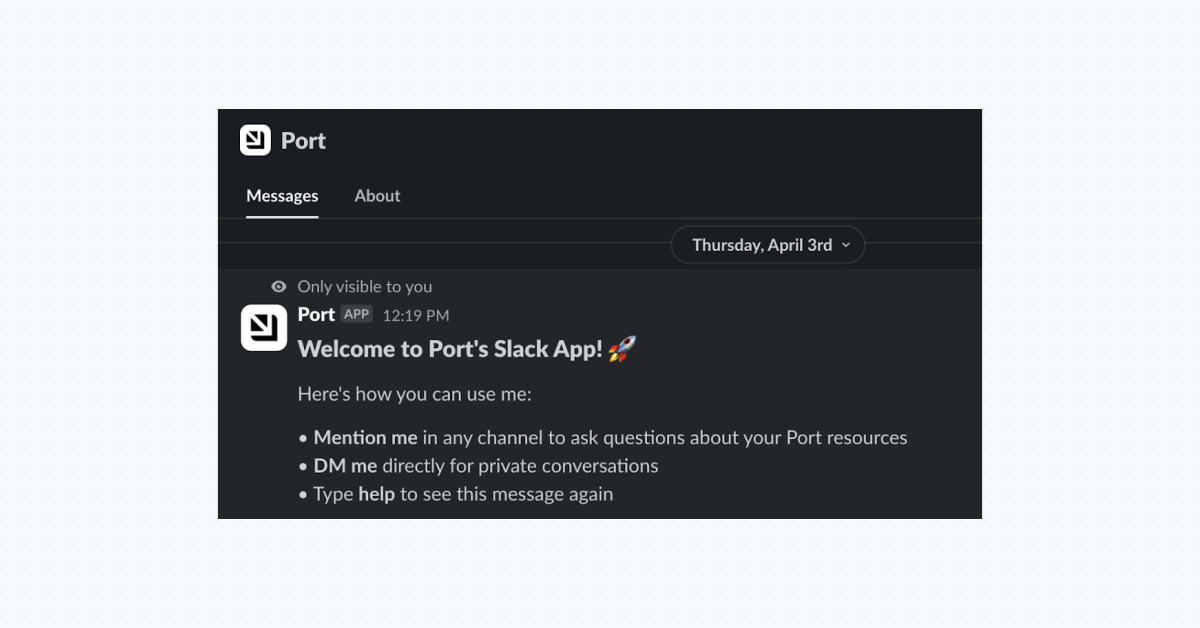
- Once installed, you will receive a Slack message from Port's bot with a summary of the app's capabilities:
Chat with it
Just mention @Port in any channel or in any DM where the app is installed
.png)
Get notifications
The Port Slack app allows you to send messages to any Slack channel directly from Port, without the need to create a separate webhook for each channel.
This can be used to communicate important notifications to people in your organization, such as:
- A new PagerDuty incident has been triggered in this service
- A new GitHub issue has been created by this user
- A GitLab merge request has been merged by that user
Display Slack channel names in Port
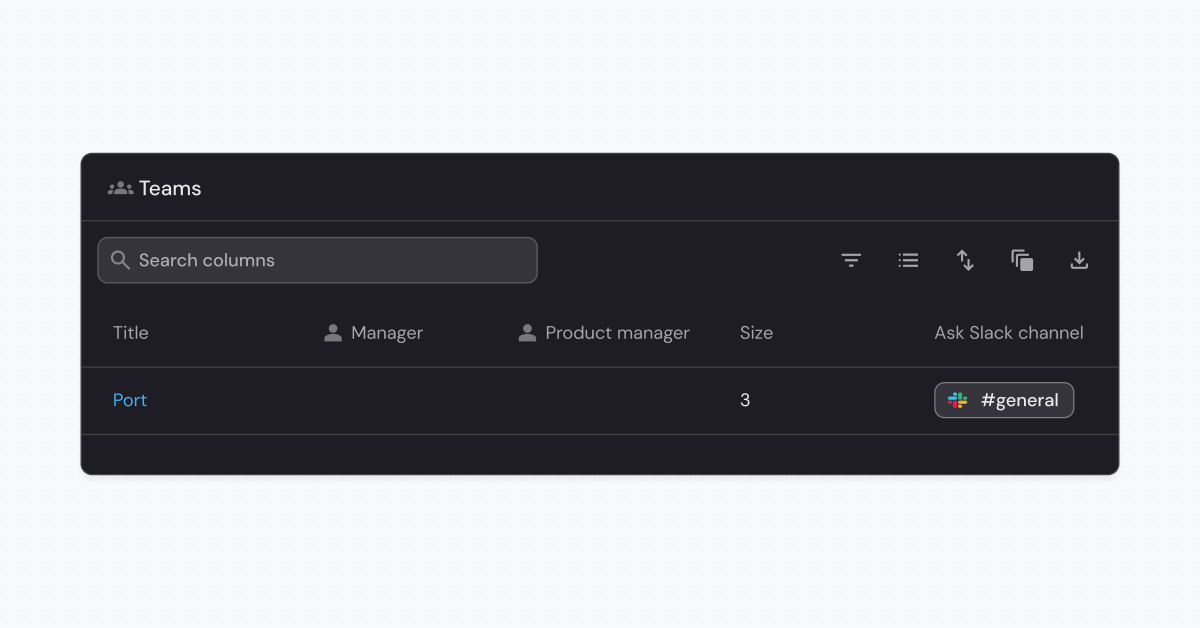
Once you install the Port Slack app, Port automatically enriches any Slack channel URL in your catalog with the actual channel name.
Other bits and bytes
- Use /port or /port help for available commands.
- Chat with Port via Slack’s AI side panel
- Customize notification messages using Slack blocks
- Rename the Port bot in Slack settings to anything you like
How it works
The Port Slack app connects to Port AI API through the Model Context Protocol (MCP). MCP is an open standard that lets AI assistants access external tools and data sources. This means the Slack app uses the same AI infrastructure that powers Port's web interface and IDE extensions.
Each team member authenticates with their own Port account when they use the Slack app. This means your audit logs show exactly who asked each question or triggered each action.
We also know that enforcing permissions is vital wherever Port is used, so the Slack app follows the requesting user’s permissions. They will only get answers about entities they are allowed to see and only be able to trigger actions they have permission to trigger.
.png)
What’s next for the Port Slack app
We’re really excited about extending Port to other places, especially Slack. Here’s what we’d like to work on next for the Slack app:
- Get answers from specific Port AI agents instead of the general AI assistant
- Trigger actions more explicitly (instead of letting AI choose the action based on your request)
- Interact with self-service action forms natively within Slack
How you can get started today
Just visit the installation page, or read more in our docs.
We can’t wait to hear how you use Port AI in Slack!


Get your survey template today
%201.svg)


Download your survey template today


Free Roadmap planner for Platform Engineering teams
Set Clear Goals for Your Portal
Define Features and Milestones
Stay Aligned and Keep Moving Forward
Create your Roadmap


Free RFP template for Internal Developer Portal
Creating an RFP for an internal developer portal doesn’t have to be complex. Our template gives you a streamlined path to start strong and ensure you’re covering all the key details.
Get the RFP template


Leverage AI to generate optimized JQ commands
test them in real-time, and refine your approach instantly. This powerful tool lets you experiment, troubleshoot, and fine-tune your queries—taking your development workflow to the next level.
Explore now
Check out Port's pre-populated demo and see what it's all about.
No email required
LIVE WEBINAR, Aug 18, 2026:
Context-aware Vibe Coding for Platform Engineering
Thursday, October 22 12:00pm EDT⋅6:00pm CET
To learn more about the new capability and to see a live demo, join our upcoming community session with GitHub
Move fast while staying in control
Build governed agentic workflows on one central platform.
See it in action:
Watch this video on generating Terraform with Port, or explore our public demo.
.png)
Check out the 2025 State of Internal Developer Portals report
No email required
Minimize engineering chaos. Port serves as one central platform for all your needs.
Act on every part of your SDLC in Port.
Your team needs the right info at the right time. With Port's software catalog, they'll have it.
Learn more about Port's agentic engineering platform
Read the launch blog
Contact sales for a technical walkthrough of Port
Every team is different. Port lets you design a developer experience that truly fits your org.
As your org grows, so does complexity. Port scales your catalog, orchestration, and workflows seamlessly.
Port × n8n Boost AI Workflows with Context, Guardrails, and Control
Port Builders Session: A Single, Governed Interface for All MCP Servers
Book a demo right now to check out Port's developer portal yourself
Apply to join the Beta for Port's new Backstage plugin


n8n + Port templates you can use today
walkthrough of ready-to-use workflows you can clone
From manual to autonomous engineering
One platform to build, govern, and operate the Agentic SDLC.
Port is open for you to try it
build your first agentic workflow today