
Turning support tickets into organization-wide intelligence
How Port's AI agents turn everyday support data into insights for every team




Every company has a goldmine of valuable information trapped in its support tickets. These daily interactions contain customer feedback, bug reports, and pain points — yet most teams never tap into them. The data is often siloed, making it difficult for teams like Research & Development (R&D) or Customer Success (CS) to extract actionable insights without manually digging through endless ticket histories.
To solve this, we developed an internal "Support AI Hub" built on Port's Agentic Engineering Platform (AEP). This hub isn't just another support tool — it's a collection of specialized agents designed to surface insights for your entire organization. Together, these agents deliver:
- Faster ticket intelligence and insights
- Curated context sharing for ticket escalations
- Proactive customer health checks
- Monthly ticket trend analysis
Below, we'll walk through how we leveraged Port's Agentic Engineering Platform (AEP) to create a hub of agents that serve multiple teams across several common support scenarios. The agents achieve this by tapping into Port's Context Lake, which contains aggregated and correlated data from our support stack, including HubSpot, Zendesk, Jira, and Slack.
1. Faster ticket intelligence
Our first challenge was making it faster and easier to understand a support ticket. The obvious starting point was a Summarize Ticket agent that could distill a long support interaction into a concise, insightful paragraph — giving a support engineer the context they need to jump straight into solving the issue.
That simple summary proved so useful for individual ticket context that we extended the concept to support handovers between engineers providing follow-the-sun coverage.
Rather than a brief paragraph, the Handover Support Ticket agent generates a comprehensive brief that can be copied directly into an internal note. It includes a full chronological timeline (e.g., "Anna did this, then we opened a Jira bug"), steps to reproduce, additional observations, current hypotheses capturing where the previous engineer's investigation left off, instructions on how to verify the fix, and immediate next steps for the new owner. The result is a detailed handover with the full context of the situation.
.png)
2. Escalation "translator" to bridge the Support–R&D gap
Effective collaboration often comes down to clear communication. When support escalates an issue to an R&D team — whether for a quick consultation or to create a Jira ticket — the engineer has to recall or track down the specific information and format that the R&D team expects. That formatting friction can slow the entire process down.
The Ticket Summary + Escalation Assistant agent acts as a "translator" to solve this. It automatically generates escalation drafts using pre-defined templates tailored to each R&D team's preferences. These templates ensure that crucial details are included from the start, such as:
- Customer environment
- Integration version
- Deployment type
This agent has significantly improved collaboration by ensuring R&D receives the precise information they need, in the format they prefer — eliminating back-and-forth and accelerating problem resolution.

3. Proactive customer health checks
While summarizing individual tickets is useful, true strategic value comes from understanding a customer's experience over time. Account teams would love to know, "What pain points has Customer X experienced in the last two weeks?" Having a clear picture of recent issues is the kind of priceless context you want right before a customer meeting.
The Cluster Zendesk Tickets agent provides exactly that context, along with actionable insights. Here is a recent scenario that highlights the impact:
- Customer X complained on a call to their account team about "GitLab instabilities."
- The account team escalated the most recent ticket, and the R&D team responded asking for more specific details.
- Running the agent was a lightbulb moment. It returned a precise list of the GitLab issues the customer had reported — delivering the specifics R&D needed to turn a vague, high-level complaint into a focused, data-driven conversation and enabling our team to address the root problems effectively.
4. Trend analysis (and learning as we go)
The ultimate goal is to move from reactive analysis and fixes to proactive trend identification.
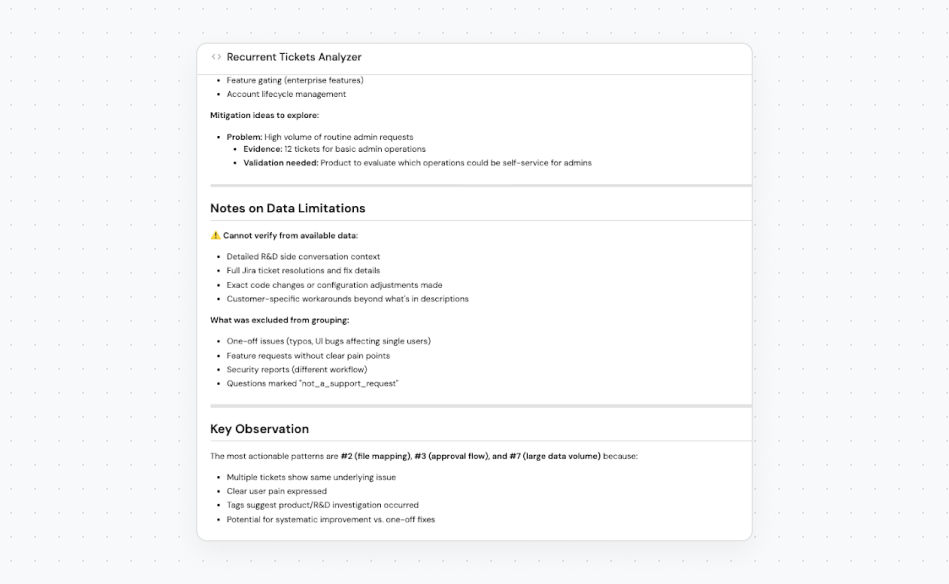
Agents like the Recurring Tickets Analyzer are designed to sift through multiple tickets and uncover systemic issues. The strategic goal is to provide support managers, R&D, executive teams, and product teams with a clear view of what's burning in production — helping them decide where to focus their investment.
This agent is still a work in progress. The quality of the trend analysis isn't where we want it yet, given the large volume of data and context required to perform the analysis well. That said, it will continue to improve through the iterative process of building, testing, and refining.
5. Measuring agent usage and impact
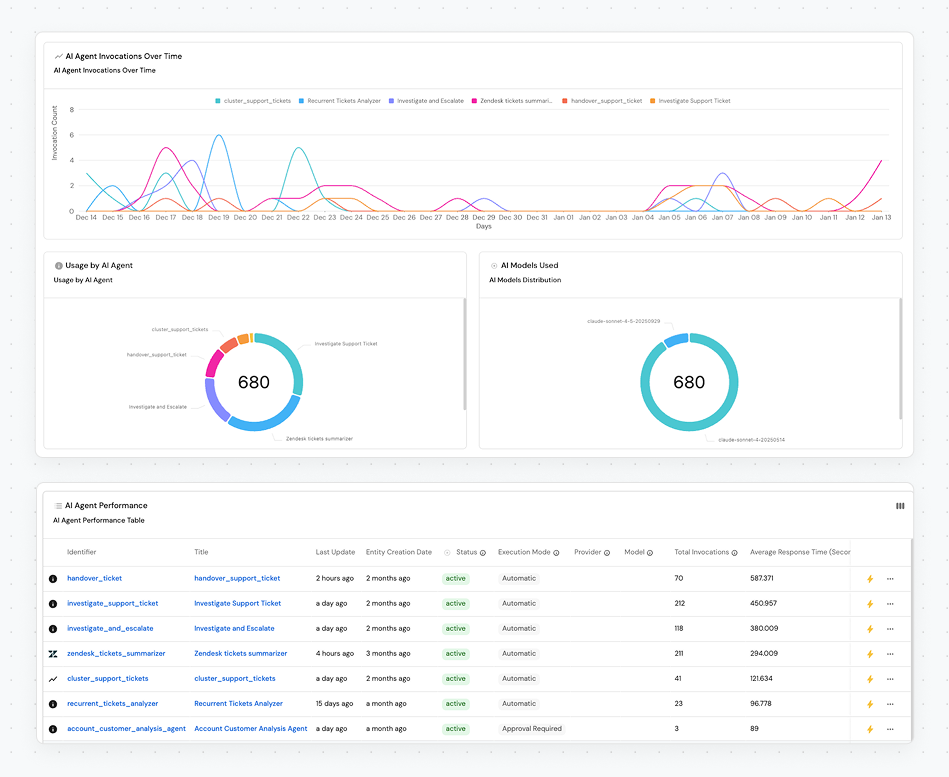
To understand the effectiveness and impact of these agents, it's important to monitor them and gather usage metrics. Configuring these agents to collect metrics — and having a Port dashboard to display usage and performance — helps answer key questions and provides visibility into:
- Total Invocations: How often are the agents being used?
- Usage Over Time: Which agents are most popular, and when?
- Performance: Key operational data like agent response times.
- Run Status: Tracking completed, failed, and in-progress runs to immediately spot issues. This is also crucial for troubleshooting, allowing us to investigate exactly why a run failed.
- Team Usage: Visualizing which teams (R&D, Product, Support) are leveraging the hub, proving its org-wide value.
These metrics are essential for measuring the value and adoption of the agents in the Support AI Hub and ensuring its continued health and relevance across the organization.
What insight will you unlock next?
Building a Support AI Hub didn't just increase efficiency — it helped rewire how our entire organization gains insights through better customer intelligence. By making these insights accessible, teams across the business are empowered to make faster, more informed decisions grounded in real customer experiences.
If you could quickly build AI agents that unlock data and provide insights for your organization, what problem would you solve?
Think building an agent is too hard? It's not! Check out Build an AI Agent in Port to see how easy it is for agents to access the Context Lake of integrated data from your platform.


Get your survey template today
%201.svg)


Download your survey template today


Free Roadmap planner for Platform Engineering teams
Set Clear Goals for Your Portal
Define Features and Milestones
Stay Aligned and Keep Moving Forward
Create your Roadmap


Free RFP template for Internal Developer Portal
Creating an RFP for an internal developer portal doesn’t have to be complex. Our template gives you a streamlined path to start strong and ensure you’re covering all the key details.
Get the RFP template


Leverage AI to generate optimized JQ commands
test them in real-time, and refine your approach instantly. This powerful tool lets you experiment, troubleshoot, and fine-tune your queries—taking your development workflow to the next level.
Explore now
Check out Port's pre-populated demo and see what it's all about.
No email required
LIVE WEBINAR, Aug 18, 2026:
Context-aware Vibe Coding for Platform Engineering
Thursday, October 22 12:00pm EDT⋅6:00pm CET
To learn more about the new capability and to see a live demo, join our upcoming community session with GitHub
Move fast while staying in control
Build governed agentic workflows on one central platform.
See it in action:
Watch this video on generating Terraform with Port, or explore our public demo.
.png)
Check out the 2025 State of Internal Developer Portals report
No email required
Minimize engineering chaos. Port serves as one central platform for all your needs.
Act on every part of your SDLC in Port.
Your team needs the right info at the right time. With Port's software catalog, they'll have it.
Learn more about Port's agentic engineering platform
Read the launch blog
Contact sales for a technical walkthrough of Port
Every team is different. Port lets you design a developer experience that truly fits your org.
As your org grows, so does complexity. Port scales your catalog, orchestration, and workflows seamlessly.
Port × n8n Boost AI Workflows with Context, Guardrails, and Control
Port Builders Session: A Single, Governed Interface for All MCP Servers
Book a demo right now to check out Port's developer portal yourself
Apply to join the Beta for Port's new Backstage plugin


n8n + Port templates you can use today
walkthrough of ready-to-use workflows you can clone
From manual to autonomous engineering
One platform to build, govern, and operate the Agentic SDLC.
Port is open for you to try it
build your first agentic workflow today

.png)

