Scorecards 2.0: Why we took scorecards further
Port had scorecards before. They helped you measure standards, but you couldn't act on them - no automations, no clear ownership, no permissions. Scorecards 2.0 rebuilds them as native catalog entities so you can define standards, track results, and fix issues in one place.



Why we worked on this
You've probably already agreed on your standards. Production readiness. Security hygiene. Ownership. Compliance.
Your problem isn't deciding what 'good' looks like. It's making those standards clear, consistent, and actionable across your hundreds of services, deployments, and environments.
Port introduced scorecards 1.0 early to help teams measure these standards. They worked, but over time you hit the limits of that approach.
Legacy scorecards lived outside the core catalog model. Most creation and editing happened in JSON. Rules were hard to update and custom, hard to govern, and hard to connect to workflows. You could calculate a score, but you struggled to evolve standards as your org grew - ownership stayed limited to a small group of experts.
We kept hearing the same questions:
- Who owns this rule or scorecard?
- What should be fixed first?
- Who can view or edit this scorecard?
- How can we tie a remediation to a failing rule?
This was not just a few isolated asks. A feature request got 58 votes from 40+ accounts. One user put it plainly: “it’s important to introduce automation based on the scorecards' change value.”
The core limitation underneath all of this was that Scorecards 1.0 were not first-class, actionable objects. You could measure the score, but you could not build automations around scorecards themselves. For example, you could not trigger anything based on a scorecard changing or a rule result failing, because scorecards were not modeled as native catalog objects. Extending the scorecard model was also not possible, so things like adding due dates to rules, assigning owners, and setting read or update permissions on scorecards were out of reach.
At some point, incremental fixes were no longer enough, the foundation had to change.
When we started rolling out Scorecards 2.0, one user described it as a “game changer in terms of functionality.", explaining they could finally manage scorecards like any service in the catalog.
A rebuild, not a refactor
Scorecards 2.0 changes how you define and work with scorecards.
Already using Scorecards 1.0? No action required. We've rolled out Scorecards 2.0 to all organizations automatically, and your existing scorecards will keep working as-is.
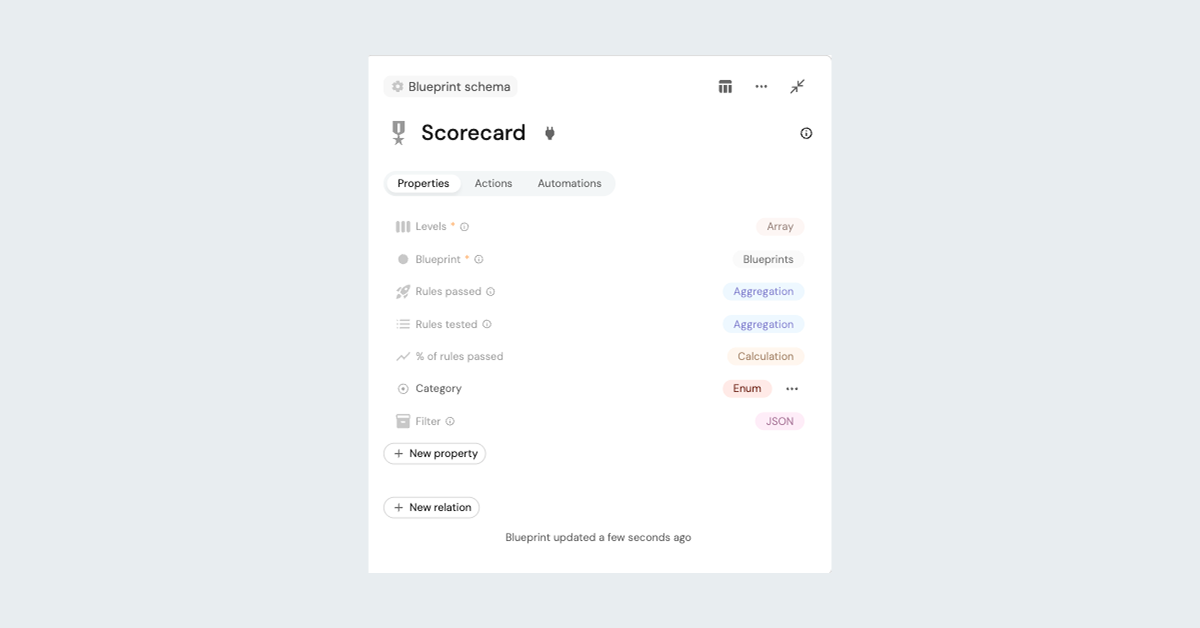
Going forward, instead of treating scorecards as a special feature, we model them as first-class catalog entities. This introduces three predefined blueprints (Port’s building blocks for creating and managing your software catalog):
- Scorecard: defines the standard for the entities it evaluates (e.g. Production Readiness for services)
- Scorecard Rule: defines each requirement and its logic (e.g. Freshness < 30 days)
- Scorecard Rule Result: captures the outcome (Passed or Not passed) for each rule per entity
Because these are native objects, they support relations, permissions, automations, dashboards, calculations, and history tracking out of the box.
With this change, scorecards stop being a one-time configuration and become something teams actually manage and trust over time.
A new creation experience, built for real teams
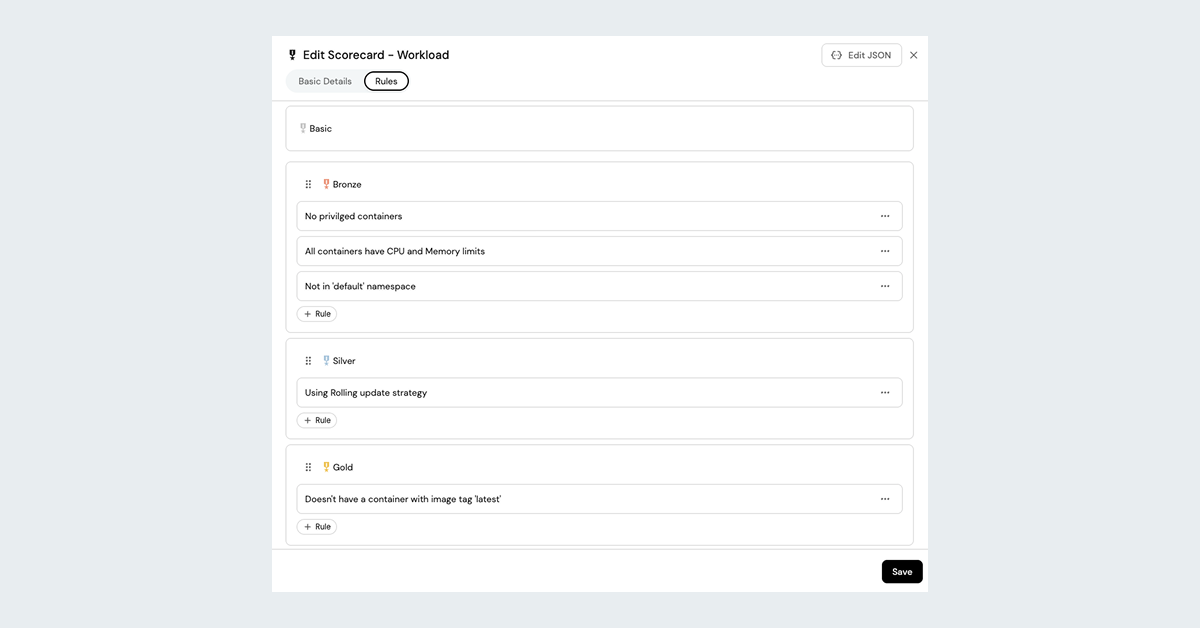
The data model change was only half of what you needed. The creation experience had to change too.
Previously, creating or updating scorecards meant working mostly in JSON. That limited ownership to a small group of experts and slowed iteration.
With Scorecards 2.0, scorecards and rules have a dedicated UI.
Instead of treating scorecards as a config artifact, you now work with them the same way you work with any other core catalog object.
- Create scorecards directly from the catalog using an intuitive form
- Add rules using a visual builder
- Define levels, logic, and custom colors in context
- Review results and history without leaving the product
- Customize who can view or edit the scorecards.
You'll find standards easier to create, easier to review, and safer to evolve.
What changes in day-to-day work
Use case 1: Standards become real, structured data
Who this is for: Platform teams
You define a Production Readiness scorecard. Each rule represents a concrete requirement, such as “Has On Call”, “Branch protection set”, “PagerDuty incidents under 10”, etc.
With Scorecards 2.0, you can add metadata directly to the scorecard and scorecard rules. Such as assigning owners, categories, and even due dates.
.png)
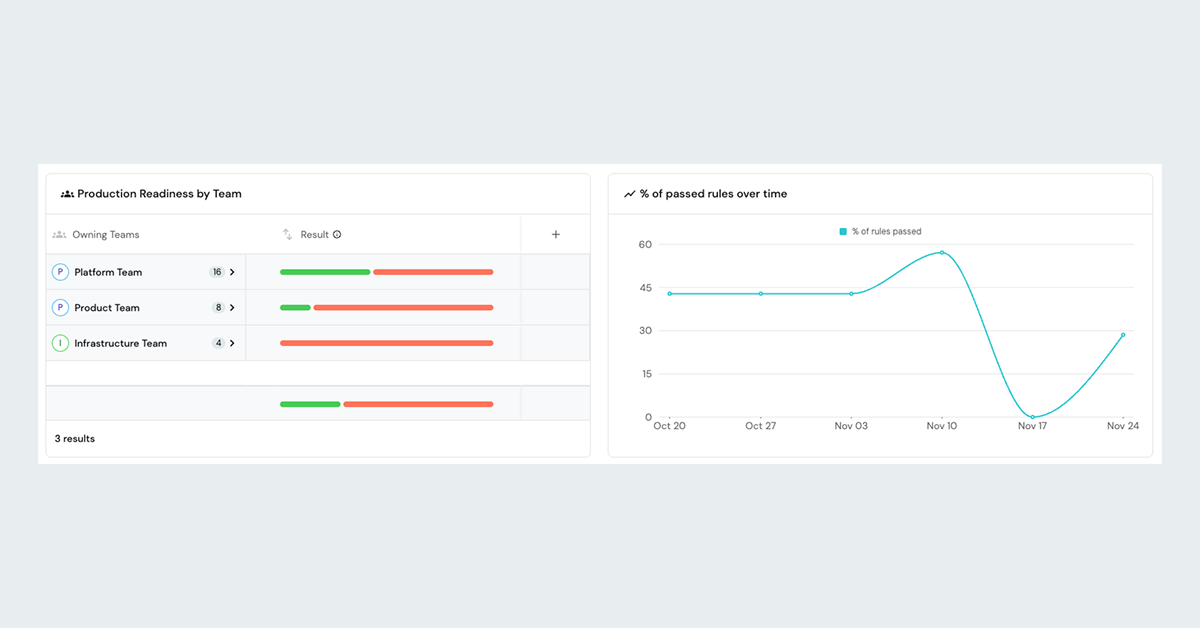
This information flows everywhere. You can filter failed rules by service or urgency. Your managers can review rules passed by owning team.
Use case 2: Dashboards that drive decisions
Who this is for: Engineering managers, developers
You need a different view than your engineering manager does.
With Scorecards 2.0, you get out-of-the-box scorecards dashboards that you can fully customize. You can extend the scorecard and scorecard rules data model, and adjust your dashboards to support any view, such as:
- A service view that tracks improvement over time
.png)
- You can view your action items based on Not Passed rule results. The contextual actions are accessed from the lightning icon.
.png)
Use case 3: Automated workflows
With Scorecards 2.0, you can define automations based on scorecard properties to streamline your processes and act in context.
- When a scorecard degrades, Port automatically notifies your team or opens a ticket with the relevant context - the failing rule, the owning team, everything you need to act.
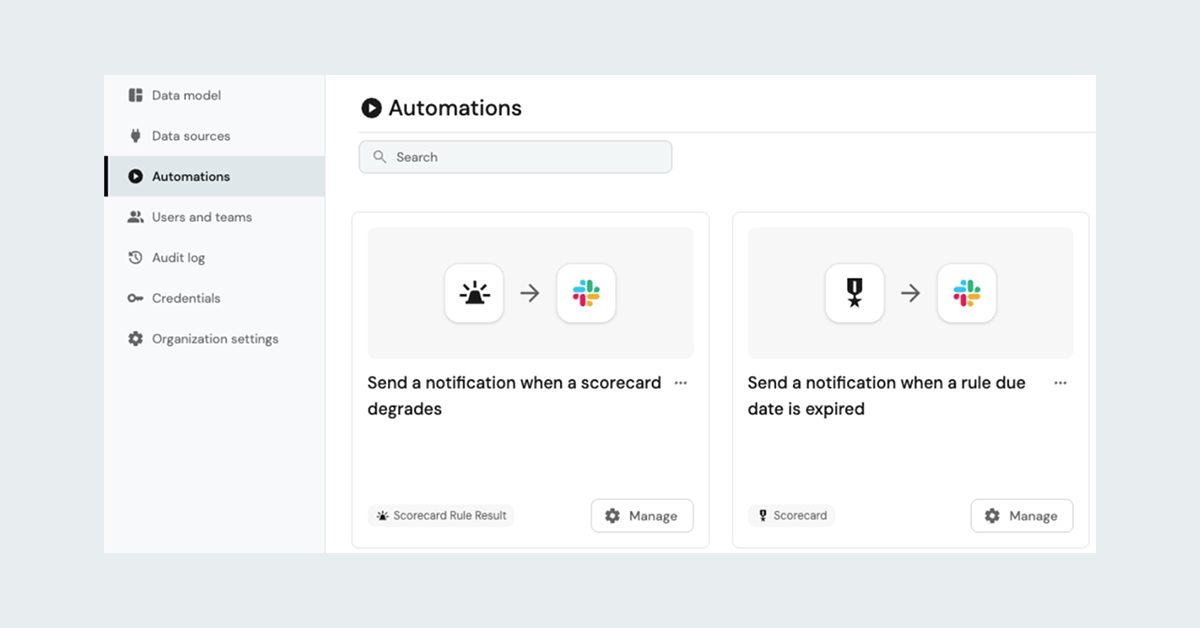
Use case 3.1: Agentic ticket resolution.
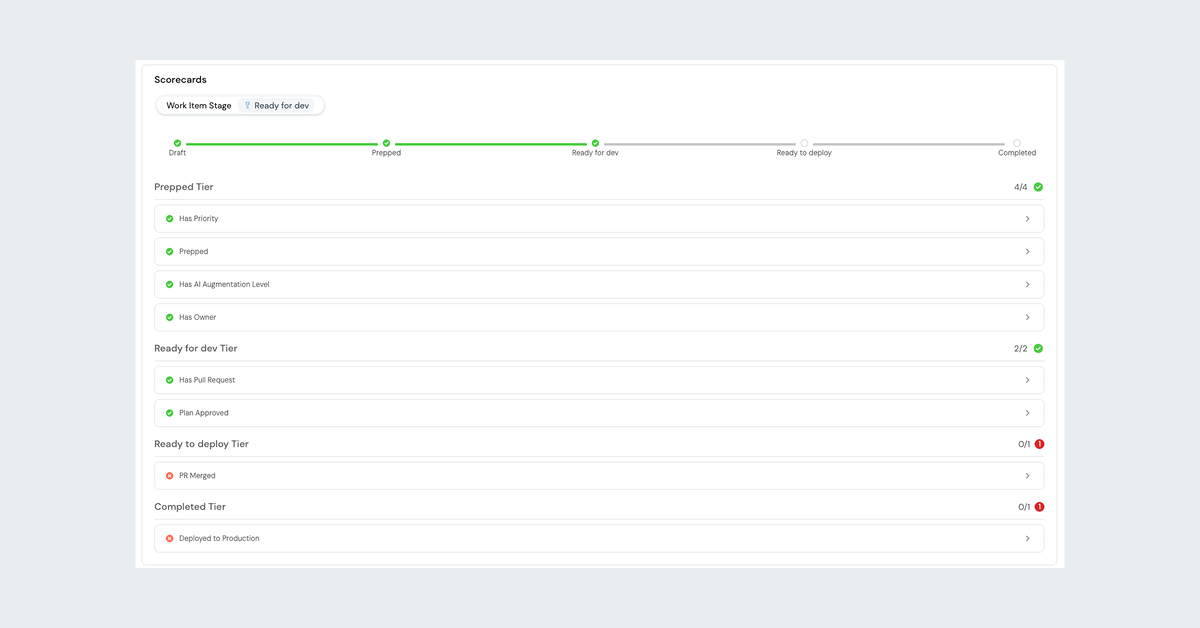
Use Scorecards to power self-healing ticket resolution by mapping Scorecard levels to workflow stages. See how we implemented it in the Port public demo.
Who it’s for: Developers, Engineering Managers
How it helps:
- If you're a developer: You see the current stage of each work item and use AI agents to fill gaps and meet requirements.
- If you're a manager: You get a clear, top-down view of work items by stage.
- Automated progression: AI agents can run automatically to advance work items based on the Scorecard rules.
.png)
Use case 4: Govern who can view or change standards
Who this is for: Platform, security, and SRE leaders
Scorecards often represent org-wide standards, so you need control over who can view and change them. With Port, you can set permissions on scorecards so the right users, teams or roles can manage the right standards:
- Admin role can read, update or delete any scorecard.
- Security scorecards can be managed only by the Security team
- Production Readiness scorecards can be managed only by Director role
- A sensitive scorecard can be viewed only by a specific user
.png)
⚡ Saving the best for last:
Use case 5: Fix issues where they appear in context
Who this is for: Developers
A developer opens a service page and sees a failed rule, like missing branch protection.
Instead of switching tools or hunting for instructions, they trigger a self-service action attached to that Failed scorecard rule result. The action applies the required change or opens a pull request. The way to define it is by using the condition property of the self service action, in this example “Set Branch Protection” and set the condition logic to be - result equal “Not passed” and the related Rule identifier to be the rule identifier with a prefix of the scorecard identifier. In practice, this means developers fix issues from the same screen where they discover them, without switching tools or hunting for instructions.
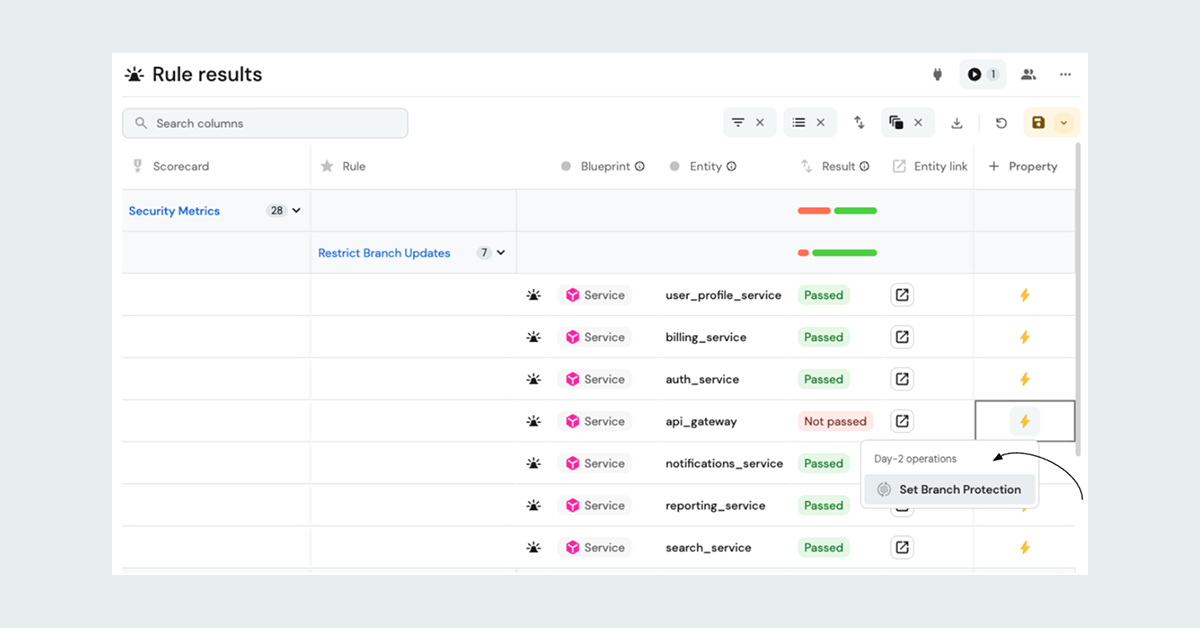
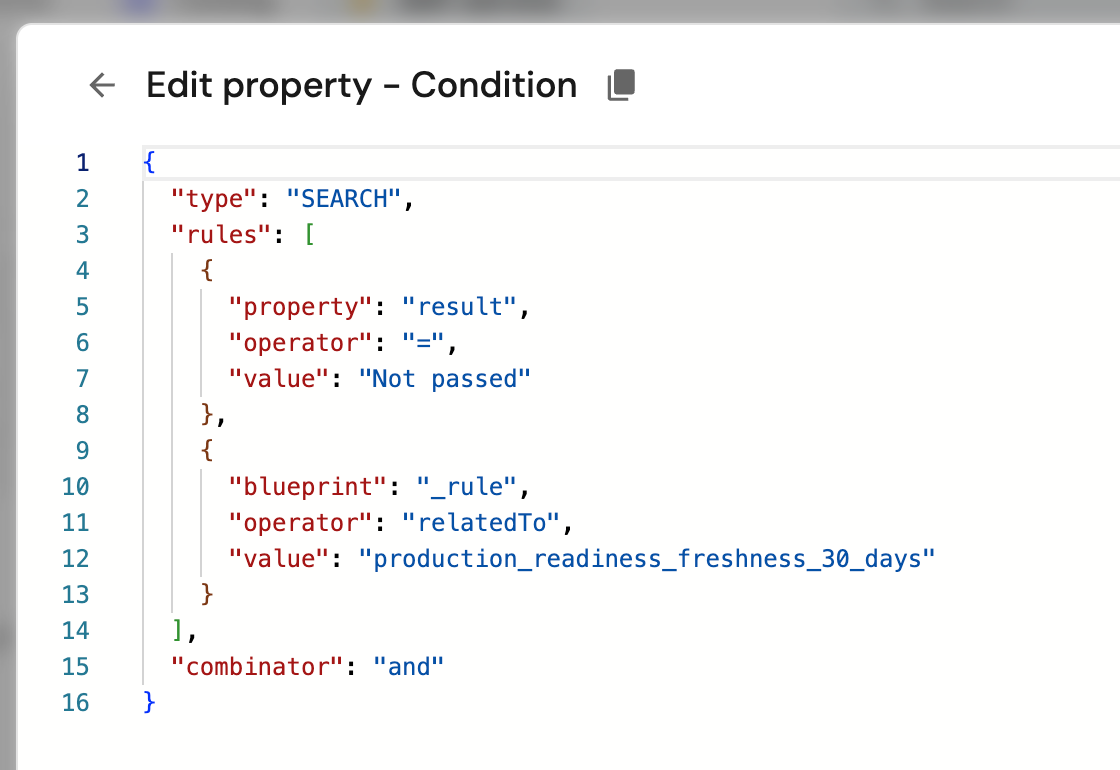
When the rule passes, the action disappears. The feedback loop closes.
🎯 This is the difference between measuring standards and actually helping you meet them - and why we rebuilt scorecards instead of patching our old model.
How it works behind the scenes
Scorecards 2.0 extends Port’s data model with predefined blueprints. Scorecard Rule results maintain dynamic relationships to evaluated entities, such as services or environments.
Aggregation and calculation properties roll results up to the scorecard level. Automations listen to real entity changes. When a scorecard rule result changes, workflows, actions and automations can be triggered immediately.
Because everything lives in the catalog, permissions, history, and remediation work the same way they do for your other catalog entities.


Get your survey template today
%201.svg)


Download your survey template today


Free Roadmap planner for Platform Engineering teams
Set Clear Goals for Your Portal
Define Features and Milestones
Stay Aligned and Keep Moving Forward
Create your Roadmap


Free RFP template for Internal Developer Portal
Creating an RFP for an internal developer portal doesn’t have to be complex. Our template gives you a streamlined path to start strong and ensure you’re covering all the key details.
Get the RFP template


Leverage AI to generate optimized JQ commands
test them in real-time, and refine your approach instantly. This powerful tool lets you experiment, troubleshoot, and fine-tune your queries—taking your development workflow to the next level.
Explore now
Check out Port's pre-populated demo and see what it's all about.
No email required
LIVE WEBINAR, Aug 18, 2026:
Context-aware Vibe Coding for Platform Engineering
Thursday, October 22 12:00am EDT⋅6:00pm CET
To learn more about the new capability and to see a live demo, join our upcoming community session with GitHub
Move fast while staying in control
Build governed agentic workflows on one central platform.
See it in action:
Watch this video on generating Terraform with Port, or explore our public demo.
.png)
Check out the 2025 State of Internal Developer Portals report
No email required
Minimize engineering chaos. Port serves as one central platform for all your needs.
Act on every part of your SDLC in Port.
Your team needs the right info at the right time. With Port's software catalog, they'll have it.
Learn more about Port's agentic engineering platform
Read the launch blog
Contact sales for a technical walkthrough of Port
Every team is different. Port lets you design a developer experience that truly fits your org.
As your org grows, so does complexity. Port scales your catalog, orchestration, and workflows seamlessly.
Port × n8n Boost AI Workflows with Context, Guardrails, and Control
Port Builders Session: A Single, Governed Interface for All MCP Servers
Book a demo right now to check out Port's developer portal yourself
Apply to join the Beta for Port's new Backstage plugin


n8n + Port templates you can use today
walkthrough of ready-to-use workflows you can clone
From manual to autonomous engineering
One platform to build, govern, and operate the Agentic SDLC.
Port is open for you to try it
build your first agentic workflow today