Why you need an MCP registry, and who should own it
Security approves the servers. Keeping them scoped, discoverable, and safe to hand to humans and agents is the platform team's job, and that's where the real work lives.



Your security team did everything right. They reviewed every MCP server, vetted the vendors, and signed off on an approved list. And your developers are still wiring up whatever they want, your agents can still reach tools that delete production data, and nobody can tell you which servers are actually in use.
The approved list didn't fix the problem. It just made everyone feel like it was handled.
Here's the part that gets missed: approving MCP servers was never the hard part. Deciding what's allowed is a security call you make once. Everything after is platform engineering work that runs forever: who gets which tools, how tightly they're scoped, how they reach the right developer or agent, and what happens when a server ships new tools next week.
An agentic SDLC platform is only as strong as this layer, so it's worth getting right. This piece covers what an MCP registry actually is, why it's a platform problem and not a security one, how to organize it by job instead of by vendor, how agents draw from it, and what running it actually takes.
{{from_manual_to_autonomous_engineering}}
What is an MCP registry?
An MCP registry is the catalog of approved MCP servers and the specific tools each one exposes, and the single place a developer or an agent finds what they're cleared to use.
MCP is the Model Context Protocol, the standard way an AI client connects to external tools, and a registry sits on top of it. Strip it down and a registry does two jobs: it says which servers are allowed, and it says which tools inside each server are on. That second job is the one people skip, and it's where the trouble starts.
A registry is not the servers themselves; it's the index that points to them and governs what's reachable. Call it a registry, call it an MCP hub. The label doesn't matter; the operating model does.
Security can build the list. Keeping that list useful is a different discipline: scoped, current, discoverable, and safe to hand to an agent. That discipline is platform engineering.
Who owns and maintains the MCP registry after approval?
Scoping a raw server down to what's safe and useful is real work, and it doesn't belong to security. Platform engineering has run this exact play before: it took a sprawl of services built ten different ways and turned it into a catalog with golden paths, scorecards, and day-2 ownership. An MCP registry is the same shape in new clothes, a pile of raw capabilities that needs curation, scoping, and an owner.
One MCP server, every tool turned on: the over-scoping problem
A vendor ships one MCP server with every tool they've got: read, write, admin, delete, all in the box. The GitHub MCP server can read a file and delete a repo. The Datadog one can pull a metric and mute a monitor. Hand that server to a developer who just needed to read logs, and you've handed them the whole blast radius.
Hand it to an agent and it gets worse. An agent with a delete tool will eventually call it, by misreading a task or looping on a retry, and a destructive action runs that nobody asked for. The problem isn't a bad actor; it's that the tool was in reach at all. The default posture of a raw server is everything on, which is the wrong thing to put in front of a person or a model.
There's a performance cost on top of the blast-radius one. Once a developer wires up a few raw vendor servers, their IDE can be carrying seventy to a hundred tools at once. That's enough that the model itself degrades, reaching for the wrong tool or inventing one that doesn't exist. Over-scoping doesn't just raise the stakes; it makes the agent worse at its job.
Organize your MCP registry by job, not by vendor
Here's the mistake almost everyone makes: one registry entry per vendor. A Datadog MCP, a Sentry MCP, a GitHub MCP, a PagerDuty MCP. That layout mirrors the vendor's product line, not your developer's actual work.
A developer paged at 2am doesn't think "I need the Datadog server and also the Sentry server." They think "I'm debugging a production incident." So build the registry around that thought. Create a Production Incident MCP that bundles the read tools from Sentry and the read tools from Datadog into one capability, scoped to exactly what incident work needs and nothing else.
Call this a logical MCP: a capability defined by the job, composed from whichever vendors it takes, exposing only the tools that job requires.
Add up a handful of these and the math gets lopsided fast. You end up exposing well under a fifth of the tools your vendors ship, and nobody misses the rest.
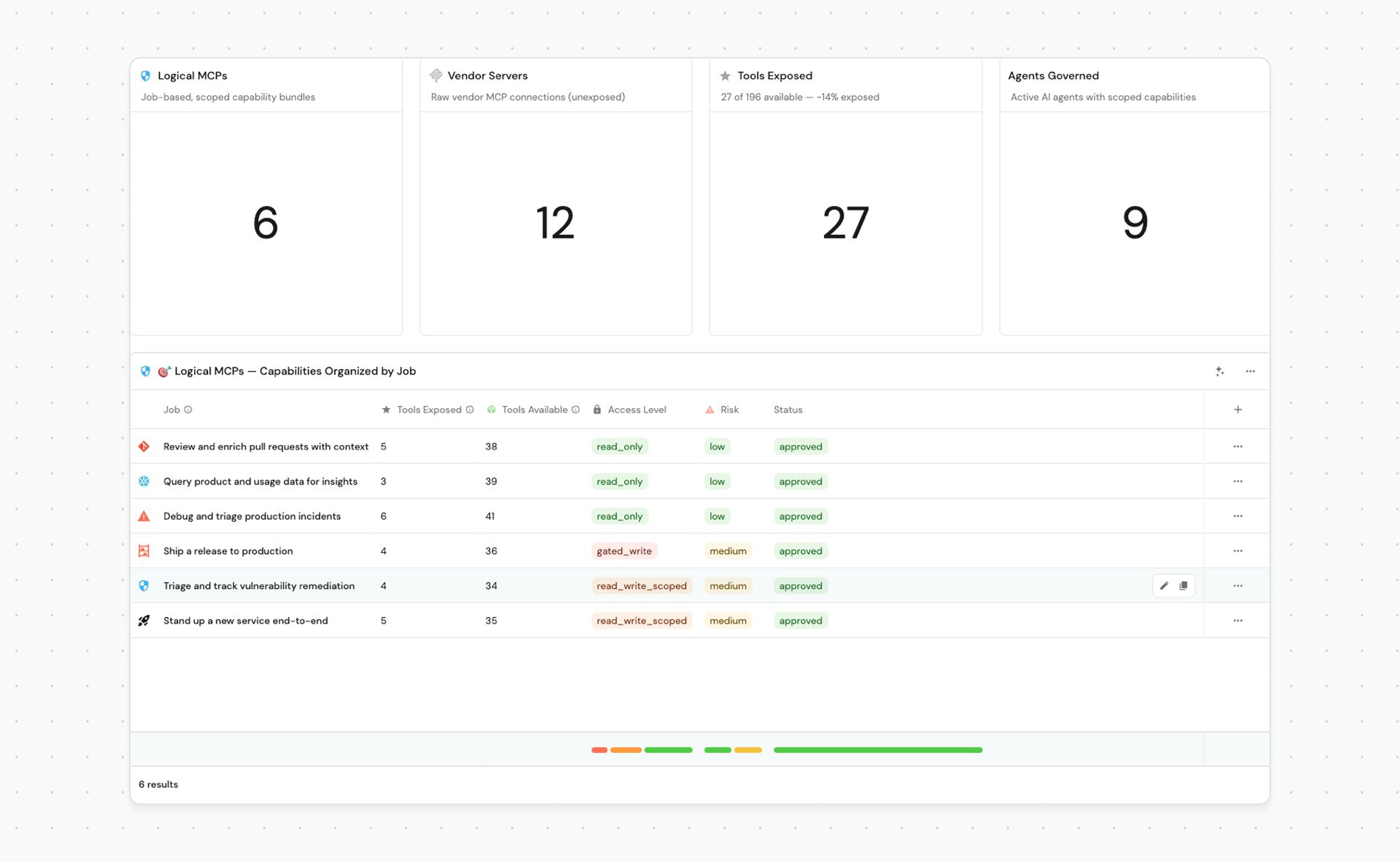
Blast radius is the lead reason to do it. The incident responder gets read-only across Datadog and Sentry and simply cannot mute a monitor or mutate state, because those tools were never exposed. Least privilege stops being a policy you hope people follow and becomes the shape of the thing they're handed.
Scoping cuts both ways, and that's the point. A Service Onboarding MCP might bundle the GitHub tools to scaffold a repo with the PagerDuty tool to register an on-call rotation, with write access this time, because that job genuinely needs it. You're not banning write everywhere; you're matching the toolset to the work.
Cognitive load drops. A developer picks one capability instead of reasoning about four vendor servers and forty tools before they've even started.
Agents get sharper. A tight, purpose-built toolset makes tool selection more accurate and keeps the context window from drowning in options.
Job isn't the only useful axis. Team works just as well. A developer on the frontend team gets the servers that matter to frontend work, like the Figma MCP server, while someone on analytics gets a different set entirely. Neither one loads the agent's context with tools they'll never touch. It's the same principle as job-based grouping, aimed at who the developer is instead of what they're doing right now.
Who builds these? The platform team owns it at the start, while the patterns are still forming. As the org matures and team leads know their own workflows best, hand them the ability to compose logical MCPs for their own teams.
Why tool scoping matters even more for agents than humans
When you spin up a new agent, the instinct is to bolt on every vendor server it might touch. That's the same mistake as before, aimed at a non-human. The stakes are higher here, because an agent acts on its own and at machine speed: a wrong tool call runs before any human can catch it, and if a destructive tool is in reach, the agent is one bad step from firing it. An agent should get the composed, least-privilege capability: the incident-triage agent gets the read-only Production Incident MCP, not admin-level Datadog.
Assigning tools to an agent should be as simple as picking the capabilities it needs at creation time. The same logical MCP a human discovers is the one you grant an agent.
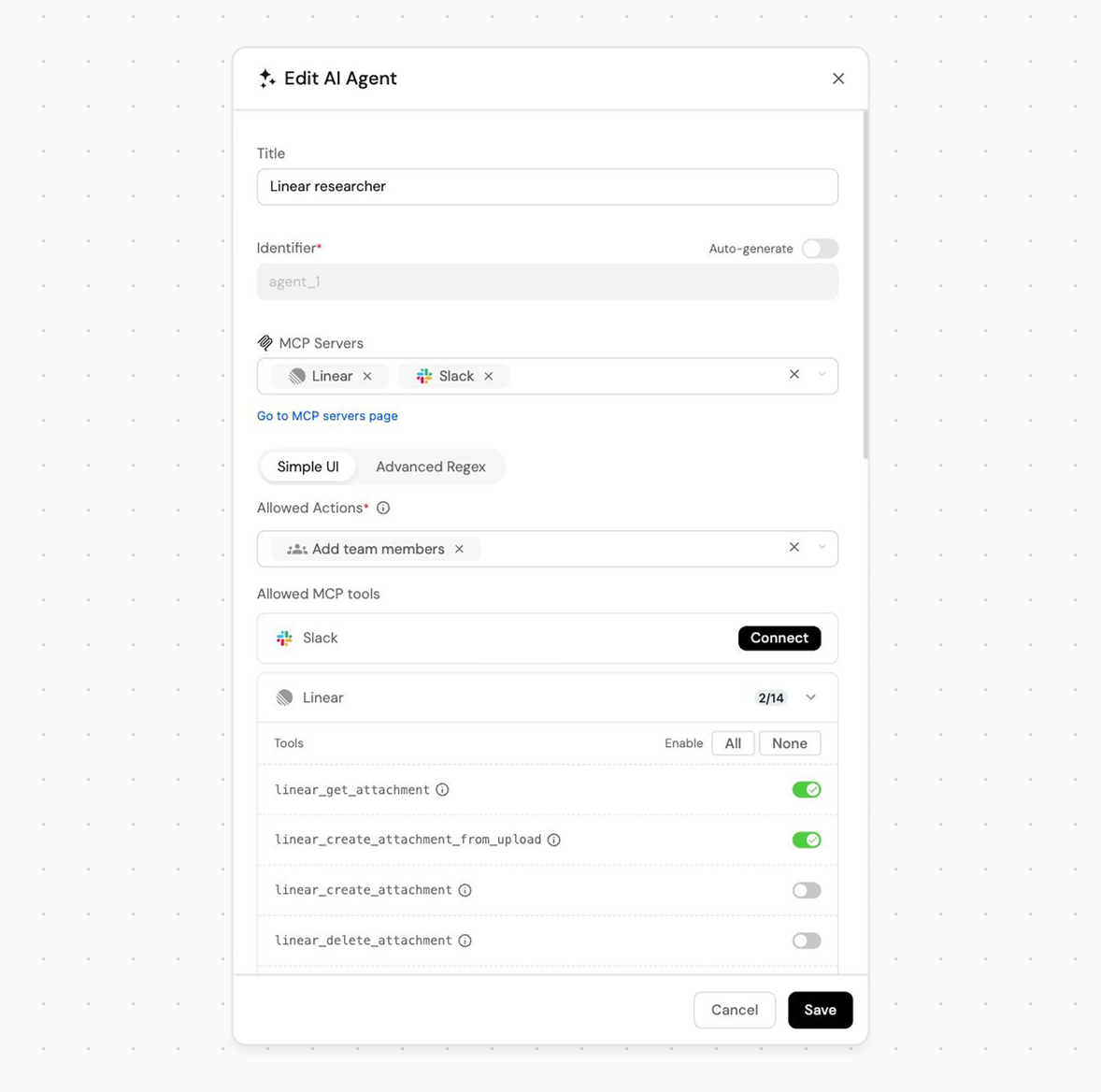
That gives you one governed source with two access patterns: a human discovers a capability and installs it, while an agent gets provisioned with one at creation. Same catalog, same scoping, and you can answer "which tools does this agent hold?" the same way you answer it for a person. In an agentic SDLC where agents ship code and touch production, capability audit for non-humans isn't optional.
What it takes to actually run an MCP registry
Two parts of running an MCP server registry matter most.
First, a real approval process. Developers should request a capability, not a raw server. They describe the job, name the MCP servers and the specific tools that capability needs, a named platform owner reviews it, and they get a yes or no with a reason. If that path is slow or nobody owns it, developers give up on it. They paste servers straight into their IDE instead, and you're back to shadow AI with no idea what's connected.
Speed matters most here. When the intake has no owner, requests pile up in a backlog, and a single tool can wait nine months for a yes. No developer waits nine months. They go around you, and the registry dies. A registry without an owner and a clear turnaround time isn't a registry, it's a spreadsheet nobody trusts.
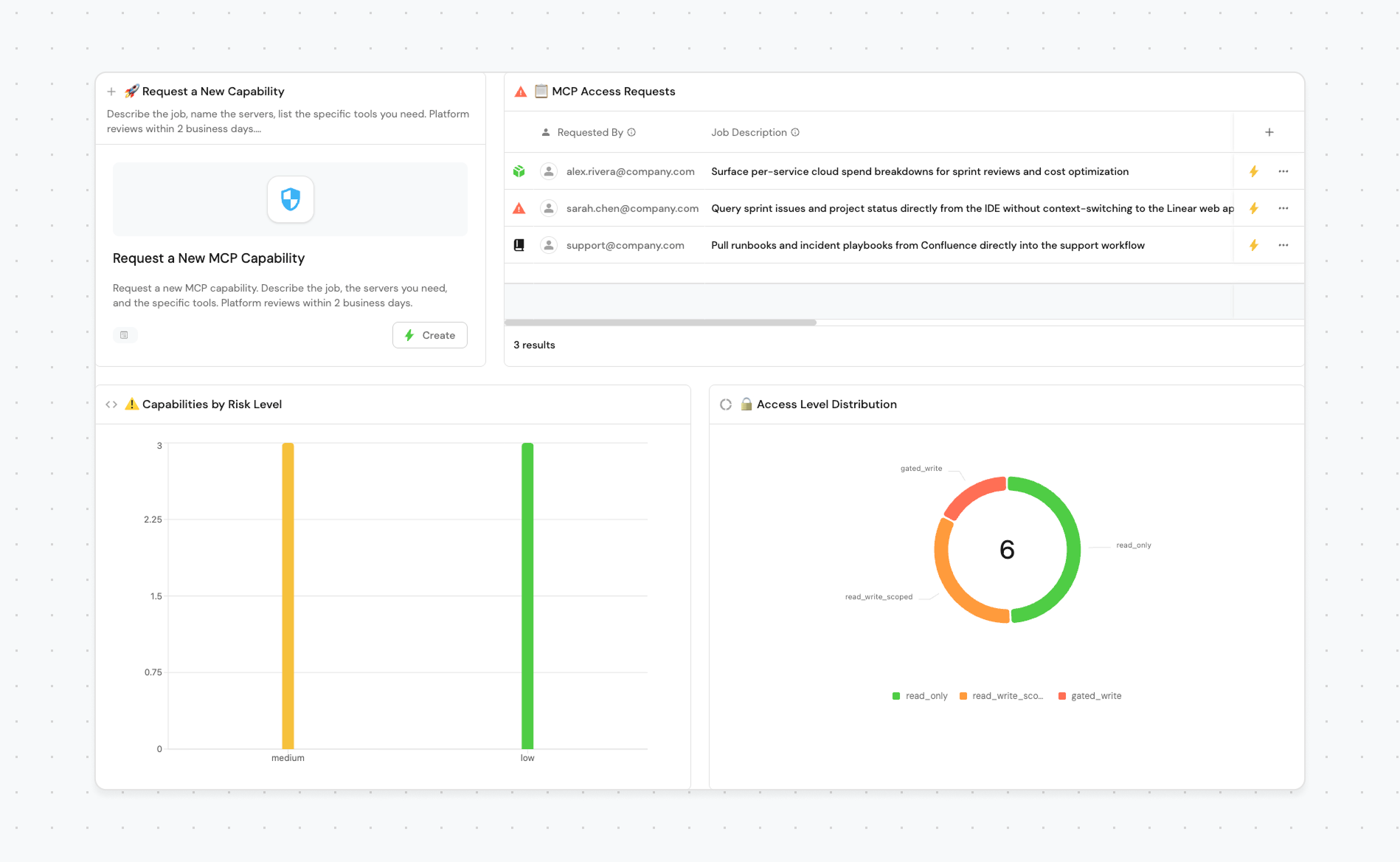
Second, access control. Approval gets a capability into the registry. Access control decides how far it reaches: which tools it exposes, whether those tools are read-only or can write, and which people and agents are handed it. This is where logical MCPs and per-tool scoping do their work, turning a raw vendor server into something safe. And because servers change over time, access control is ongoing, not a one-time setup.
Why approving MCP servers is the start of the work, not the end
The teams that win the agentic SDLC won't be the ones with the longest list of approved servers. They'll be the ones who treated their MCP registry like a product: scoped to the job, owned by someone, and pointed at the right consumer, human or agent.
Security signing off was never the end of the work. It was the moment the platform engineering started.
Where Agentic SDLC platforms fits
Everything above needs a place to execute, and that's where a platform like Port comes in. Port sits between clients and servers as an MCP gateway: every call from a developer or an agent routes through it, with RBAC and audit applied to each tool invocation. Platform engineers pick exactly which tools a connector exposes and which tools a given agent may call.
That's the enforcement surface for the whole argument. You scope a vendor server down to the tools a job needs, point both humans and agents at the same governed catalog, and track who and what holds which capabilities. Port's guide on managing an MCP registry walks through the full setup: request and review workflows, per-tool exposure, and per-agent tool grants.
The mechanics matter less than the mindset. A raw vendor MCP server is a starting point, not something you hand to a person or an agent as-is.
FAQ
What is an MCP registry?
An MCP registry is the catalog of approved MCP servers and the specific tools each one exposes, plus the single place a developer or an agent finds what they're cleared to use. It governs not only which servers are allowed, but which tools inside them are actually reachable.
Is managing an MCP registry a security or a platform engineering job?
Security owns which servers and vendors are allowed, and the risk and data-access policy. Platform engineering owns everything after: scoping servers down to the tools a job needs, distributing them, keeping them current, and retiring them. Allowing a server is a moment; the registry is a system that runs long after it.
What is a logical MCP?
A logical MCP is a capability organized by job rather than by vendor. Instead of a raw Datadog server and a raw Sentry server, you compose a Production Incident MCP that exposes only the read tools from both. It shrinks blast radius, cuts a developer's cognitive load, and makes agents pick tools more accurately.
How do you stop shadow AI with MCP servers?
Give developers a faster path than going around you. A real intake flow beats a stale spreadsheet: a developer requests a capability, a named platform owner reviews it, and they get an answer with a clear turnaround. When that path is slow or missing, developers paste raw servers into their IDE and you lose all visibility into what's connected.
How should AI agents get their MCP tools?
Point agents at the same scoped capabilities you build for humans, not at raw vendor servers. Grant an agent a composed, least-privilege logical MCP at creation time, and track which tools each agent holds, the same way you'd audit a person's access.


Get your survey template today
%201.svg)


Download your survey template today


Free Roadmap planner for Platform Engineering teams
Set Clear Goals for Your Portal
Define Features and Milestones
Stay Aligned and Keep Moving Forward
Create your Roadmap


Free RFP template for Internal Developer Portal
Creating an RFP for an internal developer portal doesn’t have to be complex. Our template gives you a streamlined path to start strong and ensure you’re covering all the key details.
Get the RFP template


Leverage AI to generate optimized JQ commands
test them in real-time, and refine your approach instantly. This powerful tool lets you experiment, troubleshoot, and fine-tune your queries—taking your development workflow to the next level.
Explore now
Check out Port's pre-populated demo and see what it's all about.
No email required
LIVE WEBINAR, Aug 18, 2026:
Context-aware Vibe Coding for Platform Engineering
Thursday, October 22 12:00pm EDT⋅6:00pm CET
To learn more about the new capability and to see a live demo, join our upcoming community session with GitHub
Move fast while staying in control
Build governed agentic workflows on one central platform.
See it in action:
Watch this video on generating Terraform with Port, or explore our public demo.
.png)
Check out the 2025 State of Internal Developer Portals report
No email required
Minimize engineering chaos. Port serves as one central platform for all your needs.
Act on every part of your SDLC in Port.
Your team needs the right info at the right time. With Port's software catalog, they'll have it.
Learn more about Port's agentic engineering platform
Read the launch blog
Contact sales for a technical walkthrough of Port
Every team is different. Port lets you design a developer experience that truly fits your org.
As your org grows, so does complexity. Port scales your catalog, orchestration, and workflows seamlessly.
Port × n8n Boost AI Workflows with Context, Guardrails, and Control
Port Builders Session: A Single, Governed Interface for All MCP Servers
Book a demo right now to check out Port's developer portal yourself
Apply to join the Beta for Port's new Backstage plugin


n8n + Port templates you can use today
walkthrough of ready-to-use workflows you can clone
From manual to autonomous engineering
One platform to build, govern, and operate the Agentic SDLC.
Port is open for you to try it
build your first agentic workflow today