Getting started with AgentOps: How to let developers create agents safely?
AgentOps starts at agent creation. See how platform teams define a golden path that scaffolds new AI agents securely at scale.



What is “AgentOps”?
AI agent operations (a.k.a AgentOps) is the practice of creating, running, and operating AI agents reliably in production and at scale.
Platform teams are being asked to get every team in the organization building with AI agents, without losing control over what those agents can access or who is responsible for them. Gartner's recent AI Agent Operations Playbook recommends you do that by governing the agent at every stage, from the moment it is created until it runs in production.
How to build a production ready AI Agent
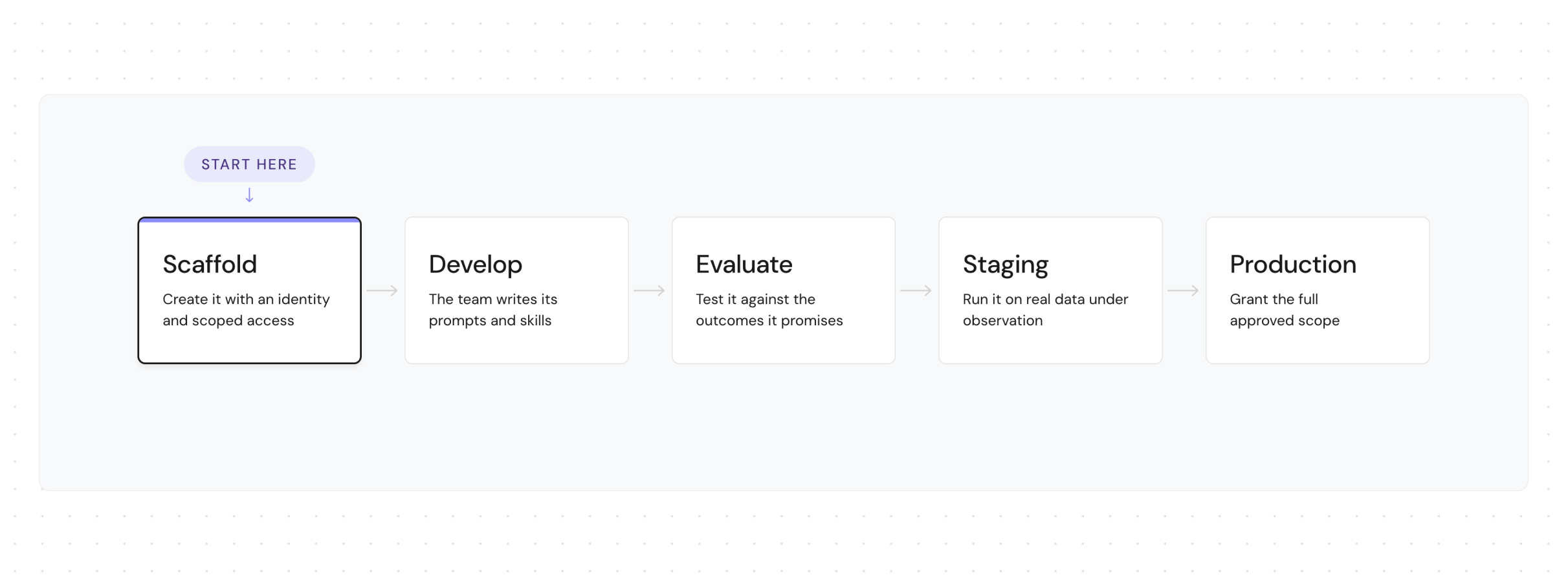
Every agent goes through the same lifecycle on its path to production: it gets created, a team develops it, it gets evaluated, then promoted through staging into production. In this blog, we will focus on standardizing the first stage, agent creation.
Today agents are created without a defined process
Each team is creating agents in their own way. Someone generates a token and leaves it in an env file instead of the vault, decides which repos it can touch, and nobody records what it ended up with.
What will you do as a platform team? You’re stuck between defining a slow ticket-based process, reviewing every request manually, and a too loose process, where each team can create agents their own way.
Define a golden path
To avoid having hundreds of agents you can’t control, now is the perfect timing to define a process. Platform teams who standardize the agent lifecycle usually start with an agent registry, because they need to know which agents already exist before they can govern any of them. Once that is built, they standardize the first step of the agent lifecycle - creating new agents. So every agent is on the path to production readiness from day 1, based on templates and best practices.
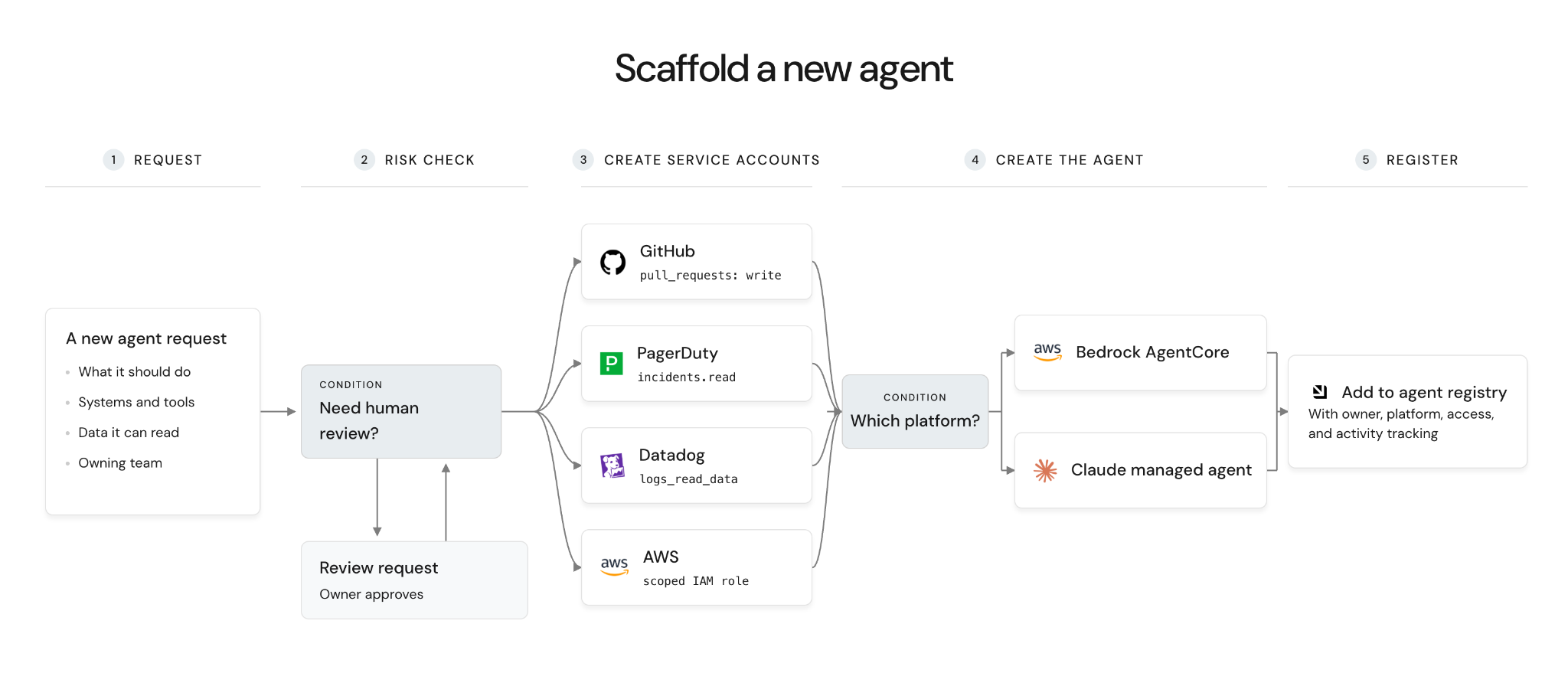
We call that workflow "Scaffold a new agent".
This is very similar to the process of scaffolding new repositories and provisioning cloud resources through golden paths, applied now to agents, based on their ecosystem.
What does the agent creation workflow do?
- A developer chooses the agent name, its purpose, the platform, the systems and tools it needs, and the skills to load from the skills registry
- If the request requires production access or sensitive data
- Wait for the owning stakeholder to approve
- For each system requested
- Create a scoped service account with the minimum permissions it needs
- Create a service account in Port (for workflows running, and context access)
- Provision the agent on the chosen platform (Claude, Bedrock, Azure Foundry)
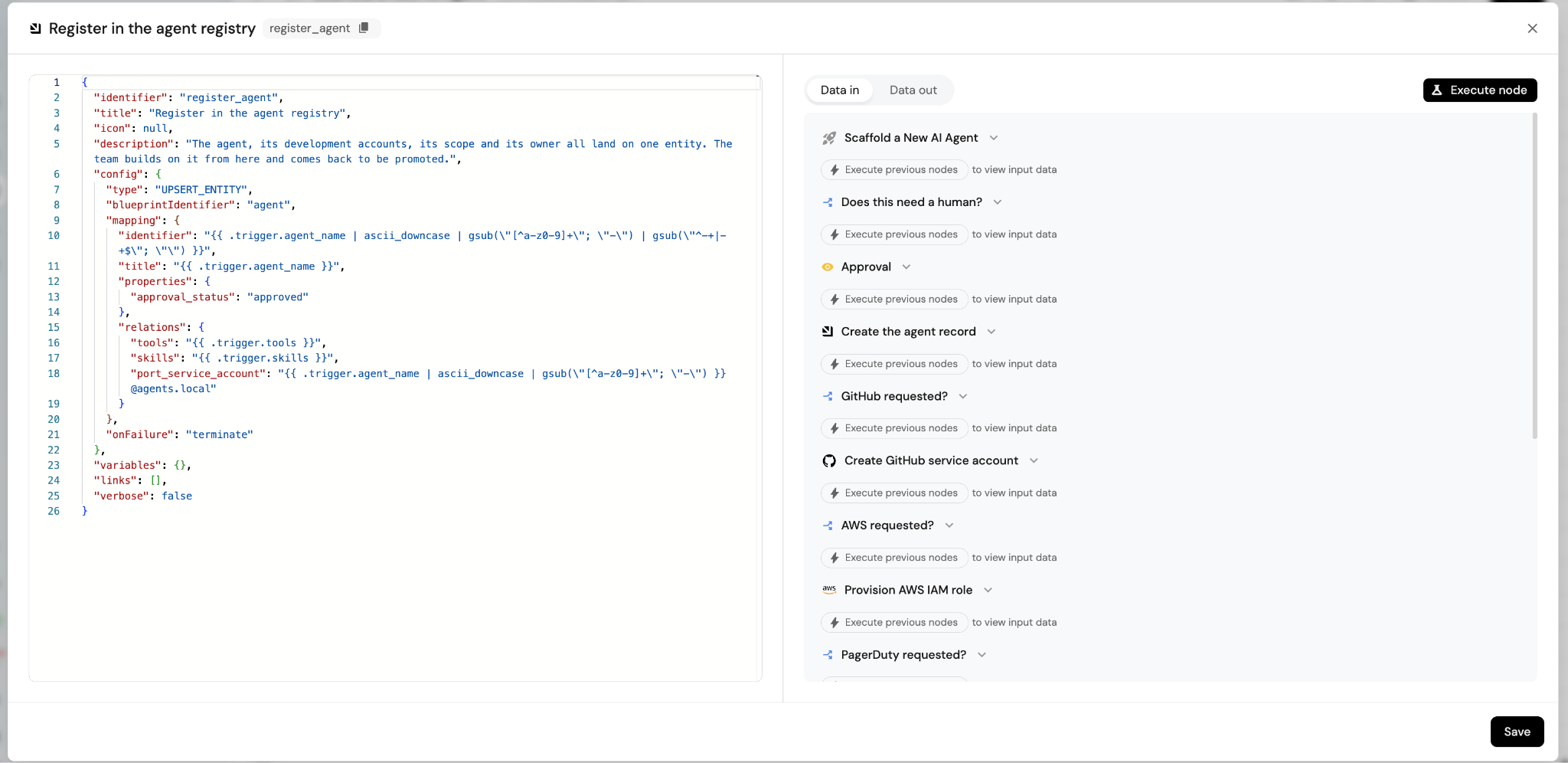
- Register the agent in the agent registry for continuous tracking
What do you gain from setting this golden path?
- Access control - Agents are scoped with permissions and use service accounts.
- Ownership - Every agent has a named person and team.
- Audit log - Every creation, approval and rejection is recorded.
- Consistent infrastructure - Every agent runs on the same pattern
- Cost tracking - Usage and spend attribute to a single agent.
- Monitoring - You can see what exists, what it can reach, and what it is doing.
A step-by-step guide to building this in Port
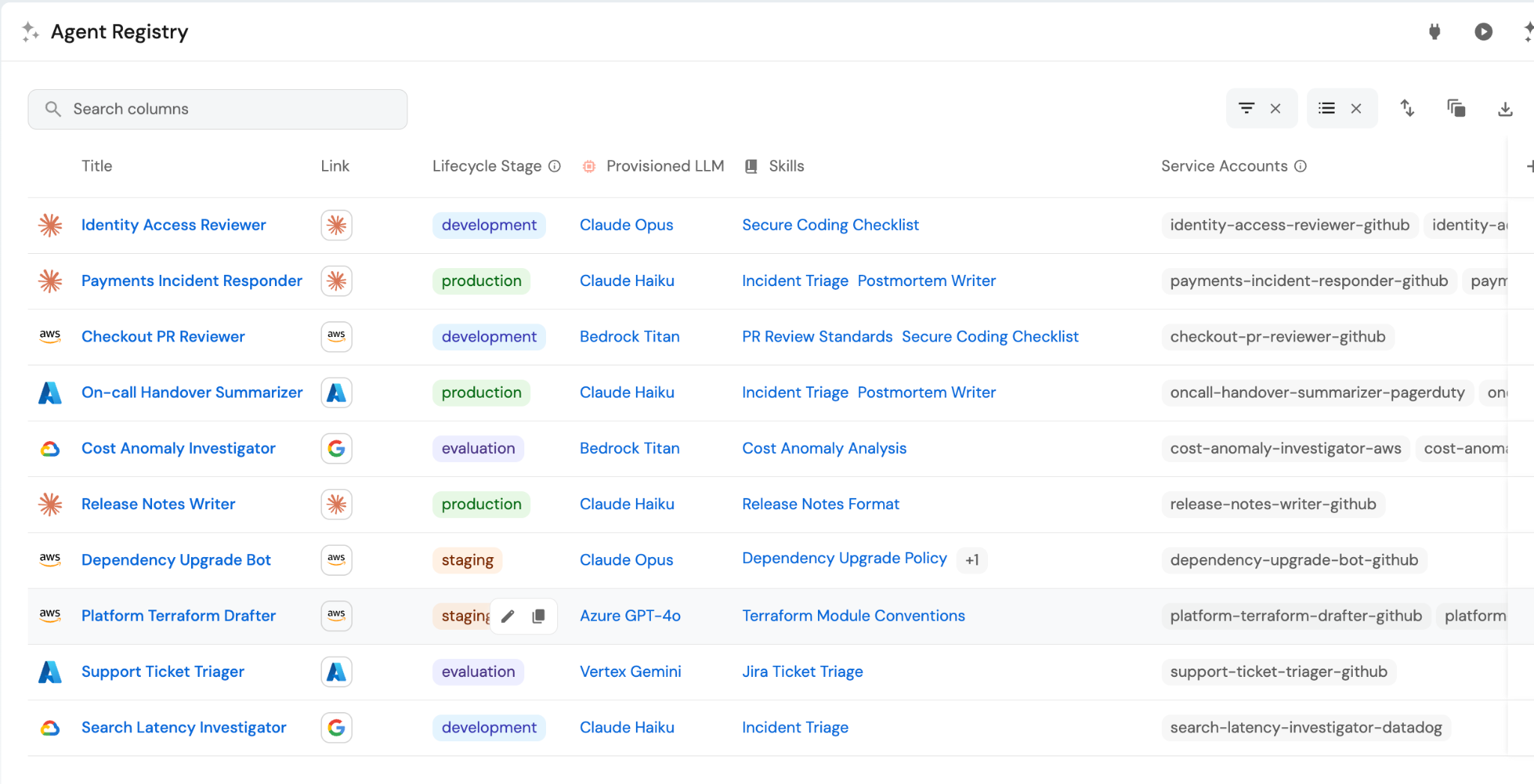
Step 0: Data model and agent registry
We start by modeling the business process in Port's Context Lake, which becomes the system of record for the agent lifecycle. That means blueprints for the agent, a service account per platform, its tools, its skills, and a Port identity of its own.
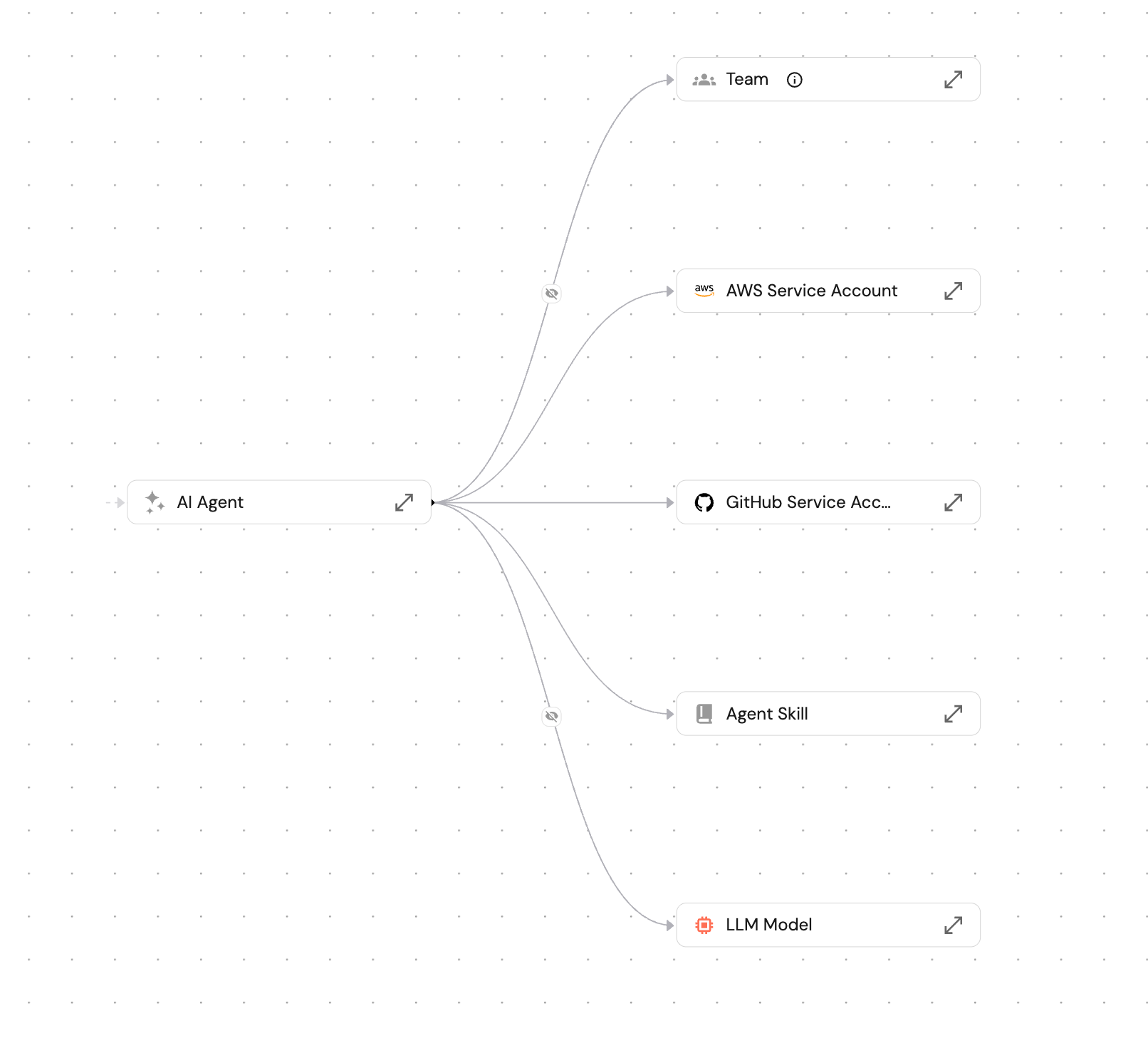
This is the data model of the agent registry, which answers what agents exist, what each one can do and who owns it.
Step 1: Define the developer's request
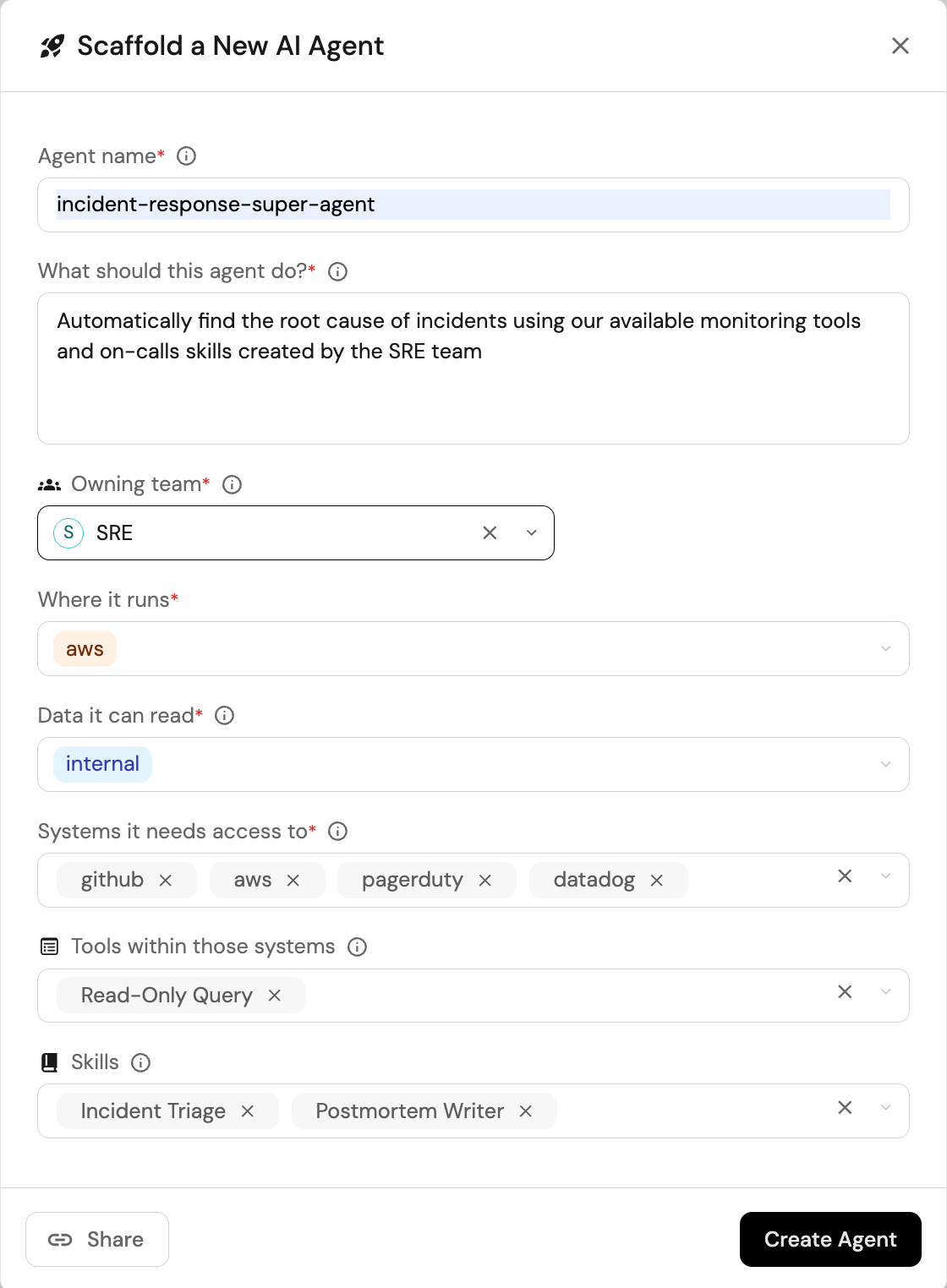
Here you decide the schema of the request, which is what a developer or an agent fills in to get a new agent created.
These are the user inputs working for most teams when creating an agent:
- What should this agent do
- Which systems it needs to reach, and which actions inside them
- Which skills to load from the skills registry
- What data it will read
- Which platform should we deploy it on (Claude, Bedrock)
- Which team owns it
Everything else is abstraction work you handle behind the form. A developer should not be picking IAM role names, VPC subnets, model IDs, or token scopes to get an agent created.
Step 2: Build the workflow
A workflow in Port is a chain of steps behind a self-service action. This one runs in four parts.
2.1 The form
The inputs from step 1, filtered so a developer only sees what they are entitled to request.
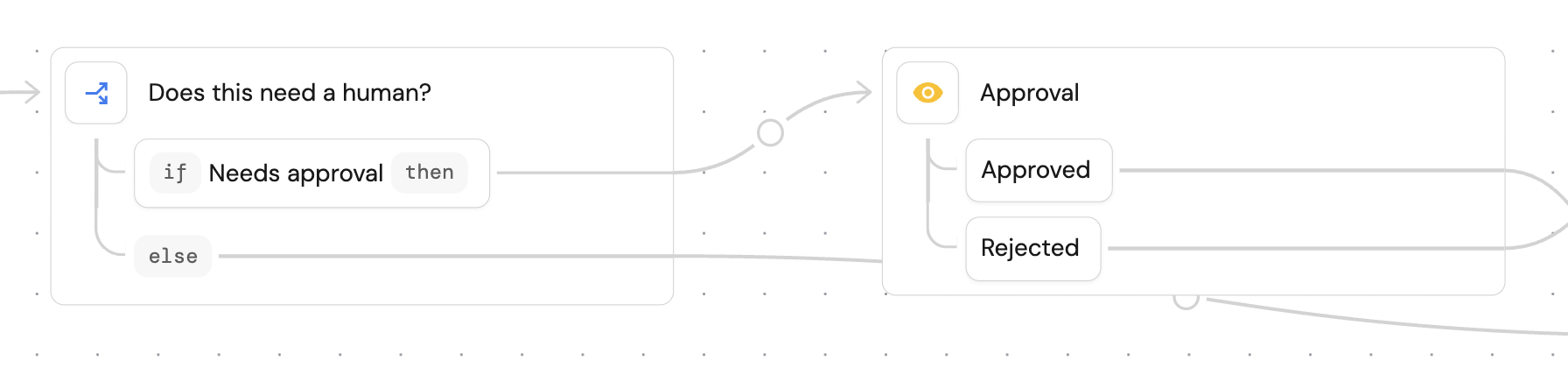
2.2 Human approval condition
A jq expression over those inputs, flagging sensitive data and cloud access.
.trigger.data_classification == "confidential"
or .trigger.data_classification == "restricted"
or ((.trigger.systems // []) | index("aws") != null)
If the agent would be able to perform risky operations by your definition, the workflow stops at an input node and waits for the relevant approver before anything gets created.
2.3 Create the agent's identity and access
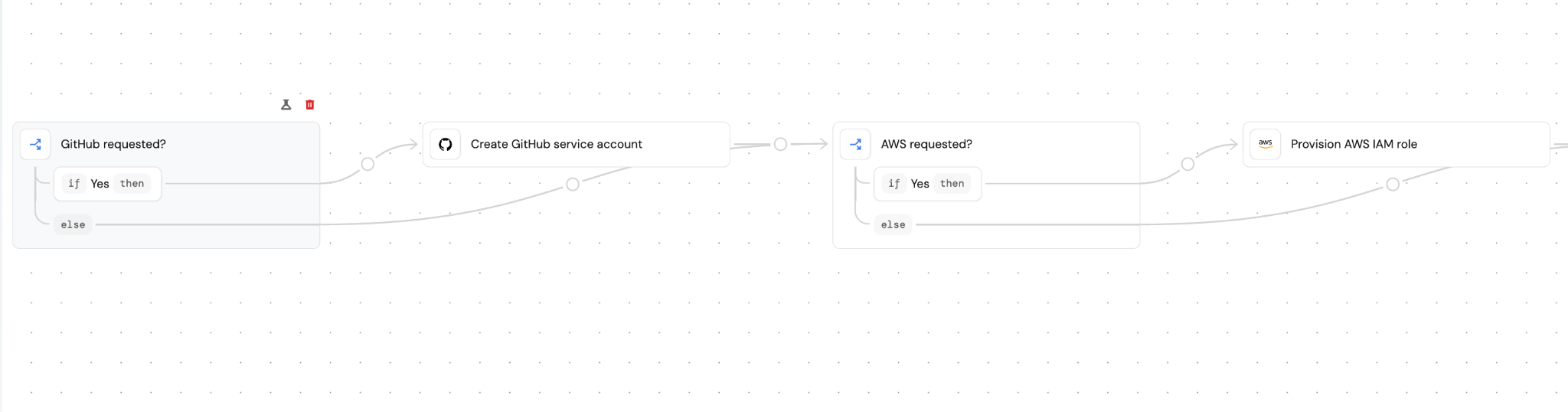
Based on the access requested, the workflow calls each tool's API to create a service account for the agent, scoped to the actions the developer selected, with the credential going into your vault. GitHub, PagerDuty, Datadog, and an IAM role through Terraform.
It also gets a service account in Port, which is the identity it uses to query the catalog rather than a developer's token.
2.4 Provision the agent and register it
With the access in place, create the agent on the platform the developer chose, with only the tools they requested turned on. Then write it back into the registry with its accounts, tools, skills and owner attached, so the entry is complete the moment the agent exists.
Step 3: Define the interface and meet developers where they are
Decide where developers can create agents from:
- MCP, so a developer in Cursor or Claude Code asks inside the conversation they are already having and the model collects the inputs
- Slack, where most requests come from in practice
- Self service portal, for running the workflow via UI
- The API and CLI, for teams that want to script it
We went with Port's MCP server and a Slack bot. All of them hit the same workflow, with the same permissions and approval routing behind it.
Step 4: Monitor and optimize
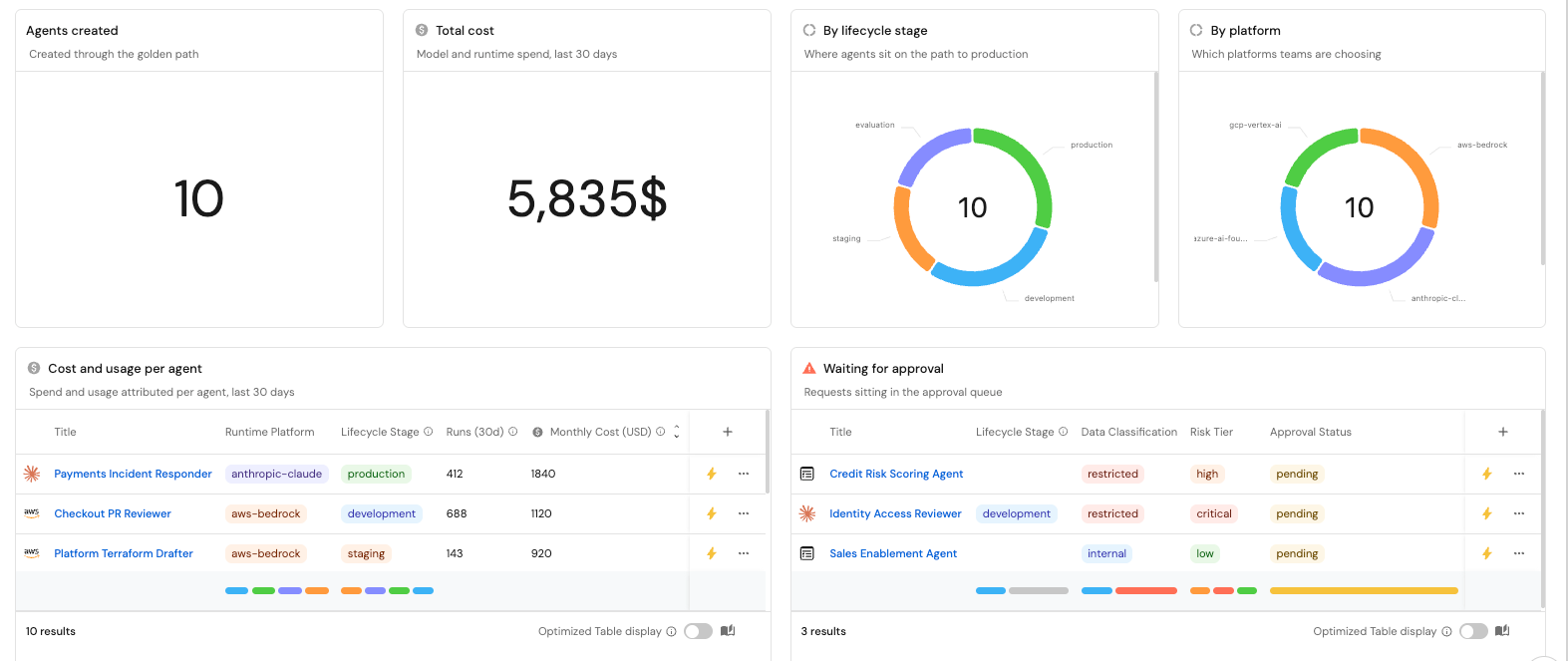
Build a dashboard on top of the registry so you can see requests per week, the agents that came out of it, cost per agent, and where requests are getting stuck waiting for approval.
Then use what it shows to optimize the workflow:
- If we see approval queue time climbing, we narrow the condition or move the approval to a later stage
- If we see requests arriving for a platform we do not support, we add support to it
- If we see agents holding access they never use, we trim what the form offers
- If we see the same skill attached to almost every agent, we load it by default
What comes next in your agentic SDLC
Once developers are creating agents on the golden path, you can start building golden paths for the next stages of the agent lifecycle. Evaluation, staging, and production should each be a workflow that is aligned to the defined golden path, and includes a human in the loop for risky paths in this development process.
Run this prompt to build it yourself
We created a prompt you can hand to Port and get this workflow out-of-the-box. Give it a try in Port's AI builder:
FAQ
How is AgentOps different from LLMOps?
LLMOps covers the model layer: prompt versions, evals, token spend, and the latency of a single call. AgentOps, or AI agent operations, covers what you build on top of that model once it has an identity, credentials, tools it can call, and a team that owns it from creation through production.
What does an AgentOps platform typically monitor?
What scope each service account holds, which team owns the agent, and what that single agent costs. Agent monitoring observability tells you what an agent did at runtime, and the registry underneath tells you what it was ever allowed to do.
How do teams get started with AgentOps when they are new to deploying AI agents?
Start with an agent registry, because you need to know which agents already exist before you can govern any of them. Then standardize creation, so a developer picks the purpose, the systems, and the skills, and the platform handles the scoped service accounts, the vault, and the registry entry behind the form.
What are the most important metrics to track in an AgentOps setup?
Requests per week, agents by lifecycle stage, approval queue time, cost per agent, and agents with no owner or no recent activity. Each one maps to a fix: climbing queue time means you narrow the approval condition, and unused access means you trim what the form offers.
Which open-source or commercial tools are currently used for AgentOps in production?
Teams trace and evaluate agents with LangSmith, Langfuse, Arize Phoenix, or Weights & Biases Weave, increasingly over OpenTelemetry's GenAI semantic conventions. The lifecycle layer is separate, covering the registry, the scoped accounts, and where developers request agents from, so most teams run one tool from each group.
{{from_manual_to_autonomous_engineering}}


Get your survey template today
%201.svg)


Download your survey template today


Free Roadmap planner for Platform Engineering teams
Set Clear Goals for Your Portal
Define Features and Milestones
Stay Aligned and Keep Moving Forward
Create your Roadmap


Free RFP template for Internal Developer Portal
Creating an RFP for an internal developer portal doesn’t have to be complex. Our template gives you a streamlined path to start strong and ensure you’re covering all the key details.
Get the RFP template


Leverage AI to generate optimized JQ commands
test them in real-time, and refine your approach instantly. This powerful tool lets you experiment, troubleshoot, and fine-tune your queries—taking your development workflow to the next level.
Explore now
Check out Port's pre-populated demo and see what it's all about.
No email required
LIVE WEBINAR, Aug 18, 2026:
Context-aware Vibe Coding for Platform Engineering
Thursday, October 22 12:00pm EDT⋅6:00pm CET
To learn more about the new capability and to see a live demo, join our upcoming community session with GitHub
Move fast while staying in control
Build governed agentic workflows on one central platform.
See it in action:
Watch this video on generating Terraform with Port, or explore our public demo.
.png)
Check out the 2025 State of Internal Developer Portals report
No email required
Minimize engineering chaos. Port serves as one central platform for all your needs.
Act on every part of your SDLC in Port.
Your team needs the right info at the right time. With Port's software catalog, they'll have it.
Learn more about Port's agentic engineering platform
Read the launch blog
Contact sales for a technical walkthrough of Port
Every team is different. Port lets you design a developer experience that truly fits your org.
As your org grows, so does complexity. Port scales your catalog, orchestration, and workflows seamlessly.
Port × n8n Boost AI Workflows with Context, Guardrails, and Control
Port Builders Session: A Single, Governed Interface for All MCP Servers
Book a demo right now to check out Port's developer portal yourself
Apply to join the Beta for Port's new Backstage plugin


n8n + Port templates you can use today
walkthrough of ready-to-use workflows you can clone
From manual to autonomous engineering
One platform to build, govern, and operate the Agentic SDLC.
Port is open for you to try it
build your first agentic workflow today