Connect external MCP servers into Port
MCP Connectors let you route external MCP servers through Port. Platform engineers control which servers and tools are available. Developers and AI agents get one entry point to everything.
.png)



Why We Built It
You're the platform engineer who decided to bring AI to your company. Maybe you started with a custom chat app, or you're experimenting with agents for CI/CD troubleshooting. Either way, the next step was obvious: connect MCP servers.
You started with Notion for documentation. Then Jira for tickets. Confluence for runbooks. GitHub for code. Each one made your agents a little smarter.
But now you're maintaining an MCP gateway architecture. You're writing routing logic to decide which tool handles which query. You're managing OAuth flows for each service. What started as "connect a few tools" became infrastructure you didn't sign up for.
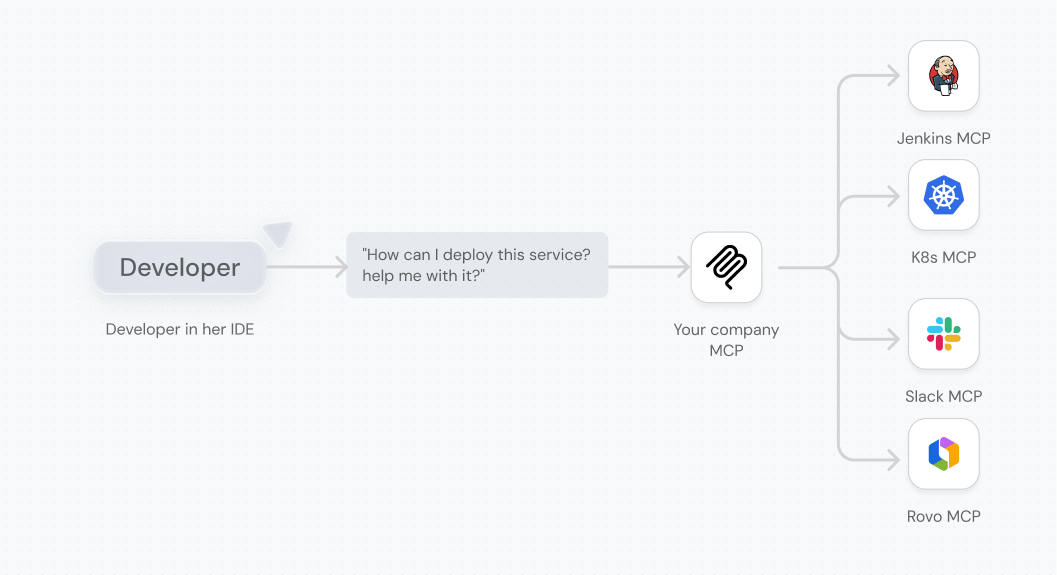
Then you tried Port's MCP server. Instead of your AI agent asking "which pipeline deploys this service?" and guessing from similar names, it knew. Service ownership, deployment pipelines, and environments were all connected. A knowledge graph for your engineering organization, queryable by agents and humans alike.
But then you hit a wall.
Not all data belongs in the Context Lake. The postmortem lives in Notion. Monitors are in Dynatrace. Frontend error logs are in Sentry. You don't want to ingest all of that. You want to query it when needed.
So you're back to the same problem: Port for your context lake, but separate MCP servers for ad-hoc data queries. The architecture complexity creeps back in.
We saw this pattern across customers. One organization told us they were building "one MCP to rule them all." Another asked about an MCP catalog feature. When we dug deeper, these were still in design and planning phases. The commitment was too high, the architecture too complex to actually start.
A platform lead in the healthcare industry put it clearly:
"I want Port to provide the intelligent routing to different AI tools, and provide the interface and architecture so we can scale our AI usage."
That's where external MCP servers come in.
{{port_builders_session}}
What is it
MCP Connectors extend your Context Lake with on-demand queries, like:
- Documents from Notion
- Logs from Sentry
- Monitors from Dynatrace
- Commits from GitHub
You select which MCP servers to integrate, and Port routes requests from developers and AI agents to the right source.
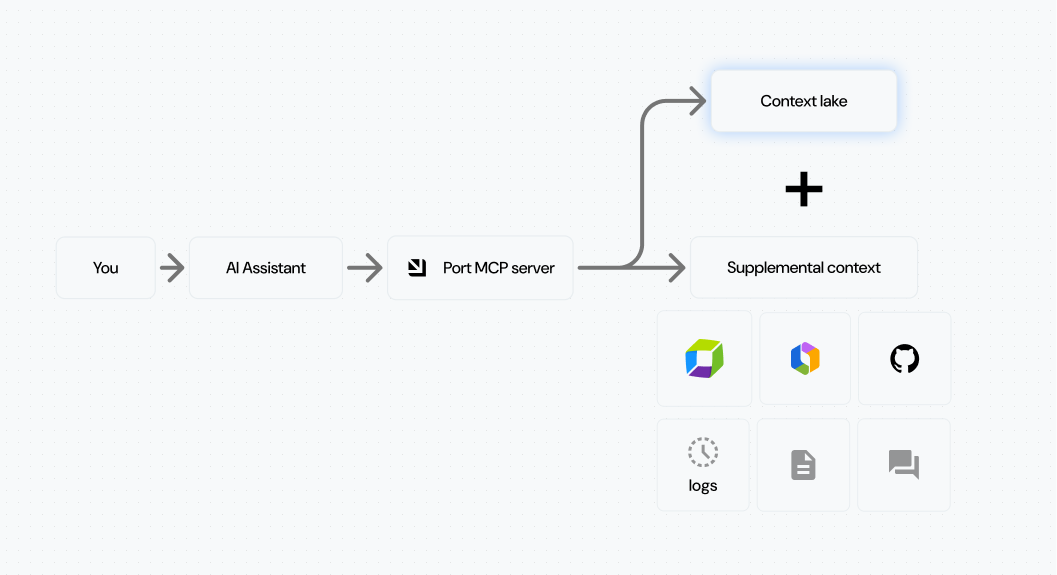
As we shared in our previous post on the Context Lake, without it, tools provide access but not knowledge. Now you get both. External tools, grounded in your engineering knowledge graph.
.png)
Governed access
You control which MCP servers to integrate and which tools to expose. You could connect GitHub's MCP server, but allow only read-only access to pull requests and commits, without any destructive actions.
You also control which groups see which servers. Frontend teams might need Sentry for error tracking. Backend teams want Dynatrace for infrastructure monitoring. Each team gets exactly what they need.
Connection respects existing permissions. Each user authenticates individually using OAuth 2.0. If you don't have a Notion account, you won't see Notion pages. If you do, you'll only access pages you already have permissions to view. No new access granted, just a new interface to what you already have.
One entry point
Developers connect Port's MCP server to their IDE and get insights across all approved tools. No manual configuration per service. One connection to Port, access to everything.
Port AI Assistant now supports MCP Connectors. You can extend its capabilities with external tools for richer insights. Ask about a service and get context from Port's catalog, recent commits from GitHub, and related documentation from Notion, all in one response.
AI agents query one source of truth without complicated routing logic.
Use Cases
AI-assisted incident resolution
As an SRE, you could find related deployments, recently merged pull requests, and incident information from PagerDuty. Helpful, but not enough to resolve incidents quickly.
Now you can query failed logs from Dynatrace, retrieve incident runbooks from Confluence, and compare with live data in Sentry. You reach the root cause faster and reduce MTTR.
.png)
Context-rich development
As a developer, you knew which pull requests were waiting for your review and which Jira tickets you were assigned to. You saw their titles, but not much more.
Now you connect Atlassian Rovo and GitHub MCPs and get the exact comments on your pull requests, the full description on your Jira issue, and can comment back from Port on each of those items. Less context switching. Real tools, one place, flow state.
.png)
Technical documentation
As a developer, you could figure out how processes work by analyzing Port's self-service hub. We know it's not enough. Technical documentation has been a long-awaited feature on our public roadmap.
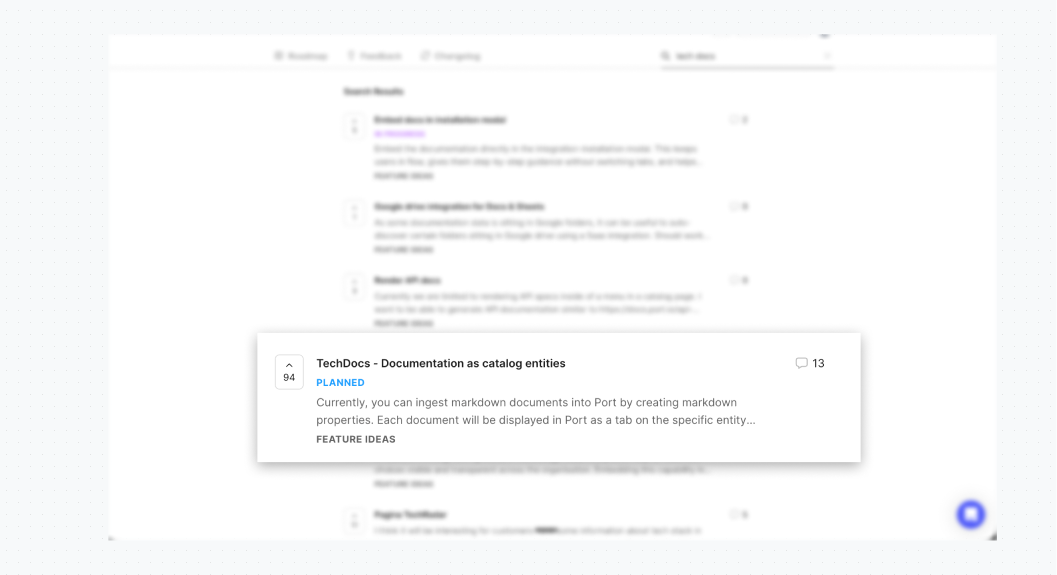
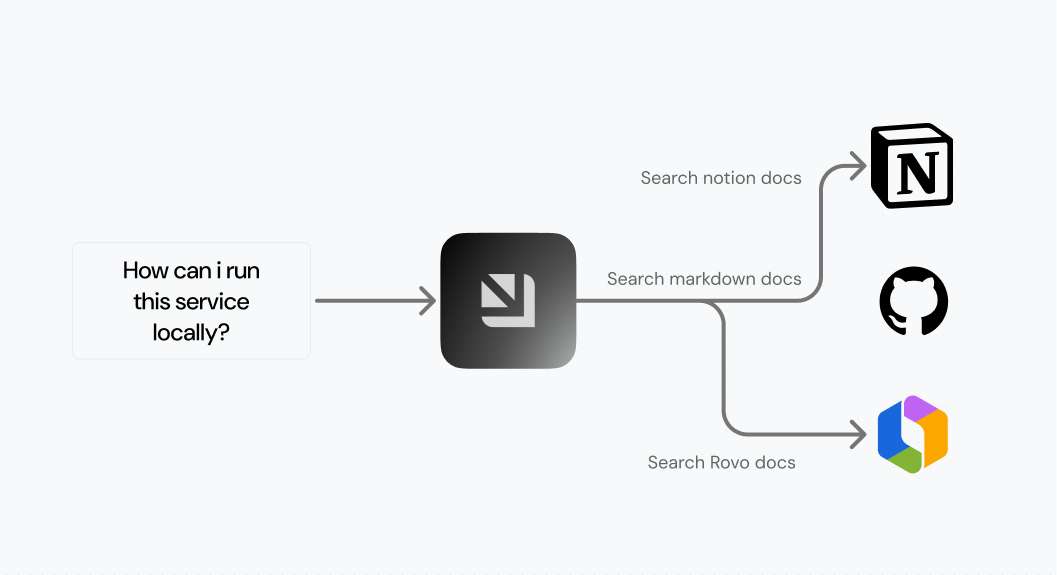
Now you connect Notion and Confluence and ask questions like:
- "How do I deploy a service to production?"
- "What's the process for getting a developer environment?"
- "What are the common troubleshooting tips for my local setup?"
This reduces lead time for development and onboarding time for new developers and AI agents.
How to use it
Here's how to get started.
For platform engineers:
- Go to the Data Sources page and click +Data Source
- Navigate to the MCP Servers tab and select the MCP server you want to add. You can also add custom MCP servers as long as they are official and publicly available.
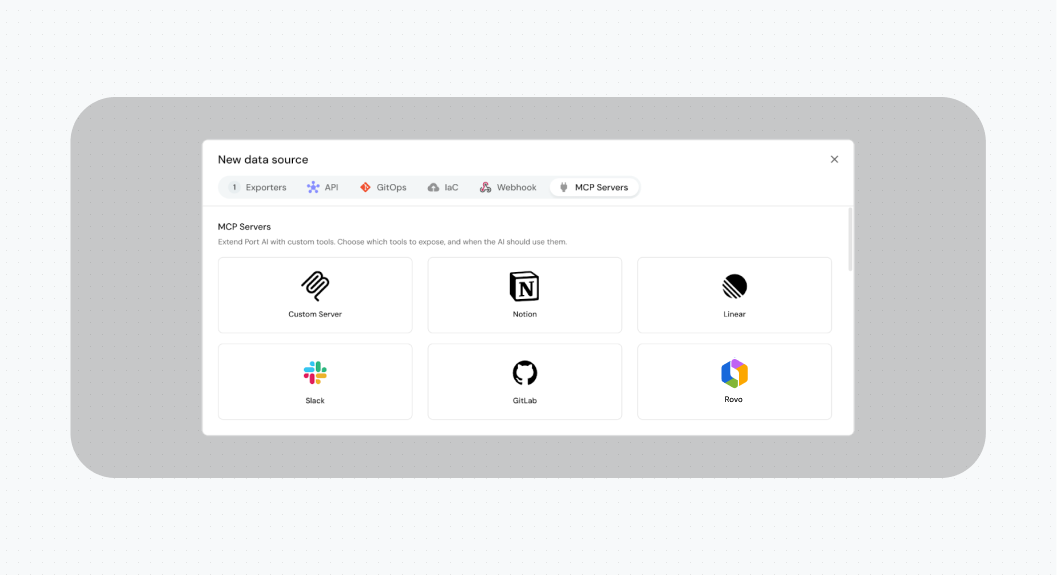
- Fill in the details and choose which tools to allow in your organization
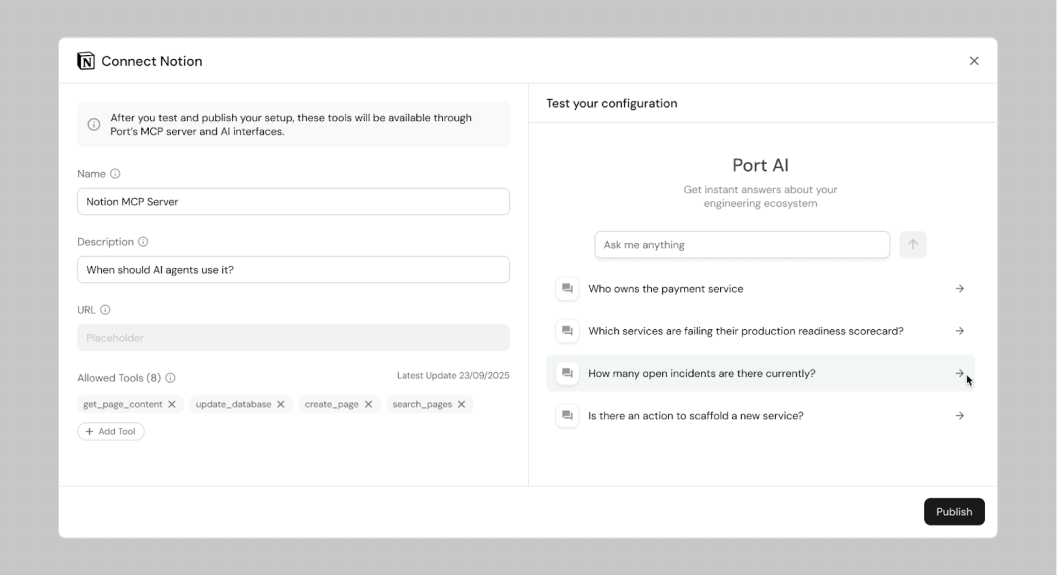
- Save
You can now use Port AI Assistant or Port MCP Server to get deep access to your engineering data.
For developers:
- Go to your MCP Servers section in Port
- Connect to each approved external MCP server
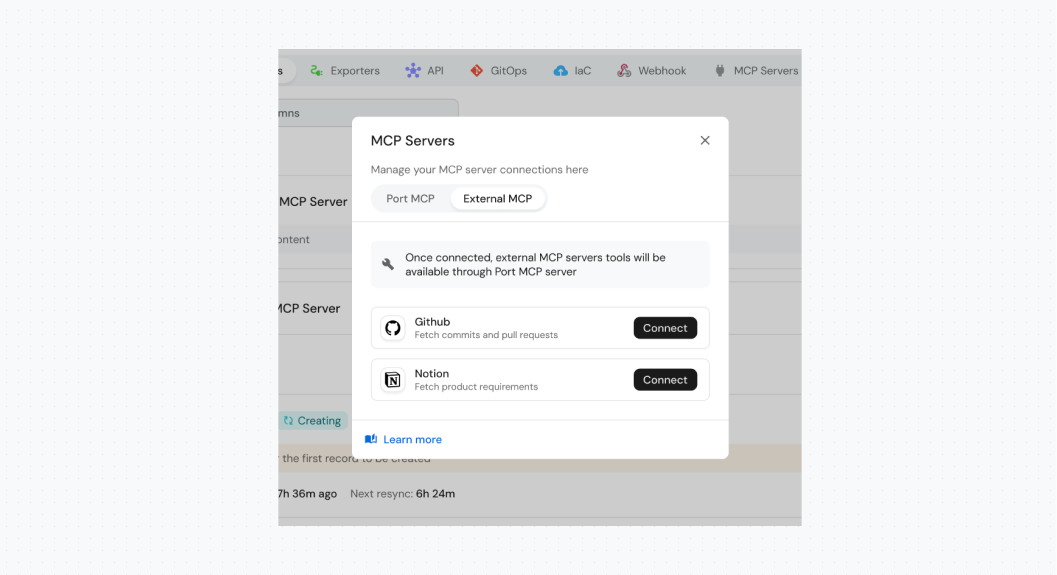
Now you can use Port AI Assistant or install Port MCP Server in your IDE to access all approved tools.
.png)
Go spread the word! Your developers now have a set of approved MCP servers to enrich their daily workflows.
{{port_builders_session}}
How it works
We treat MCP servers as first-class citizens in Port. When you sign up, you get access to the MCP Servers blueprint, and you can add new MCP servers through the Data Sources page. Learn more on our docs.
MCP server configuration is saved in the catalog. You authenticate through it, and as you do, you define which tools are available. This is saved internally in our database.
Port AI Assistant uses Port MCP Server. Behind the scenes, Port MCP Server acts as a gateway. It loads Port tools, but also tools from external MCP servers. This makes Port MCP Server the one source of truth for all MCP tools in your organization.
In a way, Port MCP Server is your organization's engineering MCP server.
You have flexibility and control over when MCP servers are used. When you add an MCP server, you define when it should be used, its description, and its name. This is how we instruct our agent.
For example, imagine you have Confluence for product requirements and Notion for technical decisions. You write this in the MCP configuration, and this is how you control which tools are used in which use cases.
What's next
We’re working with our customers to add more MCP servers to our library. We also hear that internal MCP servers are a growing need. Organizations build internal MCP servers behind their firewall, connecting to internal tools.
Similar to what MCP Connectors solve, this data might not belong in the Context Lake, but still needs access. We're looking into how to allow you to connect your internal MCP servers to Port.
We're also exploring what we call logical MCP servers. Imagine you have all kinds of servers and tools in one place. A different problem emerges: too many tools. You need to reduce the context window and improve agent accuracy.
One way to solve this is with logical MCP servers. Imagine you can build, with no code, an MCP server for the front-end team that combines only Sentry, Jira, and certain Port tools. Your tech leads might need a more capable server with Dynatrace and GitHub. You'll be able to build different MCP servers with different tools and descriptions, all without writing code. Just configure them.
We're looking forward to your feedback! Check our public roadmap to submit ideas and requests.
{{port_builders_session}}


Get your survey template today
%201.svg)


Download your survey template today


Free Roadmap planner for Platform Engineering teams
Set Clear Goals for Your Portal
Define Features and Milestones
Stay Aligned and Keep Moving Forward
Create your Roadmap


Free RFP template for Internal Developer Portal
Creating an RFP for an internal developer portal doesn’t have to be complex. Our template gives you a streamlined path to start strong and ensure you’re covering all the key details.
Get the RFP template


Leverage AI to generate optimized JQ commands
test them in real-time, and refine your approach instantly. This powerful tool lets you experiment, troubleshoot, and fine-tune your queries—taking your development workflow to the next level.
Explore now
Check out Port's pre-populated demo and see what it's all about.
No email required
LIVE WEBINAR, Aug 18, 2026:
Context-aware Vibe Coding for Platform Engineering
Thursday, October 22 12:00pm EDT⋅6:00pm CET
To learn more about the new capability and to see a live demo, join our upcoming community session with GitHub
Move fast while staying in control
Build governed agentic workflows on one central platform.
See it in action:
Watch this video on generating Terraform with Port, or explore our public demo.
.png)
Check out the 2025 State of Internal Developer Portals report
No email required
Minimize engineering chaos. Port serves as one central platform for all your needs.
Act on every part of your SDLC in Port.
Your team needs the right info at the right time. With Port's software catalog, they'll have it.
Learn more about Port's agentic engineering platform
Read the launch blog
Contact sales for a technical walkthrough of Port
Every team is different. Port lets you design a developer experience that truly fits your org.
As your org grows, so does complexity. Port scales your catalog, orchestration, and workflows seamlessly.
Port × n8n Boost AI Workflows with Context, Guardrails, and Control
Port Builders Session: A Single, Governed Interface for All MCP Servers
Book a demo right now to check out Port's developer portal yourself
Apply to join the Beta for Port's new Backstage plugin


n8n + Port templates you can use today
walkthrough of ready-to-use workflows you can clone
From manual to autonomous engineering
One platform to build, govern, and operate the Agentic SDLC.
Port is open for you to try it
build your first agentic workflow today