
Top 3 agentic workflows for platform engineers in Port
Learn about the agentic workflows you can build in Port today and how they solve major productivity challenges.


Platform engineering, while still a relatively new concept, presents an exciting match for the risks of agentic chaos, as we’ve previously discussed. With ownership over the entire software development lifecycle (SDLC), platform engineers are uniquely positioned to help engineering organizations adopt AI agents into their existing workflows and harness their force-multiplying capabilities simply by treating agents the same way they would a human developer.
By embedding agentic workflows within platform operations, teams not only improve developer experience and delivery velocity but also achieve measurable business outcomes, such as faster time-to-market, reduced operational overhead, and improved software reliability.
We are already seeing Port’s users integrate AI agents into their existing workflows, give them access to self-service actions, and provide them context data to improve their outputs. In this post, we’ll share three ways to leverage agentic workflows inspired by what our customers are already doing.
Agentic workflow 1: Autonomous resolution of non-urgent engineering tasks
In conversations with platform teams across the industry, we consistently hear the same story: high-priority tasks (P0/P1) dominate engineering attention, while P3 tickets — things like minor bugs, UX/UI issues, or refactoring tasks — quietly accumulate, creating additional noise over time. This tech debt backlog becomes a drag on engineering health, platform engineering efficiency, and developer productivity.
Some teams try to tackle it during scheduled cleanup sessions or assign on-call engineers to chip away at it during downtime. But, if we’re being honest, tackling tech debt isn’t very rewarding. Managers, too, will often de-prioritize minor bugs in favor of delivering higher-value features or focusing on P1 incidents. This means your P3 backlog is often a place tickets go to die.
Instead of relying on goodwill or spare time, platform teams can instead use AI agents to reduce tech debt without asking humans to make trade-offs. This is a massive shift from reactive cleanup to proactive backlog hygiene.
This isn’t just a productivity play, it’s part of a broader trend we’re seeing: platform teams are increasingly using AI to handle the work developers shouldn’t be doing in the first place.
Platform engineers have already invested time and effort into building guardrails, or golden paths, through the SDLC to reduce friction for developers. They’ve already defined the context devs need to succeed and have considered which existing workflows can be tailored for AI agents.
More and more, our customers are allocating P3 tasks to AI for three main reasons:
- The low-risk nature of P3 incidents makes them ideal for AI-powered autonomous resolution, turning repetitive fixes into consistent and safe outcomes.
- By resolving numerous small issues, AI agents transform what would be noise into sustained improvements in software quality and resilience.
- Offloading the “noise overload” of minor incidents to AI agents reduces cognitive load for engineering teams, allowing them to focus on higher-impact work.
Infrastructure Lead Filip Prosovsky at our customer CloudTalk recently told us how life-changing it would really be to shift P3 bug remediation from human devs to AI agents.
“We’re always reviewing Jira bugs and customer-submitted tickets. Sometimes we see spikes, suddenly there’s a wave of smaller issues that need attention,” Filip said. “If we could automate the resolution process and avoid pulling developers off their core work, that would be a game changer. Just having a flow that handles these automatically would make a huge difference.”
How it works inside Port
Inside Port’s Agentic Engineering Platform (AEP), you can orchestrate the autonomous resolution of non-urgent engineering tasks, such as P3 bugs, minor UI/UX issues, and refactoring work. Using agents to do this turns backlog noise into continuous, automated improvement.
Below is an example of this kind of workflow as it looks in Port:
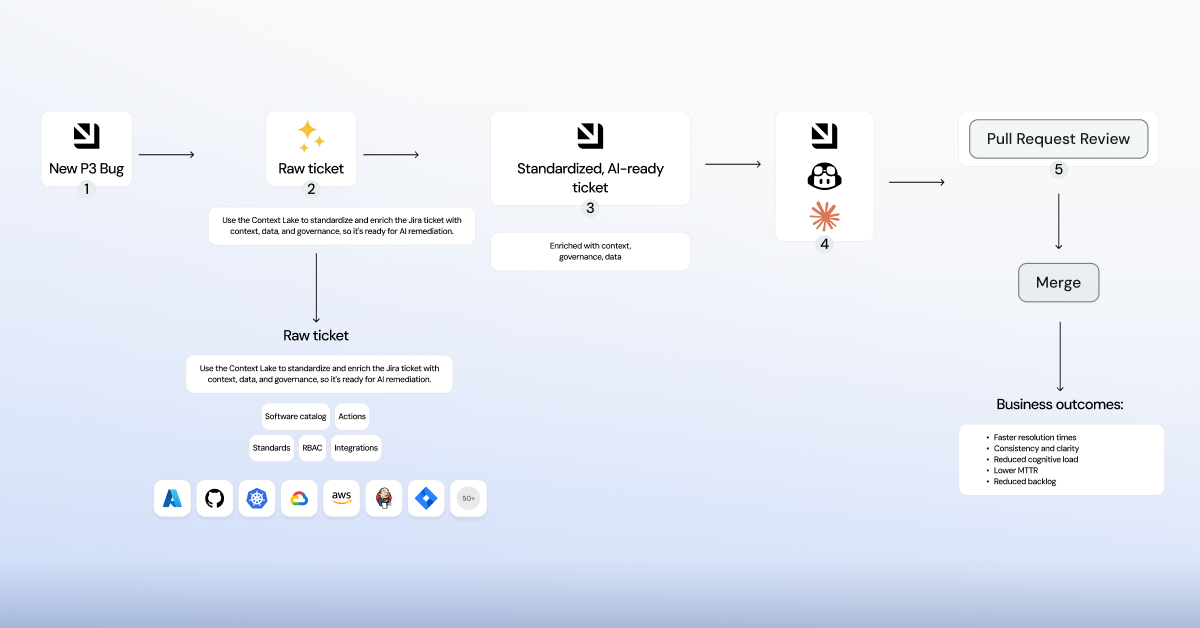
- When a new ticket is created, it enters Port as a raw, unenriched item — a lower-priority issue that would typically sit idle in the backlog. Port immediately connects the ticket to the context lake, the single source of truth that unifies engineering metrics, service catalogs, permissions, policies, and AI-driven insights, providing full context for safe, automated remediation.
- All of this information is consolidated within Port’s context lake, where it’s automatically enriched with affected services, ownership, dependencies, policies, and historical incidents. This enrichment step provides AI agents with the context and governance it needs to make confident, trusted decisions.
- Once the issue is enriched, it becomes a standardized AI-ready ticket, structured, governed, and consistent across all systems to ensure every remediation follows approved guardrails and internal standards.
- From there, AI agents take over, analyzing the issue and autonomously proposing the right fix, whether that means refactoring a function, adjusting a configuration, or updating a dependency version. Each action is traceable, policy-aware, and aligned with the governance defined by your platform engineering team.
- Engineers remain in the loop through pull request review, ensuring that every automated change aligns with engineering best practices, compliance requirements, and organizational standards. They can review or adjust proposed changes and receive root-cause analysis feedback, giving them visibility into why the issue occurred and how to prevent similar problems in the future.
By offloading repetitive maintenance work from platform engineers, Port allows teams to remediate issues safely and autonomously without waiting on DevOps or platform intervention. This shift leads to faster resolution times, clearer and more consistent remediation practices, and a significant reduction in cognitive load across engineering teams.
As automated fixes continuously resolve low-priority issues, backlogs shrink, MTTR drops, and overall software quality steadily improves, all without sacrificing visibility, safety, or governance.
Want to build a flow like this yourself? Check out our AI guide for automatic ticket resolution with coding agents.
{{cta_5}}
Agentic workflow 2: Autonomous standards enforcement with self-healing pipelines
Many engineering orgs face a common frustration: flaky pipelines and failing CI/CD jobs interrupt developer flow, delay deployments, and eat up the DevOps team’s bandwidth. When a job fails, someone has to dig in, diagnose the issue, re-run the job, and maybe escalate a ticket.
For DevOps teams, this is death by a thousand cuts. These dozens of daily nuisances can slowly erode trust in the system and waste valuable DevOps time.
Often, these issues end up being something trivial like a timeout, a missing dependency, or a misconfigured environment — all things platform engineers can automate away using an internal developer portal. But now, more mature teams can use AI agents to self-heal pipeline failures while automatically enforcing engineering standards and best practices in every fix.
In practice, this means an AI agent can:
- Automatically detect the root cause of a failed job.
- Trigger predefined remediations (retries, rollbacks, patching infra) while enforcing approved engineering standards.
- Open PRs if a deeper fix is required.
All this can be done in the background with an AI agent that is properly onboarded to your engineering environment. In short, AI serves as a first responder for CI/CD. Instead of waking up an engineer, or breaking or rolling back a deployment, the agent itself handles the easy stuff automatically, and flags only what truly needs human input.
How it works inside Port
Inside Port’s AEP, this self-healing workflow is orchestrated end to end. Here’s an example of this process:

- Platform engineering defines the engineering standards, baseline metrics, and software catalog references that shape how every pipeline operates. All of this context is structured inside of the context lake.
- When a CI/CD job fails, Port’s agentic remediation engine automatically enriches the event with context like dependencies, ownership, and historical failures, enabling agents to remediate pipelines accurately and safely. From there, the system triggers the right automated action, whether that means retrying a job, updating a pipeline configuration file, rolling back a deployment, or patching a dependency.
- Developers remain in the loop through pull request review, ensuring every automated fix aligns with organizational standards, engineering best practices, and compliance requirements. Engineers can review or modify proposed changes if they want to retain more control over what gets applied.
- Developers also receive root cause analysis feedback from the agentic workflow, providing visibility into why issues occurred and offering insights for long-term improvement.
This workflow is an example of continuous standards adherence enabled through self-healing pipelines, reducing operational overhead, improving developer efficiency, and ensuring consistent governance across the entire engineering organization.
It’s a pattern we’re seeing more and more: platform teams moving from reactive “CI babysitting” to proactive, agentic pipeline hygiene.
Brent Wolfram, Senior Manager of Cloud Platforms and Data Management at Foresters, recently told us, “Having AI that can diagnose a failed pipeline, do some of the initial homework, rerun it if appropriate, or at the very least notify the right people with clear context on why it failed, would be incredibly helpful.”
Beyond self-healing pipelines, Port applies the same agentic principles across engineering operations, with agents like the incident manager agent that automatically detect and restore degraded services, reducing manual work and downtime.
Agentic workflow 3: Context-driven microservice modernization for upgrades and migrations
Engineering leaders often tell us that migration tasks, like upgrading Node.js or framework versions across dozens of microservices, are a constant bottleneck. They require intricate knowledge of code context, dependency versions, and inter-service behaviors.
These aren’t complex feature builds, they’re essential housekeeping. Yet, manual migrations are tedious, error-prone, and highly disruptive, often monopolizing dev time and turning managers into nagging taskmasters.
With agentic engineering, however, you can reimagine this process as a fully-automated workflow handled entirely by AI.
Providing the right context is key. Agents ingest your complete service context: your repo structure, service and entity owners, version constraints, package dependencies, past tests, and more. The context you provide agents helps them make accurate, tailored updates rather than blind upgrades, and work within your software standards. With Port, the context lake provides all of the information and tools like self-service actions that agents need to be fully autonomous.
How it works inside Port
The diagram below demonstrates how Port provides a governed, context-rich foundation that allows AI agents to execute trusted microservice modernization strategies, including upgrades, optimization, and standardization, within established guardrails:
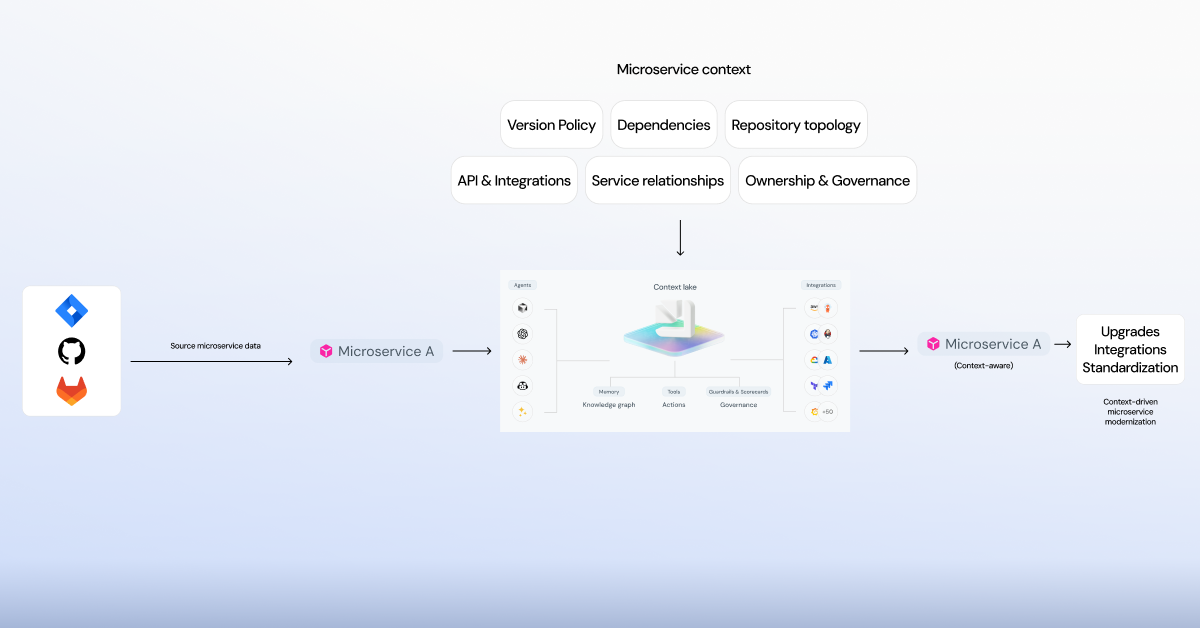
The enriched context enables agents to understand each microservice or monolithic component in relation to its full architectural landscape, including dependencies, integrations, configurations, and ownership details.
Modernization tasks are carried out through governed pipelines that follow organization-approved standards for versioning, deployment, and compatibility. This ensures that updates to one service propagate safely across dependent systems and environments.
The result is a structured, context-aware modernization process where microservice upgrades are reliable, consistent, and observable, minimizing risk and preventing regressions across the architecture.
In turn, your organization gains:
- Increased engineering efficiency: Developers spend less time on manual updates, testing, and configuration fixes, which accelerates delivery and reduces operational overhead.
- Improved governance and quality: With AI-generated pull requests and automated validation, teams maintain consistency and compliance across environments while freeing developers to focus on innovation.
- Greater visibility and accountability Managers gain real-time insight into progress, CI status, and merge activity through the AI control center, eliminating manual check-ins and enabling data-driven decisions.
Altogether, improved tool migrations and version upgrades means less friction, faster adoption, and an overall lower risk of using outdated or vulnerable software in production. Port helped Xceptor manage a full migration from a monolith to microservices smoothly, and even allowed them to automate the process of scaffolding new microservices with self-service actions.
If we took the same example and applied AI — with everything flowing through AI-managed pipelines with built-in visibility for human-in-the-loop best practices — Port’s AEP can help teams orchestrate AI agents to handle most of the work.
Manage agentic workflows with Port’s agentic work manager
As we hinted above, Port offers agentic work management via dashboards that help you see and track everything your AI agents are doing and determine where AI is used most in your SDLC. Platform engineers who build a variety of persona-driven dashboards, such as the control center or an engineering homepage, can in turn help managers gauge the velocity of their teams.
Imagine a centralized UI where managers and platform leads can:
- See agent inventory, including which microservices are queued, in-progress, or completed.
- Track the initiative of migration from a single board, and answer questions like:
- Where does agent work stand?
- Have developers reviewed the agent's work?
- Where does work stand against the targeted due date?
The AI control center dashboard transforms migrations from chaotic initiatives into visible, traceable programs. With all of the data centralized in Port, you don’t have to sift through siloed email or Slack threads to check progress or ask questions.
Agentic work management also helps build trust in AI. With full visibility into all of their behavior, context usage, and token spend, as well as access to trace and audit logs, you can more easily understand how agents work, where they are most useful, and when you need to replace them with better or more mature foundational models. Auditability means better AI outcomes.
Build trust in AI with Port
One of the biggest hurdles engineering organizations face when adopting AI is building trust with it. How can you trust AI when the same prompt sometimes produces different outputs? How do you know what it’s doing without in-context trace logs? And even more importantly, how can you build an agentic workflow when you’re not sure the AI knows how your engineering environments are structured?
This is where the Agentic Engineering Platform comes in. Port provides all of your engineering, business, and operational context to AI in real time, making it easy for platform users and builders to orchestrate AI agents across the SDLC.
This context is what makes it possible to trust AI — just the same way you’d onboard a new hire, you can onboard your AI agents, audit their outputs, gauge their performance, and empower effective models to handle work independently, with human-in-the-loop validation where needed.
{{cta-demo-baner}}


Get your survey template today
%201.svg)


Download your survey template today


Free Roadmap planner for Platform Engineering teams
Set Clear Goals for Your Portal
Define Features and Milestones
Stay Aligned and Keep Moving Forward
Create your Roadmap


Free RFP template for Internal Developer Portal
Creating an RFP for an internal developer portal doesn’t have to be complex. Our template gives you a streamlined path to start strong and ensure you’re covering all the key details.
Get the RFP template


Leverage AI to generate optimized JQ commands
test them in real-time, and refine your approach instantly. This powerful tool lets you experiment, troubleshoot, and fine-tune your queries—taking your development workflow to the next level.
Explore now
Check out Port's pre-populated demo and see what it's all about.
No email required
LIVE WEBINAR, Aug 18, 2026:
Context-aware Vibe Coding for Platform Engineering
Move fast while staying in control
Build governed agentic workflows on one central platform.
See it in action:
Watch this video on generating Terraform with Port, or explore our public demo.
.png)
Check out the 2025 State of Internal Developer Portals report
No email required
Minimize engineering chaos. Port serves as one central platform for all your needs.
Act on every part of your SDLC in Port.
Your team needs the right info at the right time. With Port's software catalog, they'll have it.
Learn more about Port's agentic engineering platform
Read the launch blog
Contact sales for a technical walkthrough of Port
Every team is different. Port lets you design a developer experience that truly fits your org.
As your org grows, so does complexity. Port scales your catalog, orchestration, and workflows seamlessly.
Port × n8n Boost AI Workflows with Context, Guardrails, and Control
Port Builders Session: A Single, Governed Interface for All MCP Servers
Book a demo right now to check out Port's developer portal yourself
Apply to join the Beta for Port's new Backstage plugin


n8n + Port templates you can use today
walkthrough of ready-to-use workflows you can clone
From manual to autonomous engineering
One platform to build, govern, and operate the Agentic SDLC.
Port is open for you to try it
build your first agentic workflow today

.png)

