External Interfaces: build your own UI on top of Port
External Interfaces let you build standalone apps on Port's catalog, where users log in with Port and keep their own permissions.



When we shipped Custom Widgets, we made Port's UI extensible from the inside. You write a plugin, upload it, and it renders in a dashboard or an entity page with Port's data and permissions behind it.
The question that kept coming back was the mirror image of that. What if the interface needs to live outside Port? Not every interface belongs on a dashboard. Sometimes a team needs a single-purpose app: a narrow view for one workflow, a tool that one group uses daily and nothing else.
Port's API and Port MCP already cover most of this. An agent connected to Port MCP can read your blueprints, relations, and entities, and write a frontend that calls the API.
Authenticationwith Port is what was missing. An app running outside Port had no way to sign a user in with their Port identity.
External Interfaces closes that gap.
What it does
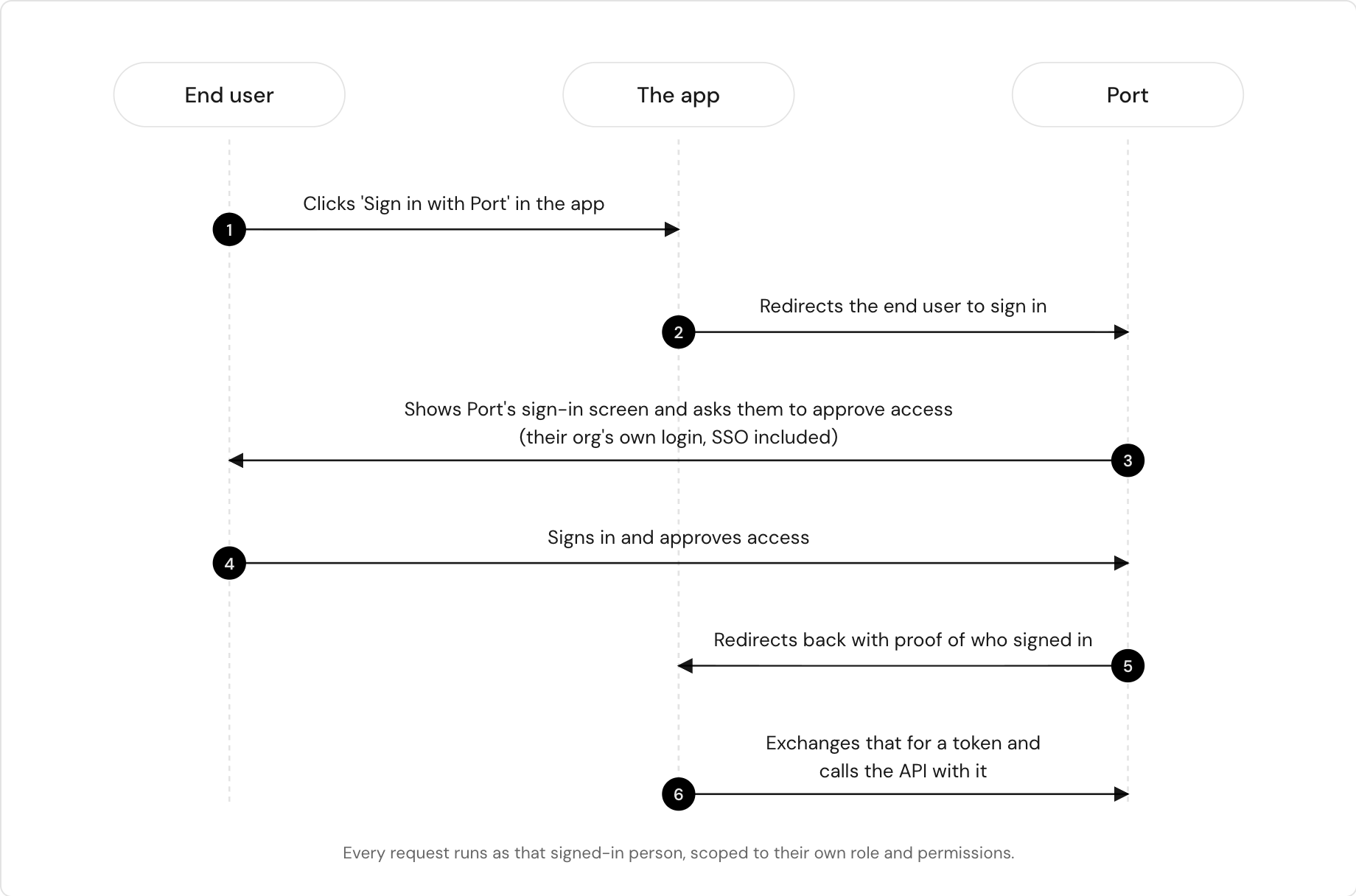
You create an OAuth App in Port. The app gets a Client ID. Your users open the app, click Login with Port, and authenticate against Port directly. From that point, every API call the app makes runs under that user's role and scopes.
That last part is the important one. There are no org-level credentials sitting in the frontend, and no second permission model to keep in sync. If a user cannot see a blueprint in Port, they cannot see it in your app either. Access control stays where it already lives.
Port is the backend
The external app is only the interface. Blueprints, entities, relations, workflows, and permissions all stay in Port, and Port serves them over the API. Nothing is duplicated and nothing needs syncing.
The app runs on Port. It reads from the context lake and triggers the workflows already defined in your portal, so the interface is new but the data and the logic behind it are the ones you already have.
That holds for any data model. Whatever shape your catalog is in, the app sits on top of it, and if the model grows later, a new blueprint, a new property, a new relation, the app follows. You can ask an agent connected to Port MCP to add those blueprints and properties for you while you build, so the model and the interface come together in one pass. Because the model lives in Port, the rest of the portal gets it too: the same data shows up in dashboards, scorecards, and automations.
Permissions come along as well. The app shows each person only the data they already have access to, and only the actions their permissions cover.
This is the difference between the two extension paths we now have:
- Custom widgets run inside Port, in a dashboard or an entity page.
- External interfaces run outside Port, as standalone apps.
Same catalog, same permissions, different surface.
How do you work with it
New API endpoints manage the OAuth App itself: create it, fetch its details, list, revoke and delete it. All of it is scriptable, so app registration can live in your setup automation like any other Port resource. Admins can easily control what's already registered and remove if needed.
The same operations are available through Port MCP, which your agent is likely connected to already for catalog context. On top of that sits a skill holding the full build sequence: registering the OAuth App, wiring the login flow, and calling the Port API as the signed-in user. The agent follows the skill instead of guessing at the auth work, which is the part that usually goes wrong.
What this looks like in practice
Any tool that builds a frontend works here: Lovable, v0 on Vercel, or a React app you write yourself in Cursor. The pattern does not change.
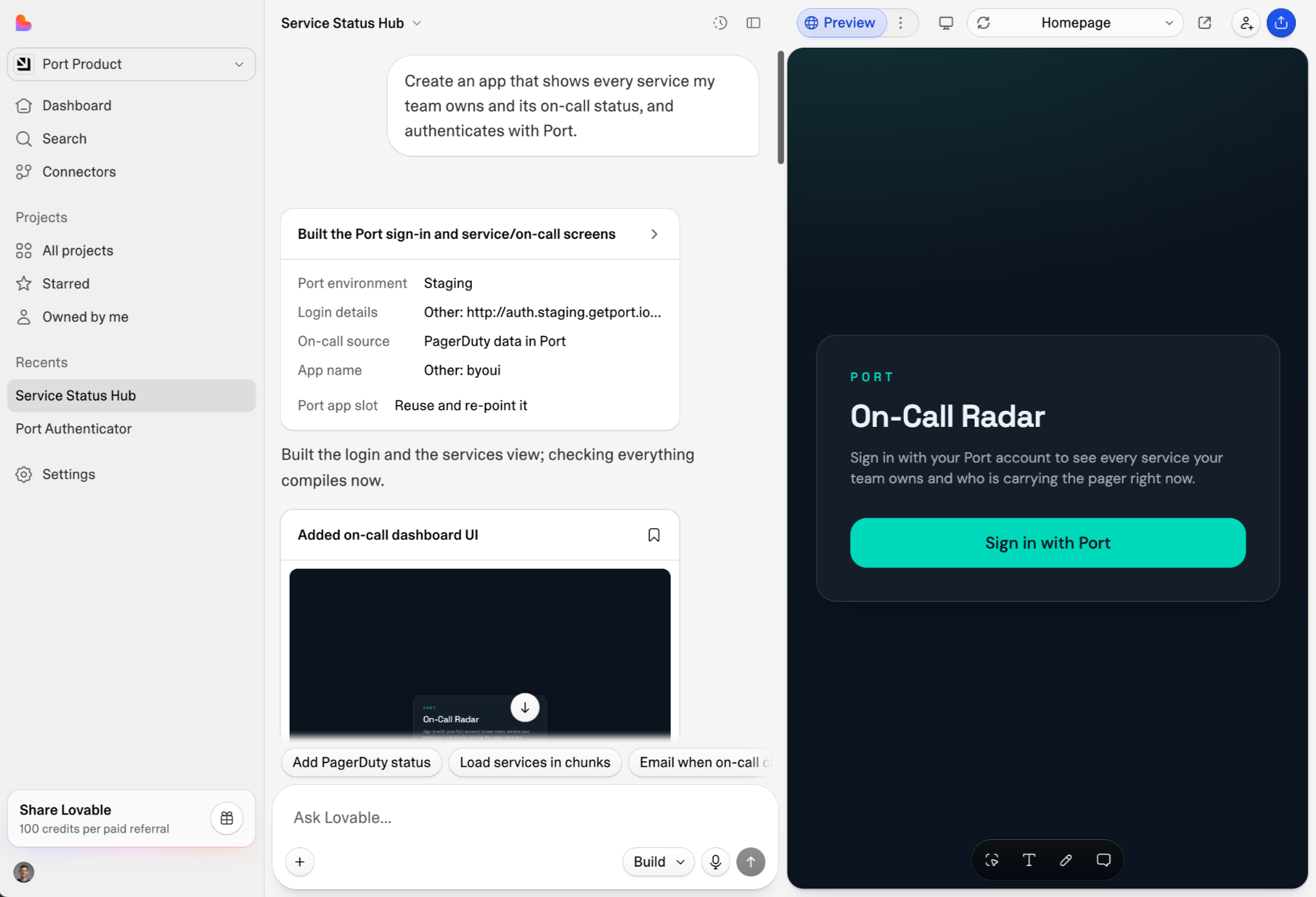
Connect Lovable to Port MCP and describe the app you want. Say the authentication part out loud in the prompt:
>> Create an app that shows every service my team owns and its on-call status, and authenticates with Port.
That last clause is what matters. It points the agent at the skill, which walks it through creating the OAuth App and wiring the login flow. Without it, the agent will write the UI and then improvise the auth, which is where these builds go wrong.
When the app comes up, the first thing it renders is Login with Port. You sign in, and the app reads your catalog with your permissions.
The tool writes the frontend. Port does everything behind it.
What to expect
We are rolling this out now. The flow works end to end, with rough edges we already know about: build times can be long, the agent does not always report what it is doing while it works, and the auth step trips up some tools more than others.
Next on the list is clearer feedback during the build, and troubleshooting guidance in the skill for the steps that stall.
Get started
The documentation walks through creating the OAuth App, the login flow, and the API and MCP operations, and includes the skill your agent needs to build the app.


Get your survey template today
%201.svg)


Download your survey template today


Free Roadmap planner for Platform Engineering teams
Set Clear Goals for Your Portal
Define Features and Milestones
Stay Aligned and Keep Moving Forward
Create your Roadmap


Free RFP template for Internal Developer Portal
Creating an RFP for an internal developer portal doesn’t have to be complex. Our template gives you a streamlined path to start strong and ensure you’re covering all the key details.
Get the RFP template


Leverage AI to generate optimized JQ commands
test them in real-time, and refine your approach instantly. This powerful tool lets you experiment, troubleshoot, and fine-tune your queries—taking your development workflow to the next level.
Explore now
Check out Port's pre-populated demo and see what it's all about.
No email required
LIVE WEBINAR, Aug 18, 2026:
Context-aware Vibe Coding for Platform Engineering
Thursday, October 22 12:00pm EDT⋅6:00pm CET
To learn more about the new capability and to see a live demo, join our upcoming community session with GitHub
Move fast while staying in control
Build governed agentic workflows on one central platform.
See it in action:
Watch this video on generating Terraform with Port, or explore our public demo.
.png)
Check out the 2025 State of Internal Developer Portals report
No email required
Minimize engineering chaos. Port serves as one central platform for all your needs.
Act on every part of your SDLC in Port.
Your team needs the right info at the right time. With Port's software catalog, they'll have it.
Learn more about Port's agentic engineering platform
Read the launch blog
Contact sales for a technical walkthrough of Port
Every team is different. Port lets you design a developer experience that truly fits your org.
As your org grows, so does complexity. Port scales your catalog, orchestration, and workflows seamlessly.
Port × n8n Boost AI Workflows with Context, Guardrails, and Control
Port Builders Session: A Single, Governed Interface for All MCP Servers
Book a demo right now to check out Port's developer portal yourself
Apply to join the Beta for Port's new Backstage plugin


n8n + Port templates you can use today
walkthrough of ready-to-use workflows you can clone
From manual to autonomous engineering
One platform to build, govern, and operate the Agentic SDLC.
Port is open for you to try it
build your first agentic workflow today