How to architect your context lake for self-healing incidents
Self-healing incidents need a context lake first. Ownership, dependencies, and change history let agents diagnose in minutes.



Most of an incident is still reconstruction. The alert told you something is wrong. Everything else (who owns it, what changed, what depends on it, what to try first) lives somewhere else, and someone has to stitch it together before anyone can fix anything. That reconstruction is often the most stressful part of the page: you are under pressure, and you do not yet have enough context to act.
A context layer is the foundational knowledge layer that sits across your SDLC, giving real-time, trusted, organizational context to an agent to fulfill its task. It is not a data lake of raw logs, but a living graph of catalog entities and relationships across services, ownership, dependencies, recent changes, and standards.
If you skip the context layer foundation, the agent still sounds confident.
What we see in practice without a context layer:
- It latches onto the first issue it finds (one log line, one trace) and treats that as the real issue, because it was first.
- It does not know who owns the service or what the next step is unless you made that explicit in the graph.
- It digs through raw logs and dashboards, bloats its own context window, and reasons worse the more telemetry it ingests.
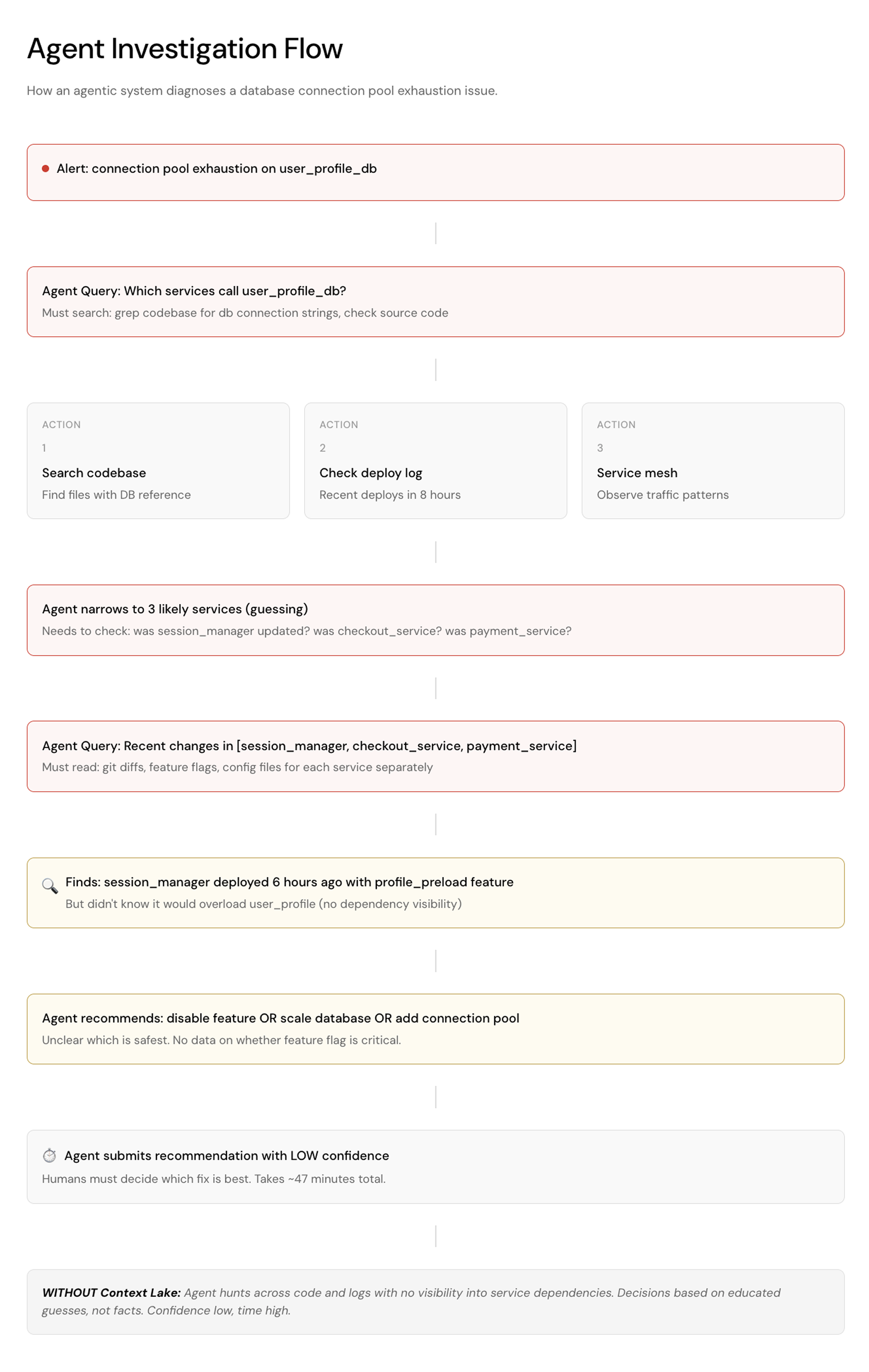
Let's take a look at a scenario when the agent does NOT have a context layer as its underlying knowledge base:
Scenario: Database Connection Pool Cascade
- Incident: Mobile app user complaints spike: "game won't load my profile”.
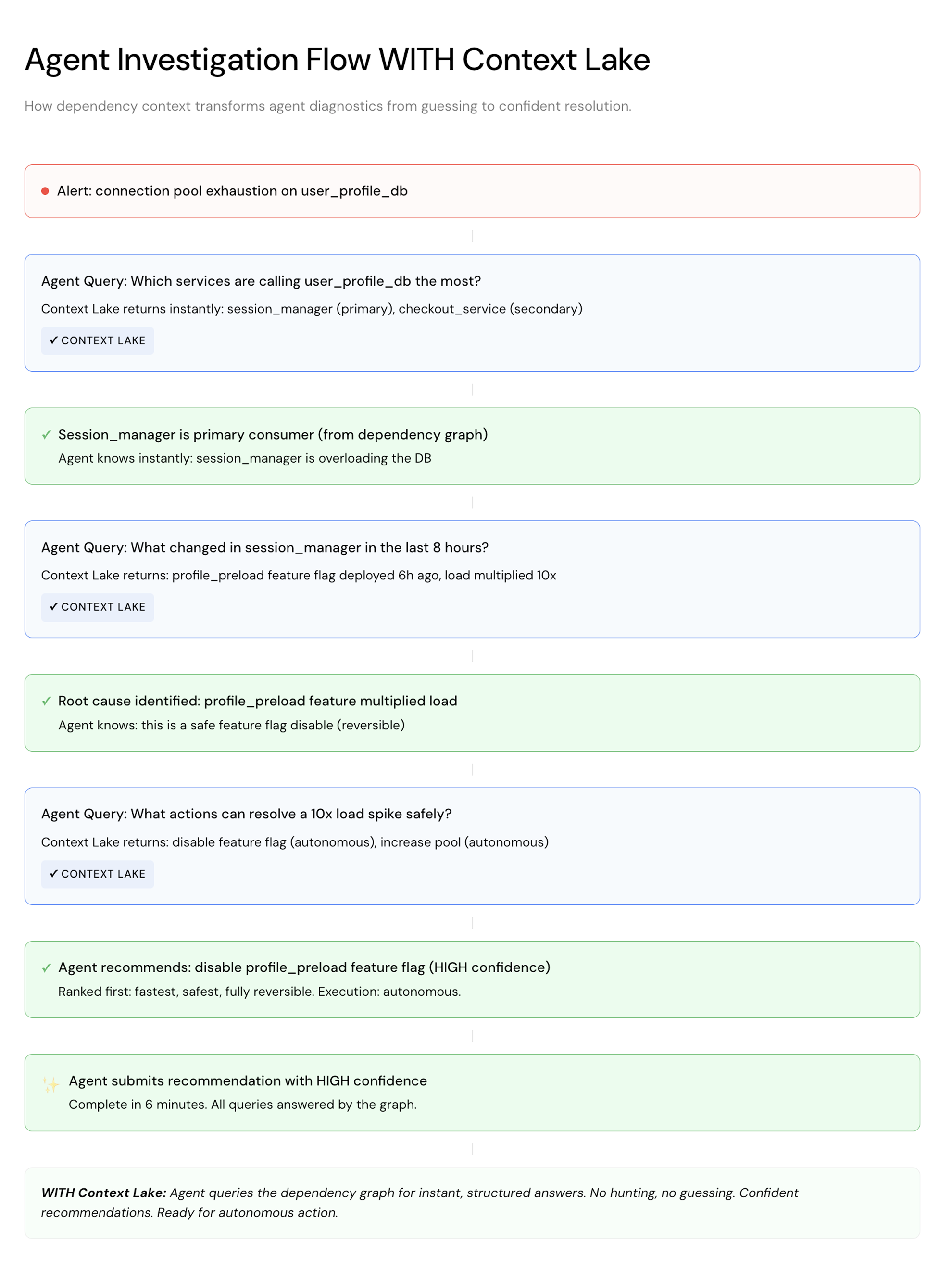
- Root Cause: session_manager service deployed 6 hours ago with profile_preload feature that multiplied load on user_profile_db
- Context: 80M daily active users, 15 backend services, heavy read load
Now let’s take a look at the same scenario when the agent HAS a context layer:
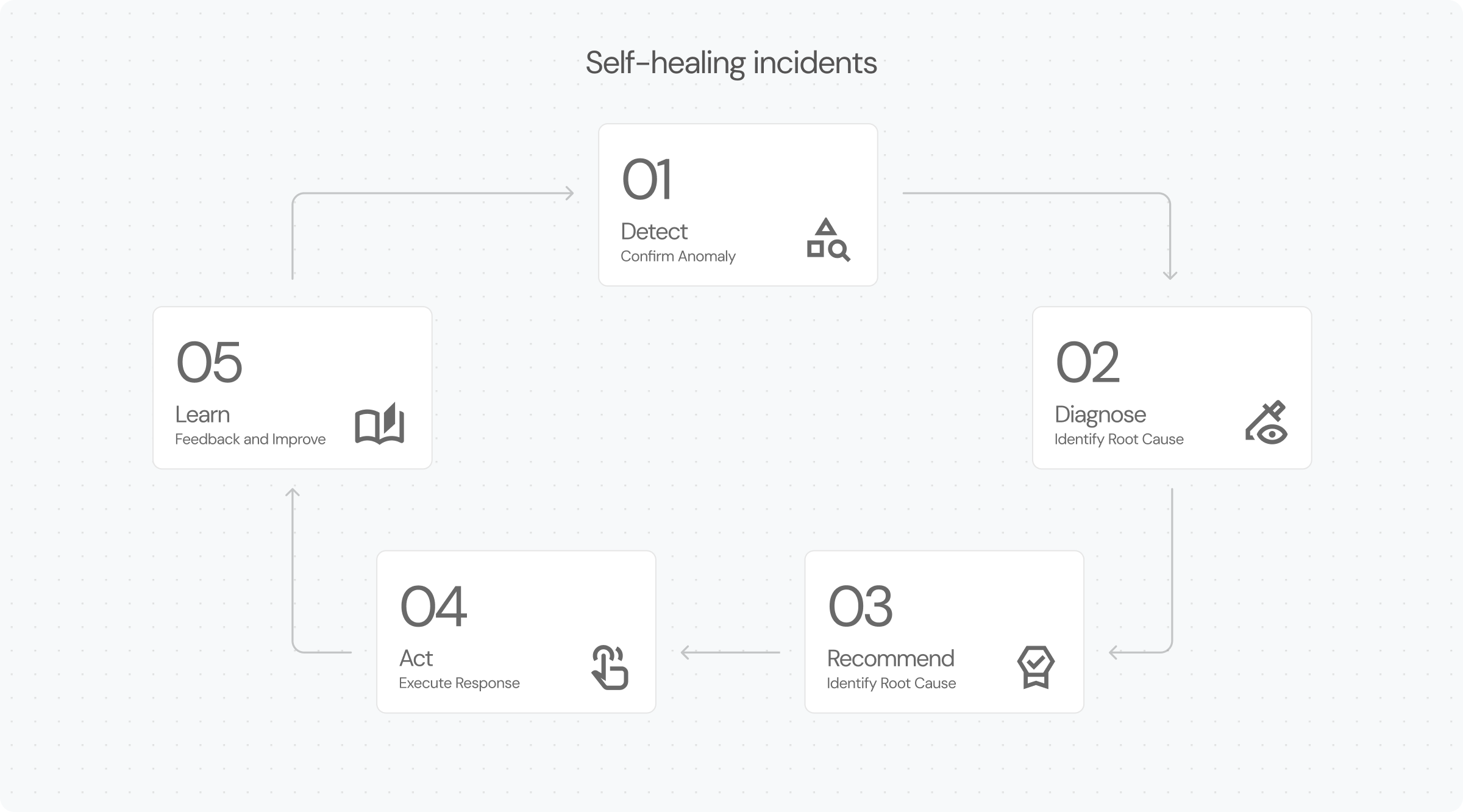
Self-healing incidents are the governed loop that does that stitching for you. The framework has five stages: Detect, Diagnose, Recommend, Act, Learn.
What "self-healing" means here
Humans stay accountable for the outcome. The system starts the detective work in parallel the moment the alert fires, and it does that work much faster than a person clicking through tabs under stress.
When an incident fires, the system should already know which service is affected, who owns it, what it depends on, what changed recently, and which SLOs or standards are at risk. Then it can route with context attached, run routine checks, surface evidence-backed likely causes (as a ranked set, not a single guess), and either execute a pre-approved recovery or escalate with a clear ask.
That is the Detect → Diagnose → Recommend → Act → Learn framework to consider. Detect builds confidence that something is actually wrong. Diagnose answers what changed and how bad it is. Recommend scores a few options before anyone picks one. Act runs the response inside gates you set in advance and verifies the fix. Learn turns the outcome into a suggested improvement plan for those gates and the system at large. A context layer should not only be used to feed every stage of the process, but also to identify upgrades to prevent and mitigate the next incident. Without those answers encoded as queryable relationships, automation is guesswork with a UI.
Foundation first, in practice
A large sports media company that has 1,600 engineers across 27+ business units adopted the Port Agentic SDLC platform and built an SRE triage agent as one of its first projects. When an incident is created, it uses catalog context plus recent deployments and PRs, then posts a structured summary into Port and the incident channel so responders start from an assessment instead of a blank pager. None of that summary comes from the agent guessing. Ownership, deploys, and PRs are already related to the service in their catalog, so triage is traversal rather than an investigation.
The foundation underneath that is simple: make context queryable, accessible, and structured, and keep it up to date. Ownership, dependencies, recent changes, and runbooks have to live as relationships an agent can ask for, not as tribal memory scattered across tabs.
When dLocal built dCoder (their agentic coding system), they didn't start with the agent. They started with Port as the source of truth: the service catalog, infrastructure relationships, repositories, ownership. When a ticket lands, dCoder evaluates its scope and pulls context from Port. The agent runs the routine work, and Port holds the context and the guardrails. The result: dCoder now handles 45% of all engineering tickets, and when it needs to deploy something, it has the environmental context to do it safely.
Three steps to get started
1. Start with the simplest service
Pick a service with a small blast radius and few moving parts. In Port, that means a service entity related to its team, environments, and deployments. Incidents come in step 2. Wire in what you already have through Port's integrations (your codebase, incident tool, monitoring stack). Some of that may already be enriched. Fill the gaps that still force responders to hunt: ownership, on-call, recent changes, dependencies, runbooks.
The point of this step is narrow. For that one service, those facts should live in the catalog as relationships, so an agent does not have to invent who owns it or what to try next.
Not having a catalog yet is not a blocker here. The systems that would fill one are already running: your git provider knows the repos, your orchestrator knows what is deployed, your monitoring knows what you measure. Port ingests from those, so this step is connecting sources and filling the gaps by hand where they matter, not documenting an estate from a blank page.
2. Attach incidents and changes
For the same service, ingest incident events and connect them to it. Put recent deployments, PRs, and config changes on the same record so the agent can traverse from alert to service to change history without leaving the graph.
Load enough history that similar past incidents, and what resolved them, are available to the system by design rather than remembered by whoever happened to be on call that night.
This step is different from "have a Context Lake." Catalog tells you what exists and who owns it. Linking incidents and changes to that service tells you what broke, what changed near the break, and what worked last time. Without that link, the agent still starts from an alert and a firehose of logs.
3. Automate one bounded recovery path
Define what self-healing means for that service: notify the right owners with context, restart, rollback, or a mix under explicit gates. Keep approval and escalation rules visible. Measure MTTR, false positives, and how often the agent escalates versus resolves.
Sportradar shipped triage first, then started extending with historical incident context (RCA patterns). That order matters: automate the stages you can ground in data before the ones that change production.
How you know each step is working
Step 1. Ownership and related facts for that service are in the catalog. An agent (or a person) can find who owns it and who is on call without Slack archaeology. Quick win: for that service, owner, on-call, and last deploy are populated and correct.
Step 2. Incidents and changes for that service are linked in the graph. Diagnosis can start from ranked evidence instead of the first log line. Quick win: a new incident for that service shows the related deploys and PRs without opening five tabs.
Step 3. Triage time and MTTR drop, and you can see which incidents stayed automated versus which needed a human. Quick win: track time-to-first-assessment, MTTR, and escalate-versus-resolve rate next to the rest of your delivery metrics. Add acceptance rate on proposals once humans are reviewing recommendations.
If automation feels risky, start proposal-only. The agent recommends and shows its reasoning while humans approve every action. Once a class of recommendation has earned it (a known restart, a low-risk rollback), auto-approve that class and leave everything else gated. Autonomy is earned, not granted.
The first thing to check
Start where the gap is easiest to see. If answering these three questions without opening another tab takes more than a minute per service, 1) Who owns it? 2) Who is on call? 3) What changed in the last 24 hours? That’s your first step. Don’t build the agent first, it comes last. Build the foundation first, then let it run on a context it can actually use.
If you want the stage model in more depth, start with the self-healing incidents overview. To wire the tools you already run, use the integrations catalog.


Get your survey template today
%201.svg)


Download your survey template today


Free Roadmap planner for Platform Engineering teams
Set Clear Goals for Your Portal
Define Features and Milestones
Stay Aligned and Keep Moving Forward
Create your Roadmap


Free RFP template for Internal Developer Portal
Creating an RFP for an internal developer portal doesn’t have to be complex. Our template gives you a streamlined path to start strong and ensure you’re covering all the key details.
Get the RFP template


Leverage AI to generate optimized JQ commands
test them in real-time, and refine your approach instantly. This powerful tool lets you experiment, troubleshoot, and fine-tune your queries—taking your development workflow to the next level.
Explore now
Check out Port's pre-populated demo and see what it's all about.
No email required
LIVE WEBINAR, Aug 18, 2026:
Context-aware Vibe Coding for Platform Engineering
Thursday, October 22 12:00pm EDT⋅6:00pm CET
To learn more about the new capability and to see a live demo, join our upcoming community session with GitHub
Move fast while staying in control
Build governed agentic workflows on one central platform.
See it in action:
Watch this video on generating Terraform with Port, or explore our public demo.
.png)
Check out the 2025 State of Internal Developer Portals report
No email required
Minimize engineering chaos. Port serves as one central platform for all your needs.
Act on every part of your SDLC in Port.
Your team needs the right info at the right time. With Port's software catalog, they'll have it.
Learn more about Port's agentic engineering platform
Read the launch blog
Contact sales for a technical walkthrough of Port
Every team is different. Port lets you design a developer experience that truly fits your org.
As your org grows, so does complexity. Port scales your catalog, orchestration, and workflows seamlessly.
Port × n8n Boost AI Workflows with Context, Guardrails, and Control
Port Builders Session: A Single, Governed Interface for All MCP Servers
Book a demo right now to check out Port's developer portal yourself
Apply to join the Beta for Port's new Backstage plugin


n8n + Port templates you can use today
walkthrough of ready-to-use workflows you can clone
From manual to autonomous engineering
One platform to build, govern, and operate the Agentic SDLC.
Port is open for you to try it
build your first agentic workflow today