
Port's business context, now native to GitHub
Enrich GitHub repos with business context from Port, so you can search, govern, and set the guardrails your agents need before they touch a repo.



TL;DR
Port entities now sync into GitHub's external custom properties, so criticality, ownership, and other business context you already model in Port becomes native property data on the repo itself. Search and govern repos by that context in GitHub's own tools, like Copilot or GitHub actions, and give agents working through GitHub's MCP server the same data before they touch a repo.
Why we built it
GitHub Rulesets are lists of rules that control how users and agents can interact with your repository’s branches, tags, and code. GitHub gave rulesets a real upgrade in 2024: instead of applying a ruleset to a fixed list of repos, you can target it with a filter on a custom property, something like "every repo where criticality is high." That unlocks a real governance model: require two approvers on every repo the business considers critical, while loosening review requirements on experimental repos so the teams building there can move faster.
That governance model matters more now that agents are opening most of the PRs themselves. An agent working through GitHub's own MCP server doesn't pause because a repo happens to be mission-critical, it acts, and the ruleset is what enforces its guardrails. But those rulesets are only effective when they rely on the most recent data.
The catch is where that data comes from. Someone still has to manually set criticality on every repo inside GitHub, and keep it current as the business changes. That value almost never starts in GitHub. In Port's context lake it's calculated in real-time: based on deployment frequency, incident history, ownership records, business policies, and more. When a repo's criticality changes in Port, whoever owns the GitHub side has to remember to update it separately. Miss one, and the ruleset built to protect that repo doesn't fire.
Once you've modeled the context in Port, a manually-updated copy in GitHub doesn't add safety, but rather another place that can drift. Particularly at scale. Manual syncs fail and the fix isn’t a new dashboard, but a pipe: automatically sync the value from where it's computed to where it's enforced.
What is it?
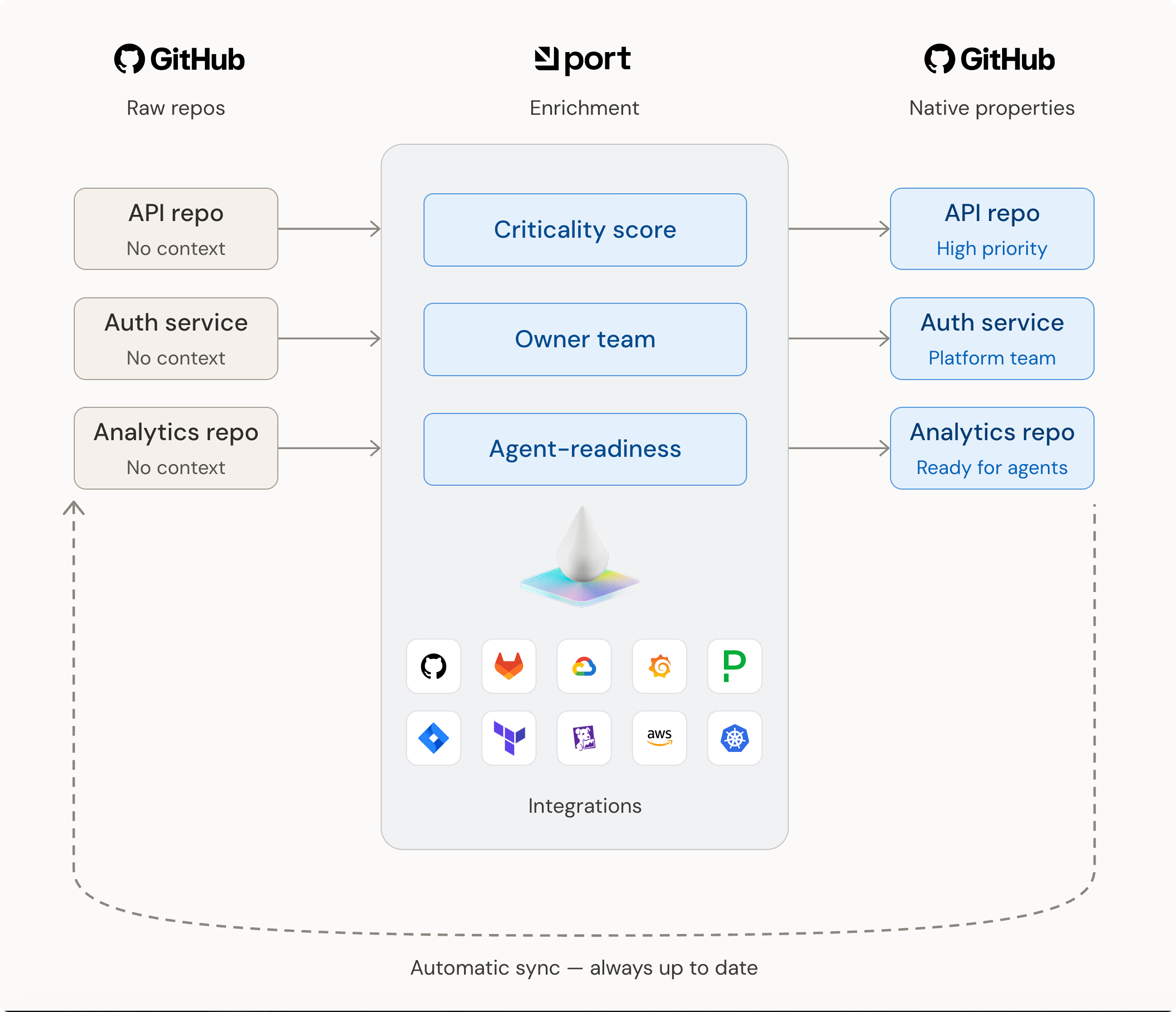
Port's GitHub integration first reads your repos, the same way it always has. From there, the context lake enriches that raw repo data: properties pull in data from your other tools and business systems and turn them into a calculated property like criticality or an agent-readiness score.
That value then pushes back out to GitHub, landing under a dedicated Port namespace as an external custom property. Once it's there, it behaves like any other GitHub property: searchable in GitHub's own search bar, and usable as a ruleset filter, with no separate tool and no manual tagging.
What can you do with it?
Search by owning team. Filter GitHub's repo search by team ownership using Port's current ownership data.
Enforce rulesets by business criticality. Target a ruleset at the criticality property Port calculates: require extra reviewers and block force-pushes on the repos your business actually depends on, and relax those same requirements on experimental repos so the teams building there can ship without waiting on approvals that don't apply to them.
Surface an agent-readiness scorecard. Agents are the ones cloning repos and opening PRs now, not just developers. Before it acts, an agent connected through GitHub's MCP server checks the repo's agent-readiness score, along with its other external custom properties. A repo Port marks low-readiness gets skipped, or the agent moves more carefully once it's in.
How do I use it?
Full details, including the exact workflow setup, are available in the implementation guide. You don't have to create workflow by hand: Port AI and the Port MCP server can build and wire it up for you straight from a prompt.
How does it actually work?
Port's GitHub integration claims the Port namespace in your GitHub organization, which lets Port write properties into GitHub without colliding with anyone else's, and stops anyone else from overriding them.
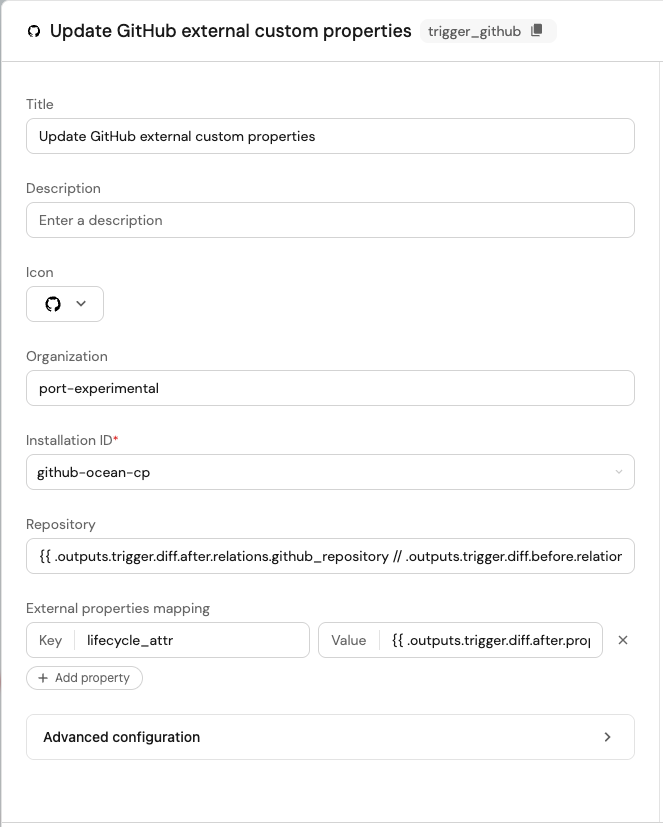
A Port workflow does the actual work in two parts: a trigger that fires when the property you're syncing changes in Port, and a dedicated node type called update_external_custom_properties that calls GitHub's API directly, using the integration credentials, to push the new value. In practice, admins choose which properties to sync and set up the workflows to handle them. From there, Port pushes every change straight to the GitHub property, with no one updating it manually.
Get started today
The sync is live in open beta today, alongside GitHub's own release note. Follow the implementation guide to wire it up in your organization.
{{cta_webinar_oct_22}}
Download the RFP guide


Get your survey template today
%201.svg)


Download your survey template today


Free Roadmap planner for Platform Engineering teams
Set Clear Goals for Your Portal
Define Features and Milestones
Stay Aligned and Keep Moving Forward
Create your Roadmap


Free RFP template for Internal Developer Portal
Creating an RFP for an internal developer portal doesn’t have to be complex. Our template gives you a streamlined path to start strong and ensure you’re covering all the key details.
Get the RFP template


Leverage AI to generate optimized JQ commands
test them in real-time, and refine your approach instantly. This powerful tool lets you experiment, troubleshoot, and fine-tune your queries—taking your development workflow to the next level.
Explore now
Check out Port's pre-populated demo and see what it's all about.
No email required
LIVE WEBINAR, Aug 18, 2026:
Context-aware Vibe Coding for Platform Engineering
Thursday, October 22 12:00pm EDT⋅6:00pm CET
To learn more about the new capability and to see a live demo, join our upcoming community session with GitHub
Move fast while staying in control
Build governed agentic workflows on one central platform.
See it in action:
Watch this video on generating Terraform with Port, or explore our public demo.
.png)
Check out the 2025 State of Internal Developer Portals report
No email required
Minimize engineering chaos. Port serves as one central platform for all your needs.
Act on every part of your SDLC in Port.
Your team needs the right info at the right time. With Port's software catalog, they'll have it.
Learn more about Port's agentic engineering platform
Read the launch blog
Contact sales for a technical walkthrough of Port
Every team is different. Port lets you design a developer experience that truly fits your org.
As your org grows, so does complexity. Port scales your catalog, orchestration, and workflows seamlessly.
Port × n8n Boost AI Workflows with Context, Guardrails, and Control
Port Builders Session: A Single, Governed Interface for All MCP Servers
Book a demo right now to check out Port's developer portal yourself
Apply to join the Beta for Port's new Backstage plugin


n8n + Port templates you can use today
walkthrough of ready-to-use workflows you can clone
From manual to autonomous engineering
One platform to build, govern, and operate the Agentic SDLC.
Port is open for you to try it
build your first agentic workflow today



