How to Roll Out an AI Software Factory Across Your Engineering Org
A practical guide to rolling out an AI software factory across your engineering org, from pilot teams and guardrails to scaling.



Key Takeaways
- Roll out in phases, starting with one team and one workflow, proving it against a baseline, and then reusing the same context, permissions, and actions for every team that follows.
- Put the prerequisites in place before any agent touches a repository, including a trusted map of services and owners, a reliable CI/CD pipeline, and permission rules a system can enforce.
- Split ownership on purpose, so platform engineering builds and governs the factory, DevOps keeps pipelines healthy, engineers run and extend workflows, and leadership sets how much autonomy each stage earns.
- Measure outcomes such as lead time, change failure rate, and merge rate, because token spend and the share of AI-written code can rise even when delivery does not.
Most engineering orgs already pay for AI coding assistants, yet very few of them ship noticeably faster, because the assistant speeds up the coding stage while review, testing, and incident work stay where they were and quietly turn into the new queue. That’s a bottleneck for engineering efficiency when it comes to software delivery at speed. While AI should actually make software development and delivery faster, in this case it becomes the opposite.
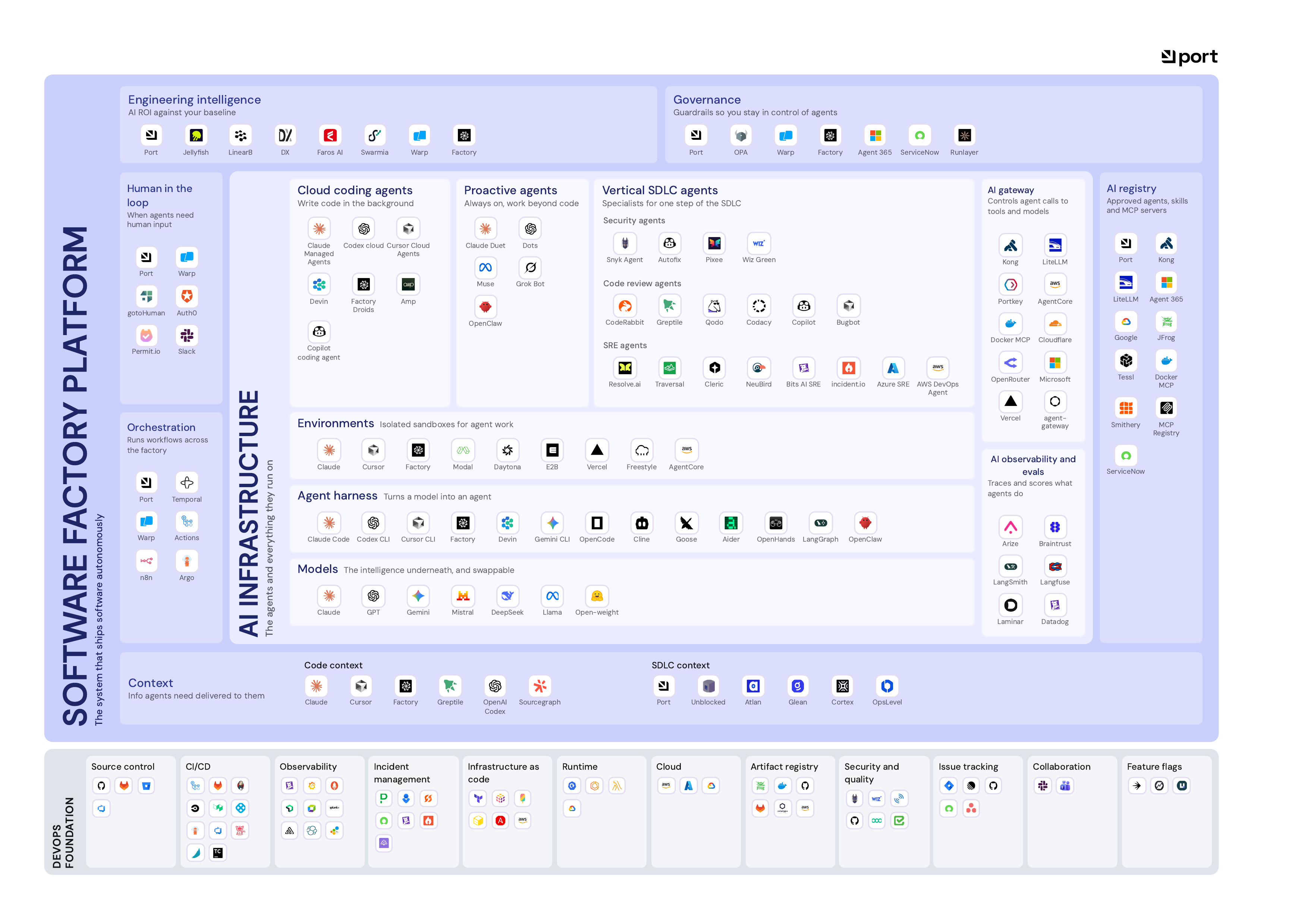
An AI software factory fixes that by running the whole delivery line with agents, shared context, and guardrails. Now, building one up for a single team is a very different task from rolling it out across hundreds of engineers who already have their own pipelines, habits, and opinions about how work should move.
This guide walks through that rollout of an AI software factory across your org, covering what has to exist before you start, the phases you move through, who owns each piece, and how you can tell the rollout is working before you put more budget behind it.
What Changes When You Roll Out an AI Software Factory
First of all, when you roll out an AI software factory inside your org, many traditional ways of doing software development and delivery change. Now, if you are already using AI coding assistants/agents inside your organization, that is going to extend across the SDLC. The biggest change is that agents stop being helpers inside one developer's editor and start running steps of the delivery process itself.
While developers used to spend so much of their effort in time consuming operational activities, that will now be assigned to agents. For example, in the software factory model, a well-scoped ticket goes to an agent that writes the fix and opens a pull request, a second agent reviews it, tests run, and the change either merges or waits for a person based on the risk level your team has set. So, the intent comes from the human/developer and everything else usually takes over by agents, with human gates kept in between for safety purposes.
That shift changes the working week for three groups in particular:
- Engineers/Developers spend less time on routine changes and more time approving agent work, handling judgment calls, and building workflows for their own domain.
- Senior reviewers stop gating every merge, because a review agent clears low-risk pull requests and routes only the ones that need real judgment to a human.
- On-call engineers open an incident with the service, its owner, recent deploys, and dependencies already pulled together, instead of gathering that context by hand.
Rules that used to live in people's heads, like who can deploy what, also have to be written down in a form a system can check, because agentic engineering only stays safe when guardrails are enforced by permissions and approval rules rather than suggested in a prompt.
What to Have in Place Before the Rollout Starts
What we have usually observed is that most teams want to start with the agents, but the harness around it is what makes them more efficient. So first, that should be made available to the agents. Because, a ticket that says "fix the checkout bug" can send an agent into payment code it has never touched, and the agent will still open a confident-looking pull request, since agents rarely flag their own uncertainty. What catches that mistake is not the agent itself but the context, permissions, and checks that sit around it, and those have to exist before the first workflow runs.
Each of these decides whether the later phases go smoothly, because it is far easier to lay the foundation your agents run on first than to bolt governance onto agents that have already shipped.
- A trusted map of engineering context, with services, repositories, owners, and dependencies in one place and one authoritative source per property, so the platform can answer who owns a service without anyone stepping in.
- A CI/CD pipeline you trust, since agents can only run the line as far as your pipeline is automated, and flaky tests or manual deploy steps will break every agent run that depends on them.
- Permission rules a system can enforce, such as a rule that excludes database migrations, authentication changes, and production config edits, along with separate credentials for opening pull requests and for deploying.
- A registry of the agents you already run, which matters because Gartner, as cited by Port, expects the average Global Fortune 500 enterprise to run more than 150,000 agents by 2028, up from fewer than 15 in 2025.
- A baseline covering elapsed time, manual interventions, failure rate, and reviewer effort, so you can tell a good demo apart from a real improvement.
The Phases of an AI Software Factory Rollout
Developers today work with so many platforms/tools and the regular context switching from one tool to another frustrates them. This is where AI tools started helping developers reduce their burden and it all started with AI coding assistants helping them with coding and even companies like it for obvious reasons of shipping software faster. It has become obvious that many organizations like to roll out AI across their SDLC to automate most of their dev workflows. We see so many AI agents and workflows created today to automate dev/engineering workflows in the organization.
So, the temptation with any rollout is to switch everything on at once, but teams that try to automate many workflows together usually end up with a pile of disconnected automations rather than a working system. A phased rollout works better because each phase proves something the next one depends on, the same way dLocal built its context, guardrails, and reporting on Port first and only then rolled out dCoder, its internal coding agent, once that foundation was in place. Treat the rollout like an agile project, where you climb one stage at a time and only move forward once the current stage is stable.
Successful rollouts tend to follow the same order, and the layer-by-layer detail behind each step is covered in Port's guide on how to set up a software factory platform.
- Lay the foundation by mapping the context the first workflow needs, setting permissions and approval rules, registering existing agents, and wrapping your current pipelines in reusable actions so GitHub Actions, Jenkins, or Terraform keep doing the work underneath.
- Pilot one workflow with one team, with a person reviewing every agent output and the old delivery route still running, and expect the first weeks to look worse as gaps in context and permissions surface.
- Hand over trusted steps one at a time, routing the rest by risk so that low-risk changes move automatically while riskier ones wait for an approval in Slack or the platform.
- Add a second workflow on the same foundation, reusing the same data model, permissions, and golden paths, because needing to rebuild them is a sign the first workflow was really a prototype.
- Expand to more teams by opening proven workflows where people already work, such as a self-service page, Slack, or their IDE through an MCP server, and letting each team build workflows for its own domain.
- Retire the old routes once the criteria you wrote down before the pilot are met, and keep tracking delivery, autonomy, and cost so each expansion is based on run history rather than anecdotes.
Who Owns Each Part of the Rollout
A rollout touches almost every part of engineering at once, from the pipelines and the service catalog to the people who approve changes and the leaders who fund the work. When nobody is clearly responsible for a piece, it tends to get maintained by whoever touched it last, and over time the standards for each step drift apart even when every step still technically works. The role that changes most is platform engineering, whose job moves from building a developer portal to building and running the system that both people and agents use to ship software, but every other team has a part to play as well.
Agree on this split before the first workflow goes live, because a rollout without clear owners turns into team-by-team experiments that never connect.
Platform engineering builds and governs the factory, which covers the shared context layer, the workflow engine, the scoped tools agents are allowed to use, and the permissions and audit trail that apply to every team.
DevOps keeps CI/CD, observability, and on-call healthy, since agents are only as reliable as the pipelines they trigger.
Engineering teams approve or decline agent work based on risk, and once the first workflows are proven, they build domain-specific workflows of their own on the shared foundation.
Security and compliance review the approval rules and credential scopes, and they use the audit trail to trace what any agent touched, what triggered it, and what came out.
The VP of R&D or CTO sets how far autonomy goes at each stage, funds the platform, and owns the ROI view that justifies each expansion.
Shared pieces like approvals belong to platform engineering, because a workflow that crosses two teams breaks the first time an agent needs approval from both and each team has built its own logic.
How to Pick the First Workflows to Move Into the Factory
Your first workflow does more than save time, because it becomes the template for everything that follows, and the context, permissions, and actions you build for it get reused by every workflow after it. It also shapes how the rest of the org sees the rollout, since a first workflow that stalls or breaks something makes the next team far less willing to join. Before you choose, write down how a few candidate workflows run today, including every point where an engineer waits for a reviewer, an environment, or an approval, because those waiting points show you where agents can actually take work off people's plates.
The best first workflow happens often, starts from recognizable inputs, and ends in an outcome you can check.
Look for these qualities when you compare candidates:
- The result is easy to verify, so tests, scorecards, or a healthy release confirm it instead of the agent's own summary of its work.
- The risk is limited and mistakes are cheap to undo, which usually rules out payments, authentication, and customer data in the first round.
- The scope is written down, covering eligible repositories, where the workflow ends, what runs automatically, and who fixes it when it fails.
- It runs on real systems, using real repositories, tickets, and alerts in staging instead of a demo, because only real work exposes the governance gaps you need to close.
For most orgs, three candidates fit those rules: ticket to pull request for well-scoped bugs, incident response that pulls context from an alert automatically, and an org-wide change such as a security patch across many services, all of which Port covers step by step in its post on the three flows to build first.
Signs the Rollout Is Working
Leadership will ask whether the rollout is working long before the full picture is clear, so it helps to agree early on what you will measure and when. The comparison only means something against the baseline you recorded before the pilot, and it helps to split the numbers before you compare them, for example by separating routine patches from larger changes or by grouping results by team and service tier, because a single blended number can look healthy while one type of work quietly fails.
A common pattern is that the coding stage speeds up first while review, testing, and incident work lag behind, so an early jump in output is encouraging but not yet proof. The stronger evidence shows up over several weeks, once you can see whether the whole line is getting faster and whether the work it ships is holding up in production.
A green dashboard only proves that every step completed, so the signals worth watching are the ones tied to quality and adoption:
- Merge rate rises and editing before merge falls, which shows agent output is usable in a way that pull request volume alone never can.
- Corrections get cheaper over time, because the same mistakes stop repeating once the missing context or permissions behind them are fixed.
- The share of work agents finish end to end grows while the change failure rate holds steady, which proves autonomy is growing without hurting stability.
- Fewer teams route around the workflow, since services that still deploy outside it usually signal that it is too slow or a poor fit for their case.
SPS Commerce shows these signals in practice, with a developer productivity team of about five people supporting hundreds of engineers across more than 3,000 services. In the first four months of its first agentic ticket workflow, SPS processed more than 500 Jira tickets with zero related incidents, while a human still approved each plan and each merge.
Where AI Software Factory Rollouts Usually Stall
A stalled rollout rarely looks like a failure, because nothing breaks in a dramatic way and the pilot keeps running, but the second team never joins and the workflow never moves past its first use case. The early warning signs are usually visible in the run history long before anyone calls the rollout stuck, such as humans overriding agent output more often, the same correction being made again and again, or eligible services quietly deploying outside the workflow. Reviewing those signals every few weeks lets you catch a stall while it is still a small fix rather than a reason to restart.
Most stalls trace back to a skipped prerequisite rather than a weak model, which means each one has a known fix.
- Agents work from a bad context. Without a shared source of truth, an agent guesses which service owns a failing endpoint, so give every agent the same context layer, which is how dLocal cut its AI token cost by 80% while its internal agent handled 45% of engineering tickets end to end.
- Every team builds its own glue. When one team hardcodes a Slack approval and another skips approvals, cross-team workflows break, so approvals, credentials, and audit logging belong in one agentic SDLC platform underneath every team.
- The pipeline is not trustworthy. Flaky tests turn every agent run into a support ticket, so treat pipeline reliability as the first milestone rather than cleanup for later.
- Too many workflows start at once. Five half-built workflows hide the gaps that one complete workflow would expose, so prove a single workflow end to end before opening the next.
- The wrong numbers get reported. Token spend and the share of AI-written code rise while delivery stays flat, so report lead time, change failure rate, and cost per unit of work instead.
FAQ
How long does a full rollout usually take?
There is no fixed timeline, but most teams get one workflow running within a few weeks, and proving it reliable takes a cycle or two of real releases or incidents. The org-wide rollout depends on how many teams you add, so plan phases around results rather than dates.
Should the rollout start with one team or the whole org?
Start with one team and one workflow, because a single team surfaces gaps in context, permissions, and pipelines quickly and at low risk, while an org-wide launch spreads those gaps everywhere at once. Keep the old route running and expand once the workflow repeatedly completes useful work.
Do existing CI/CD pipelines need replacing?
No, your pipelines stay on GitHub Actions, Jenkins, Terraform, or whatever you run today, and the factory wraps them in reusable actions that agents and developers both trigger. What needs attention is reliability, so fix flaky tests and manual deploy steps before handing any stage to an agent.
What happens to teams that are not ready to join yet?
They keep working through their current delivery route while the pilot teams prove the workflow, and nothing about the factory forces them to switch early. Use that time to map their services and owners into the shared context layer, so that when they do join, they inherit tested workflows and permissions instead of starting from scratch.
How is a rollout budget usually justified?
Most teams justify it with a baseline and a pilot, comparing lead time, change failure rate, and cost per unit of work before and after the first workflow. Results like dLocal cutting lead time and MTTR in half through 2025 help, but leadership mostly funds your own run history.
Download the RFP guide


Get your survey template today


Download your survey template today


Free Roadmap planner for Platform Engineering teams
Set Clear Goals for Your Portal
Define Features and Milestones
Stay Aligned and Keep Moving Forward
Create your Roadmap


Free RFP template for Internal Developer Portal
Creating an RFP for an internal developer portal doesn’t have to be complex. Our template gives you a streamlined path to start strong and ensure you’re covering all the key details.
Get the RFP template


Leverage AI to generate optimized JQ commands
test them in real-time, and refine your approach instantly. This powerful tool lets you experiment, troubleshoot, and fine-tune your queries—taking your development workflow to the next level.
Explore now
Check out Port's pre-populated demo and see what it's all about.
No email required
LIVE WEBINAR, Aug 18, 2026:
Context-aware Vibe Coding for Platform Engineering
Thursday, October 22 12:00pm EDT⋅6:00pm CET
To learn more about the new capability and to see a live demo, join our upcoming community session with GitHub
Move fast while staying in control
Build governed agentic workflows on one central platform.
See it in action:
Watch this video on generating Terraform with Port, or explore our public demo.

Check out the 2025 State of Internal Developer Portals report
No email required
Minimize engineering chaos. Port serves as one central platform for all your needs.
Act on every part of your SDLC in Port.
Your team needs the right info at the right time. With Port's software catalog, they'll have it.
Learn more about Port's agentic engineering platform
Read the launch blog
Contact sales for a technical walkthrough of Port
Every team is different. Port lets you design a developer experience that truly fits your org.
As your org grows, so does complexity. Port scales your catalog, orchestration, and workflows seamlessly.
Port × n8n Boost AI Workflows with Context, Guardrails, and Control
Port Builders Session: A Single, Governed Interface for All MCP Servers
Book a demo right now to check out Port's developer portal yourself
Apply to join the Beta for Port's new Backstage plugin


n8n + Port templates you can use today
walkthrough of ready-to-use workflows you can clone
From manual to autonomous engineering
One platform to build, govern, and operate the Agentic SDLC.
Port is open for you to try it
build your first agentic workflow today