
How we cut integration sync time by splitting the pipeline
We split extract from transform, load, and reconcile, so each step scales, retries, and fails on its own.



For a long time, every Port integration ran extract, transform, and load inside one Ocean process. That process talked to GitHub or Jira or a cloud account, ran JQ over whatever came back, upserted entities into the catalog, and decided what to delete. Fetch, transform, and load shared a process and a heap. If JQ got expensive, GitHub pagination waited. If the catalog was slow, fetch waited on the catalog. If the pod ran out of memory, you started the whole resync over, and you did not have a copy of what you had already pulled.
At a small scale, that is an operational story you can live with. At a higher scale it becomes a reliability problem. A bad mapping, a slow catalog write, and a GitHub timeout could all cause a resync to fail, and while we could see what Ocean was doing, we could not control the process.
Ocean still lives at the edge, next to the APIs. Everything after fetch runs in the data-source-processor (DSP): a pool of workers that pick work off a queue. You add workers when the load climbs, and a step can fail without taking the others with it. Each step emits the metrics and traces you need to operate it.
Raw batches go to an object store on the way through. DSP loads them, transforms them, and publishes upserts. It reconciles when the catalog reports those writes complete. Change the JQ and you can replay the store, so you do not have to spend the afternoon waiting on GitHub. We get ingest, we can retry and scale without cloning Ocean.
When we moved one customer's integration fleet onto DSP, two large integrations that were taking hours finished in about 45 minutes. One extract-bound GitHub integration on that fleet
still ran around 18 hours. We did not make GitHub faster.
Why one process stopped working
Dedicated Ocean-per-integration looks clean on a whiteboard: one customer, one integration, one pod, until the catalog gets large.

The entity state lived in memory. A large GitHub or Jira sync could knock the pod over and take the run with it. Transform sat in the extract loop, so the mapping for pull requests could stall the next page of the API. A crash did not retry the last batch; it sent you back to GitHub.
Wanted more transform capacity? You added extractors, and each one opened another conversation with the third party. A bug in the mapping engine or in upsert shipped in every Ocean image, so a fix meant rolling the fleet, not one service.
The customer-facing version of the same trap: tweak the JQ, pay for another full pull. Rate limits delayed the catalog, not just extract. You could not replay a batch that went wrong, or dead-letter it and let the rest of the sync finish. Reliability was whatever that process survived.
We spent about two quarters trying to make that process more reliable. The bugs were real, but the ceiling was the architecture. Extract had to stop owning everything after it.
What we moved out of Ocean
Ocean still fetches and still receives webhooks. For integrations on DSP, Ocean does not run JQ and does not write the catalog. It tells DSP when a resync started, including the mapping to freeze, and when extract is done. Raw payloads go to an object store. A queue wakes a pool of DSP workers that are not sitting in GitHub's call stack.
That pool is the ingest runtime: JQ, async upserts, reconciliation, apply mapping, live events. The playground dry-run hits the same runner production uses.

Ocean fetches and reports lifecycle. Raw batches are stored, then queued straight into JQ. Workers publish upserts. Reconcile runs after extract ends, and those writes have drained, not after every batch. Apply mapping reads the store, not the API. Abort skips reconcile.
The split gave us four things the old process did not.
- It scales with load. Add transform and load workers without adding GitHub clients. More extract means more events on the queue. More JQ or more upserts means a bigger pool, not a fatter process.
- Failures isolate. A mapping that will not compile is not an extract outage. A catalog blip is not the GitHub integration going down. You retry the step that broke. An OOM used to take the whole resync with it, and now it is one message you retry, with more memory for the worker if it needs it. In production, we haven’t had a batch OOM; it's way to the dead-letter.
- Status can name the step. A run reports JQ time, ingested vs unchanged vs failed, how much is still pending, and which class of error fired, all as per-step outcomes rather than one process result. Extract can succeed while transform has issues and the status says so, and you can retry one step and let the rest finish. We had logs before. We did not have that.
- Raw data outlives extract. That is why apply mapping exists: change the JQ, replay what we already have, leave the third-party quota alone. Selectors that change what Ocean would have pulled still need a full resync.
In the old process, a catalog write sat in the extract loop. In DSP, the worker publishes the upsert and moves on, and the catalog applies writes on its own. JQ is not stuck behind Port latency, and Port is not stuck behind one Ocean pod.
How a resync runs
Control is synchronous HTTP, and data is a worker pool on a queue. They share a resync ID, so the workers can be elastic while the run still has a beginning, an end, and a name.
Ocean does not dump batches into the void. It calls DSP first with the mapping. That snapshot sticks for the rest of the run, even if someone edits the integration while GitHub is still paginating, which someone always does. When extract has nothing left, Ocean says so.
Each batch lands in the object store. The queue message points at that object; it is not the payload. DSP loads the rows, runs JQ with the same selectors, identifiers, properties, and relations as before, skips entities that did not change, and publishes the rest as async upserts. The catalog applies those writes on its own workers and reports each bulk as complete. DSP records those reports. The resync is not done until extract has ended and there are no outstanding writes. Ocean can say ended while batches are still in the queue, so both have to be true.
Postgres holds what used to live in memory: running/ ended/ aborted, which batches are still out, which upserts are still in flight, and the identifier list for this run. We only reconcile when that list is complete, which means extract ended and the writes drained. Reconciliation then walks Port page by page and deletes entities that are no longer in the list, so an abort never deletes against a half-finished list. Deletes can be turned off per integration; the default is on.
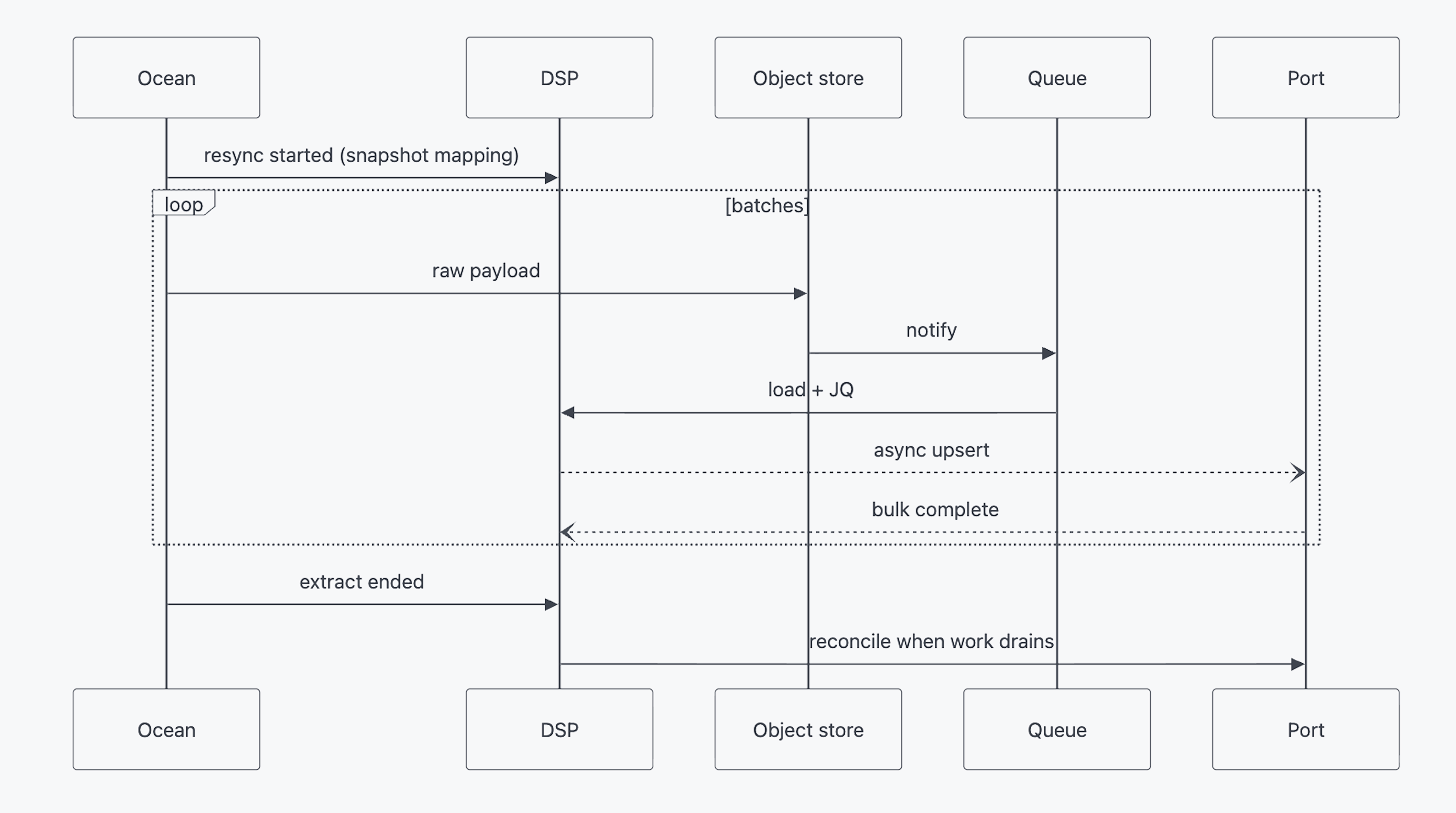
A full resync publishes upserts as batches arrive. The catalog fills while GitHub is still talking.
Apply mapping is the same JQ and a different load shape. DSP stages transformed entities, waits until the replay is over, orders them against live events that landed in the meantime, then writes. If apply mapping wrote as it transformed, the way a full resync does, a webhook and a replayed entity would take turns overwriting each other.
Live events ride the same workers. They wait on the queue, which they never did when JQ sat next to the webhook. If the pod restarts, the message is still there and gets replayed.
We were burned by a queue before
Shared transform workers are also a shared blast radius. We already had the scar: a shared async consumer misbehaved and stalled work for everyone.
That is still true of DSP, so we kept the run itself off the queue. Ocean reports started and ended over HTTP, Postgres tracks whether the work has drained, and a failed step retries its message instead of restarting extract. We rolled DSP out behind flags, with a path back to in-process Ocean if a consumer misbehaved again.
Why Go
DSP is a JQ loop over a lot of data, on the order of two terabytes a day across the whole ingest fleet when we sized it. Port's other services were TypeScript, so Go was not a default.
In March we built the same proof of concept twice, same box, same fake integration. TypeScript was fine, but on the JQ step Go was about three times faster (p95), and that was the step that mattered. We put a date on the calendar: if Go blocked the team, we would have switched. We stayed. DSP is the first official Go service in Port R&D, which meant standards, CI, and shared packages.
We did not rewrite extract. We moved the work that has to react at a high scale.
What happened in production
JQ was never the whole old process. Load, reconcile, live events, lifecycle, and the event log all had to exist in DSP, with the same behavior, before we would let production near it. If we had left lifecycle in Ocean and only moved the JQ worker, we would have rebuilt the coupling at the boundary.
We rolled integrations over behind flags. If something went wrong, we could send one back to the in-process path.
When a customer moved their integration fleet onto DSP in August 2026, one large integration dropped from about three hours to 45 minutes, and another dropped from about four hours to 45 minutes, once JQ and catalog writes were not stuck behind fetch. That’s for those two integrations, not necessarily the fleet average. Both settled around 45 minutes, which is about how long transform, load, and catalog writes take on that pool once they are not waiting on fetch.
Extract-bound GitHub can still run for hours. We stopped making GitHub wait on JQ, and we stopped making JQ wait on a catalog write. When load goes up, we add workers.
After the cutover, we could replay a batch, dead-letter a poison one, and act on the step that broke.
This is how Port integrations ingest when they run on DSP. We are still moving the fleet, integration by integration. Customers on DSP already get apply mapping, which allows them to change JQ mapping without fetching data from a 3rd party. If you are building the same kind of system, persist the fetch. Do not make extract own everything after it.
{{from_manual_to_autonomous_engineering}}


Get your survey template today
%201.svg)


Download your survey template today


Free Roadmap planner for Platform Engineering teams
Set Clear Goals for Your Portal
Define Features and Milestones
Stay Aligned and Keep Moving Forward
Create your Roadmap


Free RFP template for Internal Developer Portal
Creating an RFP for an internal developer portal doesn’t have to be complex. Our template gives you a streamlined path to start strong and ensure you’re covering all the key details.
Get the RFP template


Leverage AI to generate optimized JQ commands
test them in real-time, and refine your approach instantly. This powerful tool lets you experiment, troubleshoot, and fine-tune your queries—taking your development workflow to the next level.
Explore now
Check out Port's pre-populated demo and see what it's all about.
No email required
LIVE WEBINAR, Aug 18, 2026:
Context-aware Vibe Coding for Platform Engineering
Thursday, October 22 12:00pm EDT⋅6:00pm CET
To learn more about the new capability and to see a live demo, join our upcoming community session with GitHub
Move fast while staying in control
Build governed agentic workflows on one central platform.
See it in action:
Watch this video on generating Terraform with Port, or explore our public demo.
.png)
Check out the 2025 State of Internal Developer Portals report
No email required
Minimize engineering chaos. Port serves as one central platform for all your needs.
Act on every part of your SDLC in Port.
Your team needs the right info at the right time. With Port's software catalog, they'll have it.
Learn more about Port's agentic engineering platform
Read the launch blog
Contact sales for a technical walkthrough of Port
Every team is different. Port lets you design a developer experience that truly fits your org.
As your org grows, so does complexity. Port scales your catalog, orchestration, and workflows seamlessly.
Port × n8n Boost AI Workflows with Context, Guardrails, and Control
Port Builders Session: A Single, Governed Interface for All MCP Servers
Book a demo right now to check out Port's developer portal yourself
Apply to join the Beta for Port's new Backstage plugin


n8n + Port templates you can use today
walkthrough of ready-to-use workflows you can clone
From manual to autonomous engineering
One platform to build, govern, and operate the Agentic SDLC.
Port is open for you to try it
build your first agentic workflow today

.png)
.png)

