Port vs GitLab: Governance for Agent-Driven Delivery, Beyond the Pipeline
GitLab Duo Agent Platform governs agents inside GitLab. See how Port extends identity, approvals, and audit to every tool agents touch.



Key Takeaways
- GitLab governs agents carefully inside GitLab. Its controls include composite identity, per-tool approval modes, fail-closed rules, and its own audit and analytics.
- Pipeline gates only check changes on their way to production. Agents also act in chat, IDEs, background flows, and tools like Jira, ArgoCD, and PagerDuty.
- A multi-tool stack needs identity, approvals, standards, audit, and ROI tracking that span every tool. Port is built to be that layer.
- Most teams keep GitLab and add Port around it. Teams fully consolidated on GitLab may not need Port yet.
Agents now act across every tool in your SDLC flow, while the controls that govern them still live inside each tool separately. GitLab and Port both see that as the problem to solve.
In October 2026, GitLab gave it a name. Most organizations, GitLab says, run a “shadow software factory” built from separate tools for coding, tickets, source control, CI/CD, security, artifacts, and deployment. Its answer is the governed software factory, which brings those stages into GitLab (GitLab press release via iTWire). Port’s answer is to govern agents across the tools you already run. Which one fits depends on how much of your stack lives in GitLab.
That decision comes down to a few questions about AI agent governance:
- Whose identity does an agent act under in each tool it touches?
- What stops an agent from changing a service during an open incident?
- Does a risky change go to the service owner, or just to the person who started the agent?
- Can you show what agents returned, beyond what one tool measures?
What GitLab Duo Agent Platform Does Today
GitLab’s agent platform has been generally available since January 2026 for Premium and Ultimate customers (press release). It includes:
- Agentic Chat, which runs in the web UI and in IDEs such as VS Code, JetBrains, and Cursor, and can open issues, epics, and merge requests.
- Agents and flows, including the Planner and Security Analyst agents, custom agents shared through the AI catalog, and flows that turn an issue into a merge request or review one against your standards.
- External agents such as Claude Code and Codex CLI, which run through GitLab on runners.
- GitLab Orbit, which gives agents a graph of GitLab data and code, filtered by each user’s permissions (Orbit docs). GitLab reports up to 45x fewer retries and 4.5x fewer tokens with it (SD Times).
- Composite identity, which gives each runner-based flow one token combining the person who started it with a service account (composite identity docs).
- AI Governance, which covers per-tool approval modes, AI audit events, a governance dashboard, and session reporting from connected Claude Code, Cursor, and Codex agents (tool governance docs).
The recent release added four more pieces: Impact Analytics, which reports AI cost by team, task, and model; usage caps at the subscription, group, or user level; a Dependency Firewall, in early access, that checks packages against policy before they enter a build; and the GitLab Security Standard, a set of five controls for agentic development (SD Times, IT Brief).
What Pipeline-Level Governance Controls
Governance in CI/CD controls the moment code becomes a release, and GitLab’s controls there are mature:
- Deployment approvals block deploys to protected environments until every required approval is in. By default, whoever triggered the pipeline can’t approve their own deploy (deployment approvals docs).
- Security policies force scans and CI/CD jobs into project pipelines, and set merge request approval rules from scan results, scoped by group or compliance framework (policies docs).
- Merge request approvals and protected branches decide who signs off on a change and who can push where.
- Pipeline records show approvers, jobs, and results for every run.
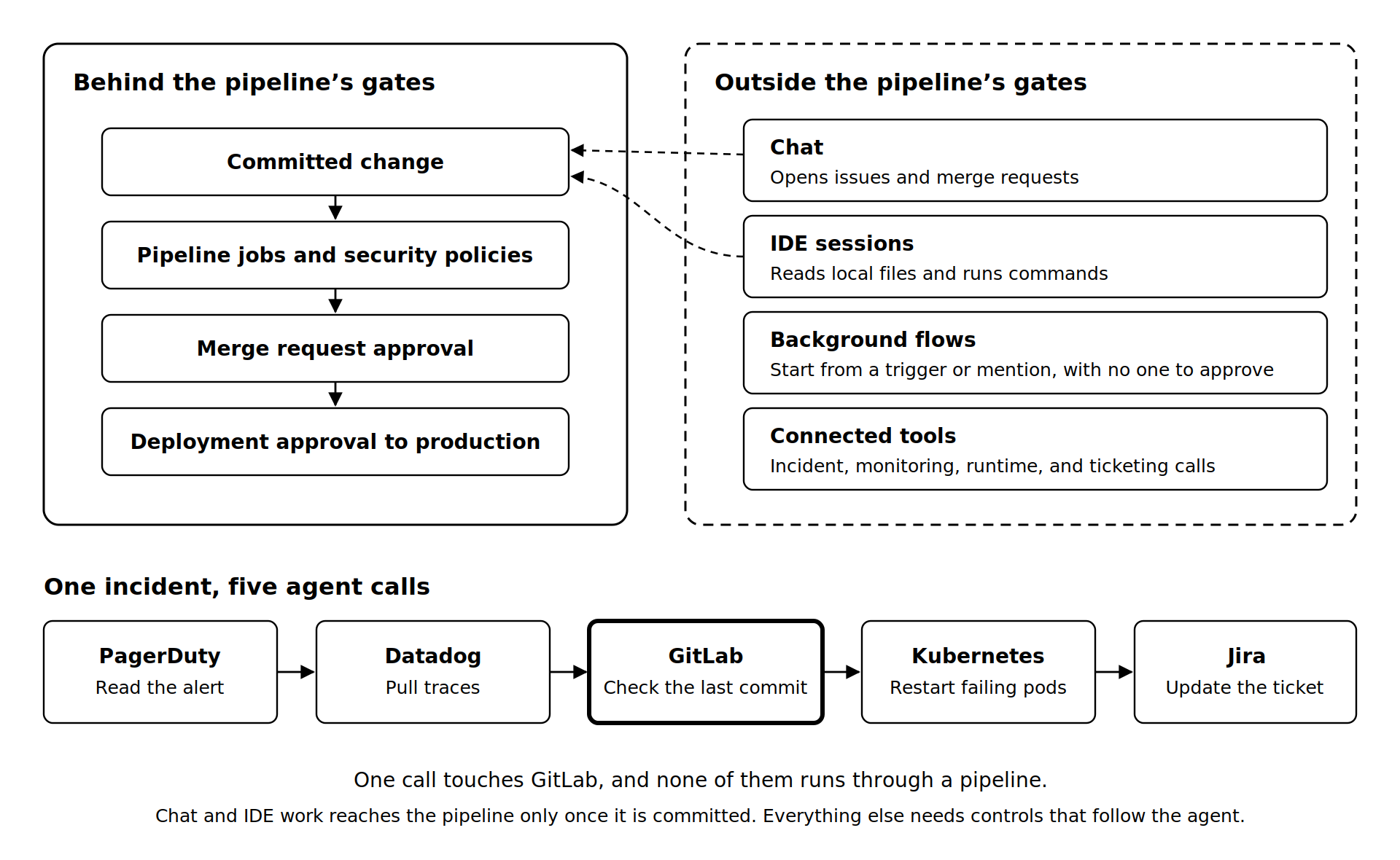
The pipeline works as a chokepoint, because a change either passes the gates or never reaches production. That is also its limit: the gates only check changes on their way to production.
Where Agent-Driven Delivery Leaves the Pipeline
A lot of agent work never passes the pipeline’s gates:
- Chat opens issues and merge requests before any pipeline starts.
- IDE sessions read local files and run commands on the developer’s machine, and the pipeline sees only what gets committed.
- Background flows run on runners from a trigger or mention, with no one watching. Always Ask can’t apply, and a tool without a background rule defaults to Always Allow.
- Connected tools get called directly, whether that’s ticketing, chat, observability, or deployment.
Follow one agent through an incident. It reads the PagerDuty alert, pulls traces from Datadog, checks the last GitLab commit, restarts the failing pods in Kubernetes, and updates the Jira ticket. One of those five calls touches GitLab, and none of them runs through a pipeline.
The Controls an Agentic SDLC Needs That a Pipeline Does Not Give You
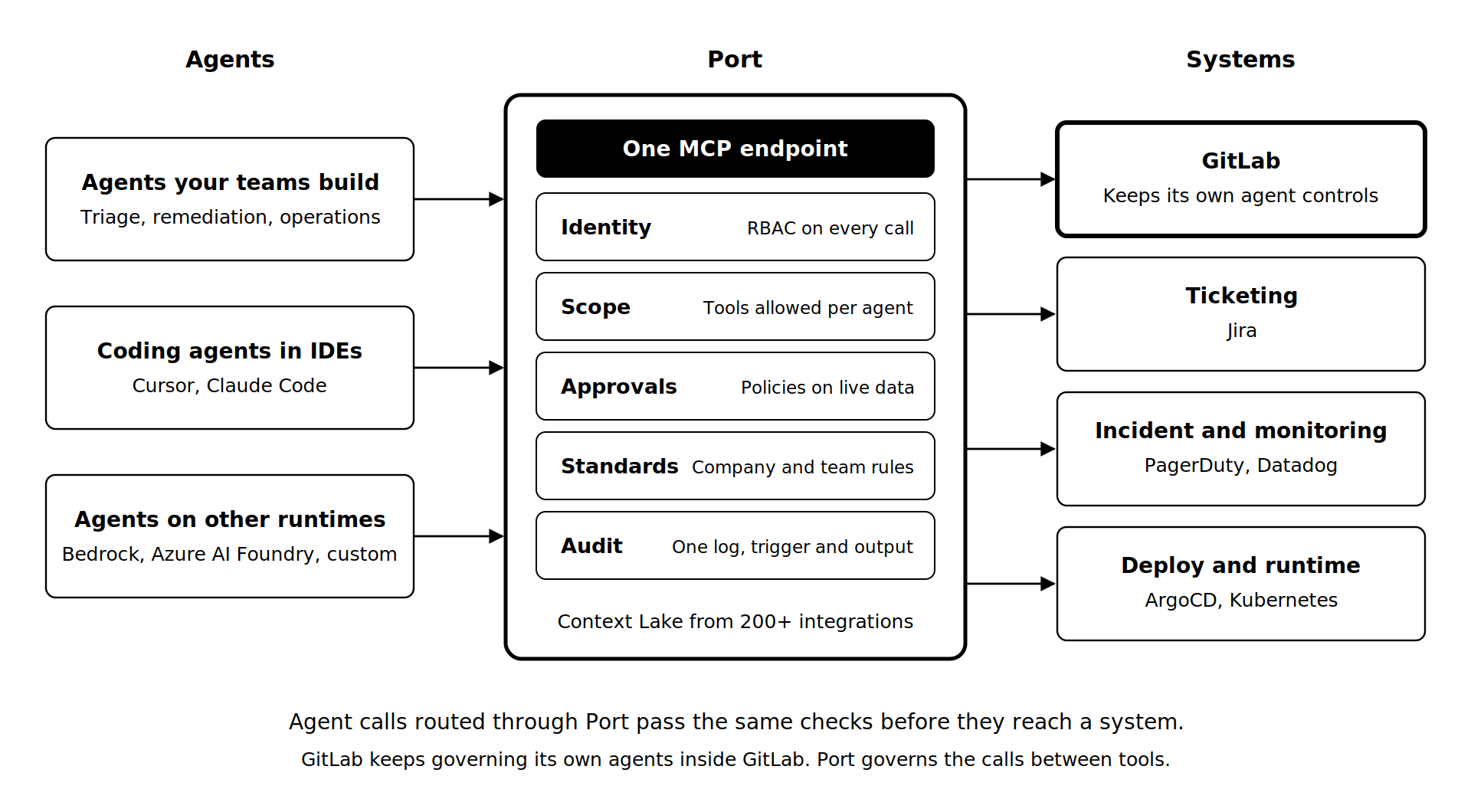
Each of these controls has to follow the agent rather than the pipeline. For each one, here’s what GitLab gives you and what Port adds across tools.
Identity
GitLab’s composite identity is one of the most carefully designed agent identity models we’ve seen. A runner-based flow acts with the stricter of the user’s role and the service account’s Developer role, so nobody can give an agent more access than the service account holds. Merge requests the flow opens are attributed to the person who triggered it, which preserves segregation of duties. Agentic Chat acts as the user.
Port runs every agent call through RBAC, whichever system the call targets, so the GitLab commit and the pod restart follow the same identity rules.
Scope
A GitLab flow reaches only the projects that both the user and the service account can access. Group Owners can block an external MCP server for Agentic Chat in the UI, but not for IDE or CLI clients configured locally.
In Port, platform engineers choose which tools each connector exposes and which of those each agent may call. A raw GitHub server can read a file or delete a repository, so each agent gets only the tools its job needs.
Approvals
GitLab sets each tool to Always Allow, Always Ask, or Always Deny by role and action category. Always Ask shows its card to the user in the session. For third-party MCP clients, it’s up to the client: Claude Code 2.1.199 and later prompts, while Cursor and Windsurf don’t. The server enforces Always Deny for every client.
Port checks policies against live data at the moment the agent acts, so a rule like “no agent changes to a service with an open incident” runs against current incident data. A small fix that passes every policy goes straight through, while a payments change goes to the approver set by ownership and data sensitivity, in Slack, Claude, or Jira. For how that holds up at scale, see Scaling Without Losing Control.
Standards
GitLab cascades rules from group to project, and projects can only tighten them. Security policies enforce scans and jobs that development teams can’t switch off, and the Code Review flow checks merge requests against your coding standards.
Port layers standards the same way, but across every tool. The platform team sets company-wide rules once, such as approved models, allowed tools, and required reviews, and teams add their own without overriding them (Port docs). When services fall short of a standard, Port can point an agent at the failing scorecard to write a fix for each one and open a pull request for the team that owns it. See Enforcing Engineering Standards with AI Agents.
Audit across tools
Once storage is turned on, GitLab’s AI audit events log each agent session, with the service account as author and the triggering user recorded alongside (AI audit events docs). Connected Claude Code, Cursor, and Codex sessions report their tool calls, including MCP calls, for visibility rather than enforcement. GitLab notes that agents on n8n, Bedrock, or custom harnesses aren’t captured.
Port logs every action and policy decision with its trigger and output, across GitLab, Jira, ArgoCD, and the rest, so an incident review can trace back to one agent and one step from a single place.
Insights and ROI
GitLab’s governance dashboard shows agent sessions, tool calls by action, agents in use, and MCP servers. Its Duo and SDLC trends dashboard sets agent usage against GitLab delivery metrics like lead time and deployment frequency, and Impact Analytics shows cost by team, task, and model.
Port ties adoption across all your AI tools to delivery, incidents, and productivity, and tracks each agent’s success rate, quality, human overrides, and time saved (Port metrics). dLocal built its context, guardrails, and reporting in Port before launching dCoder, an agent that now resolves 45% of its engineering tickets end to end. Through 2025, dLocal’s deployment frequency rose 60–70%, and its lead time and MTTR were both cut in half (Port).
Port vs GitLab on Agent Governance
Running Port Alongside GitLab
Most teams keep GitLab exactly where it is, for source control, merge requests, CI/CD, and its own agents, and use Port for agent work that crosses into other tools.
- Context: Orbit indexes GitLab. Port’s Context Lake fills from 200+ integrations, such as your repos, PagerDuty, Datadog, and Snyk, behind one MCP endpoint your agents and IDEs share.
- Agents: Port’s registry discovers agents through GitHub, AWS, Claude, and Azure, so an SRE agent on Bedrock gets the same policies and audit as everything else.
- Pipelines: Port flows mix agent steps with deterministic ones, so deploys still run through your approved CI/CD pipeline.
- Compliance: Pick one audit record as the source of truth early and feed the other into it, so incident reviews start from one timeline.
For the operating model, see Agentic Workflows in the AI SDLC.
Which Setup Fits Your Organization
If your planning, code, CI, and CD all run in GitLab, its governed software factory covers you, and you may not need Port yet. Before you scale agents, turn on AI audit event storage, set background rules for write and delete tools, and use Always Deny for anything third-party clients must never do.
If your agents already work across several tools, you aren’t choosing between GitLab alternatives. You’re choosing where governance sits. Answer these questions first:
- How much agent work stays in GitLab, and how much reaches other tools directly?
- Which actions need a service owner’s approval rather than the requester’s?
- Which system should hold the compliance record for agent actions?
- Which agents run on other runtimes, like Bedrock or Azure AI Foundry?
For the wider shift behind these questions, see The AI SDLC. Your answer to the first question shows whether GitLab’s controls still cover your agents or whether your agents already work beyond them.
FAQ
Does Port replace GitLab?
No. GitLab stays your system for source control, merge requests, CI/CD, and governing its own agents. Port adds shared context, live-data policies, one audit log, and ROI tracking for agent work that reaches other tools. Teams running both pick one audit record as their compliance source.
Can GitLab Duo agents be governed from outside GitLab?
GitLab’s own controls are the right place to govern its agents. Third-party clients that call the GitLab MCP server can hit server-enforced Always Deny rules, and connected Claude Code, Cursor, and Codex sessions report to GitLab. Agent calls into other systems need a layer like Port.
What happens to agent activity that starts in an IDE?
Agentic Chat in an IDE runs on your machine under your identity. GitLab’s tool governance modes apply, but composite identity doesn’t. After glab agent setup, Claude Code, Cursor, and Codex sessions also report to GitLab. Locally configured MCP servers stay outside GitLab’s group-level block.
Does this change anything for teams on GitLab Self-Managed?
Agent tool governance runs on Self-Managed. You control the version and feature flags, so check both before planning around newer controls. If you run your own AI Gateway, configure it to forward AI audit events, or none get recorded. Several dashboard cards need ClickHouse.
How do the two price models compare?
GitLab meters agent usage in GitLab Credits. Premium includes $12 per user each month and Ultimate includes $24, with more available from a shared pool or on demand, and admins can cap spend. Port’s pricing is on its pricing page. Compare seat counts and expected agent volume for both.
Sources
- GitLab: agent platform general availability, January 15, 2026
- GitLab press release via iTWire: the foundation for the governed software factory, October 2026
- SD Times: GitLab’s governed software factory, October 2026
- IT Brief: GitLab unveils governed software factory tools, October 7, 2026
- GitLab docs: Orbit, composite identity, tool governance, AI audit events, deployment approvals, security policies
- Port: Metrics and AI ROI
Download the RFP guide


Get your survey template today


Download your survey template today


Free Roadmap planner for Platform Engineering teams
Set Clear Goals for Your Portal
Define Features and Milestones
Stay Aligned and Keep Moving Forward
Create your Roadmap


Free RFP template for Internal Developer Portal
Creating an RFP for an internal developer portal doesn’t have to be complex. Our template gives you a streamlined path to start strong and ensure you’re covering all the key details.
Get the RFP template


Leverage AI to generate optimized JQ commands
test them in real-time, and refine your approach instantly. This powerful tool lets you experiment, troubleshoot, and fine-tune your queries—taking your development workflow to the next level.
Explore now
Check out Port's pre-populated demo and see what it's all about.
No email required
LIVE WEBINAR, Aug 18, 2026:
Context-aware Vibe Coding for Platform Engineering
Thursday, October 22 12:00pm EDT⋅6:00pm CET
To learn more about the new capability and to see a live demo, join our upcoming community session with GitHub
Move fast while staying in control
Build governed agentic workflows on one central platform.
See it in action:
Watch this video on generating Terraform with Port, or explore our public demo.

Check out the 2025 State of Internal Developer Portals report
No email required
Minimize engineering chaos. Port serves as one central platform for all your needs.
Act on every part of your SDLC in Port.
Your team needs the right info at the right time. With Port's software catalog, they'll have it.
Learn more about Port's agentic engineering platform
Read the launch blog
Contact sales for a technical walkthrough of Port
Every team is different. Port lets you design a developer experience that truly fits your org.
As your org grows, so does complexity. Port scales your catalog, orchestration, and workflows seamlessly.
Port × n8n Boost AI Workflows with Context, Guardrails, and Control
Port Builders Session: A Single, Governed Interface for All MCP Servers
Book a demo right now to check out Port's developer portal yourself
Apply to join the Beta for Port's new Backstage plugin


n8n + Port templates you can use today
walkthrough of ready-to-use workflows you can clone
From manual to autonomous engineering
One platform to build, govern, and operate the Agentic SDLC.
Port is open for you to try it
build your first agentic workflow today