Best AI Tools for Developers
The best AI tools for developers across chat assistants, IDE copilots, coding agents, and app builders, plus how to choose one.




Key Takeaways
- AI development tools now fall into seven or so categories, and most teams end up using tools from more than one.
- Chat assistants and IDE copilots help with individual tasks. Coding agents and orchestration platforms handle multi-step workflows.
- Before buying anything, settle four questions: how much of the codebase the tool reads, where it runs, what happens to code that leaves the company, and who approves what it ships.
- Coding agents need review gates. Treat their output the way you would treat a pull request from a new contractor.
- As the number of AI tools grows, governance and measurement matter more. Pick platforms that show what agents did, not just what they produced.
AI has moved well past autocomplete. Developers now work with chat assistants, IDE copilots, coding agents, orchestration platforms, and full-app builders, each covering a different part of the software lifecycle. This guide walks through the best AI tools for developers in 2026, grouped by category, and ends with a set of criteria for choosing among them.
The bigger shift underneath the list is the move to an agentic SDLC. Early tools were assistive: you led, and the AI followed. Today's tools are increasingly agentic, meaning the AI plans, executes, and takes action across workflows while engineers set the guardrails and review the output. Each tool below sits somewhere on that spectrum, and knowing where it sits tells you how much oversight it needs.
How to Choose AI Tools for Developers
Most comparison lists start with features. A better starting point is the decisions your team needs to make before a tool reaches anyone's laptop. Four questions cover most of them.
Does the tool work on a single file or across the entire codebase? Some tools only see the file you have open. That's fine for a quick fix or a test, but refactors, migrations, and bug hunts across services need repository-wide context. Decide which kind of work matters most to your team, and let that drive the shortlist more than any single feature.
Does it run inside the IDE or on its own? Tools inside the editor fit into the flow developers already have. Standalone tools, such as terminal agents or web-based builders, can run longer tasks without anyone watching, but they add context switching and another place where work can drift. Many teams end up with one of each.
What happens to code that leaves the company? Check where prompts and code are processed, whether the vendor uses them for training, how long they're retained, and which enterprise controls exist, such as single sign-on, audit logs, and private deployment. Bring your security team in before the pilot starts, not after it's already running on production repositories.
Who signs off on what the tool ships? Write down who approves agent-generated changes, which repositories agents can write to, and which actions need a human in the loop. Without this, agents tend to accumulate permissions nobody intended to grant. Settle these four questions first, and the shortlist usually shrinks quickly.
Agentic Workflows and Orchestration
AI is most useful when it can move work across tools and workflows, not just within a single editor. That's where orchestration platforms come in.
- Port: The AI software factory platform for engineering teams. Port combines a Context Lake, workflow orchestration, AI agent management, and governance. Platform and developer experience teams use it to coordinate agents across the full lifecycle, with reusable workflows and a clear view of what each agent is doing.
- n8n: A workflow automation tool that connects multiple AI models and agents, so developers can chain tasks into end-to-end flows.
- Zapier: A no-code and low-code automation platform that uses AI features to connect APIs, apps, and agents into business workflows.
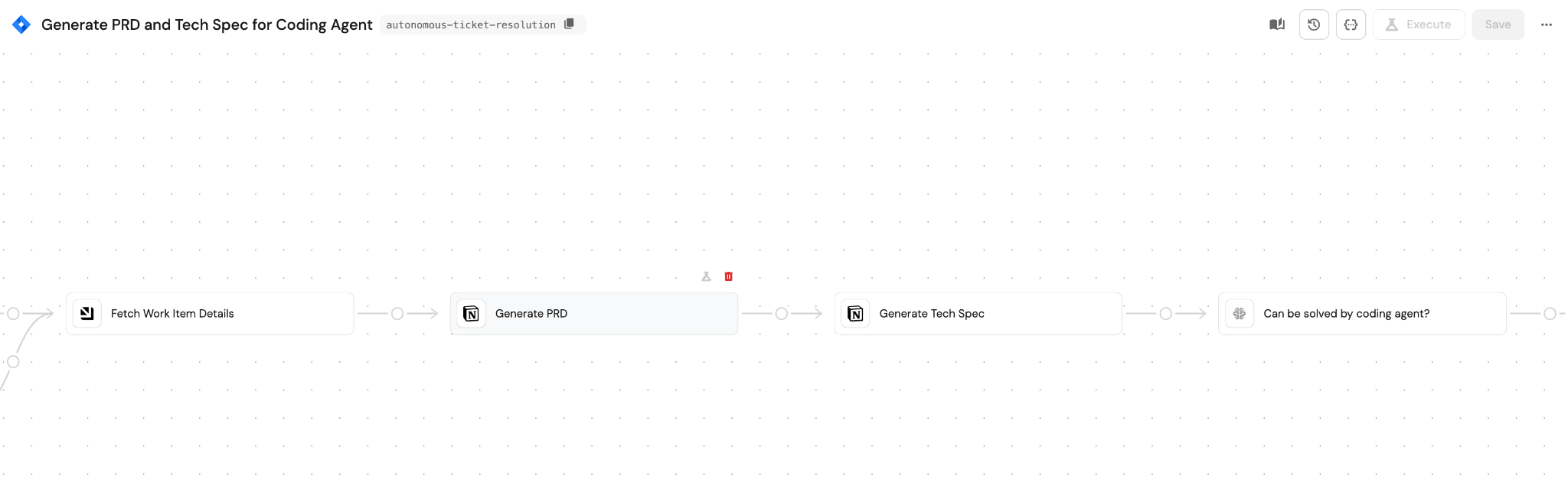
Port orchestrating an autonomous ticket resolution workflow
Port orchestrating an autonomous ticket resolution workflow, from work item to PRD, tech spec, and coding-agent handoff. See it here
Chat and Assistant Tools
Conversational AI is now a standard part of problem-solving, brainstorming, and day-to-day development. These tools are strongest when you need reasoning, explanation, or a second opinion, and they work best when you paste in the relevant code or context yourself.
- Claude (Anthropic): Strong at reasoning, summarization, and code review conversations. Claude handles long, complex context well, which makes it useful for design discussions and for working through large documentation.
- ChatGPT (OpenAI): The most widely used general-purpose assistant. It's handy for debugging, drafting documentation, and explaining unfamiliar code.
- Gemini (Google DeepMind): A multimodal model that fits well with Google's ecosystem and with research-heavy workflows that mix text, images, and documents.
AI Coding Tools: IDE Copilots
Most developers first encounter AI coding tools in the editor. Copilots suggest code as you type, answer questions about the file you have open, and help with refactoring and review. The right pick depends on how much of the codebase the tool reads and how strict your privacy rules are.
- GitHub Copilot: The most widely adopted IDE-integrated coding assistant, with inline suggestions and chat across the editor.
- Cursor: An AI-first fork of VS Code that combines natural-language editing with context-aware changes across a project.
- Kiro: A structured assistant for guided development, where work moves through defined stages instead of open-ended prompting.
- Tabnine: A privacy-focused assistant built for teams with strict IP requirements, with deployment options that keep code inside the organization.
- Windsurf: An AI IDE built around natural-language, agent-assisted development.
AI Coding Agents
Copilots suggest, and coding agents act. Give an agent a task, and it can plan the steps, edit several files, run tests, and open a pull request, with varying amounts of human checkpoints along the way. This is where the largest productivity gains show up, and also where the largest review burden sits.
- Cursor agents: Autonomous, multi-step workflows built into the Cursor editor.
- GitHub Copilot coding agent: Takes on assigned tasks beyond autocomplete and works toward a pull request that a human reviews.
- Devin AI: Branded as the first AI software engineer, designed to manage project tasks end to end.
- Codex (OpenAI): OpenAI's coding agent, which builds on the same underlying models that power many other coding assistants.
- Claude Code (Anthropic): An agentic coding tool that works from the terminal, the desktop app, and inside IDEs, and handles tasks across a codebase.
- opencode: A terminal-native AI coding agent that works with more than 75 LLMs and can run several agents in parallel.
Full-App Vibe Coding Tools
Vibe coding tools skip the line-by-line writing and scaffold entire apps from a prompt, a wireframe, or a description. They're fast for prototypes, internal tools, and demos. Production systems still need the review and governance steps covered earlier in this guide.
- Replit: A cloud IDE with AI-powered prototyping and hosting.
- v0 (Vercel): Generates production-ready frontends from text prompts.
- Lovable: Builds functional apps from natural-language descriptions.
- Bolt: An AI app builder aimed at startups and quick prototyping.
- Base44: An emerging tool for rapid prototyping and deployment.
AI for Documentation and Developer Knowledge
Documentation and knowledge reuse, which is part of what makes innersource work, become critical as engineering teams grow. AI can take over much of the drafting and searching.
- Mintlify: Generates new documentation and updates existing pages as code changes.
- Pieces: An AI workspace for code snippets, documentation, and project context.
- Glean: An AI-powered knowledge platform that searches across company data, including documentation and code, so developers find answers without asking around.
Security and Governance AI Tools
As AI accelerates development, security and compliance remain non-negotiable. These tools help teams check what AI produces and what it touches.
- Snyk: AI-enhanced vulnerability scanning across dependencies, containers, and infrastructure as code.
- Domo: An AI and data platform with governance, workflow automation, and real-time compliance visibility. It's better suited to data-heavy teams than to code security, but it's useful when AI-driven data work needs audit trails.
- Darktrace: An AI-driven cybersecurity platform that detects threats in real time and responds autonomously across networks, cloud, endpoints, and identities.
AI Libraries for Developers
Beyond assistants and agents, many developers want to build their own AI-powered applications. AI libraries provide the building blocks: frameworks that connect models, manage context, and orchestrate agentic behavior, so teams don't start from scratch.
- LangChain: A widely adopted framework for building LLM-powered applications. It chains prompts, connects external data sources, and orchestrates multi-step workflows.
- LangChain4j: A Java adaptation of LangChain that brings LLM application development to the JVM, which helps enterprise teams add AI features to existing Java applications.
- LangGraph: A graph-based orchestration framework built on LangChain. It lets developers design and visualize agentic workflows as directed graphs, which improves observability and control.
- LlamaIndex: A data framework that connects LLMs to APIs, databases, and enterprise documents, which makes retrieval-augmented generation (RAG) easier to build.
- Haystack: An open-source framework for search and question-answering systems powered by LLMs, designed for production information retrieval pipelines.
- Guidance: A library for controlling LLM output with programmatic structure, constraints, and templates, which suits developers who need fine-grained control over model behavior.
Frequently Asked Questions
What is the difference between an AI coding assistant and an AI coding agent?
An AI coding assistant works alongside you while you write code. It suggests completions, explains a function, or answers a question about the file you have open, and you make every change. An AI coding agent takes a task and carries it out. It plans the steps, edits several files, runs the tests, and may open a pull request. Agents do more of the work, so they need clearer permissions, stricter review gates, and a record of every change they make.
Are AI coding tools safe to use on a private codebase?
They can be, but safety depends on the vendor's data handling more than on the category of tool. Check whether your code and prompts are used for training, how long they're retained, where they're processed, and whether the tool offers enterprise controls such as single sign-on, audit logs, and private deployment. Involve your security team before the pilot starts, and limit agent access to the repositories and environments the task actually needs.
How many AI tools does one engineering team actually need?
Many teams do well with a small set: one IDE assistant, one coding agent, one general chat assistant, and whatever governance or orchestration layer the platform team runs. Every extra tool adds licensing cost, another set of permissions to review, and more context switching. Start with the workflow that creates the most friction, add a tool only when the current set can't solve the problem, and retire any tool that nobody uses.
Do AI coding tools work on large legacy codebases?
Yes, with caveats. Tools that index a whole repository can find related code, trace dependencies, and suggest changes across several files, which matters for legacy systems. Results still depend on documentation quality, test coverage, and how clearly the task is described. Start with bounded work, such as adding tests, updating a dependency, or documenting a module, and review agent changes closely before expanding the scope.
Where AI Tools for Developers Go Next
Most of the tools in this list compete on generating code, and that part keeps getting faster. The harder problem for engineering leaders is coordination: knowing which agents exist, what they can touch, what they changed, and whether the work moved the team forward.
That's the problem Port is built around. Port's Context Lake maps the environment, workflow orchestration runs governed agentic work across the SDLC, AI management tracks the agents and skills in use, and metrics show what AI is doing for engineering. The code-generation tools will keep improving. The teams that benefit most will be the ones that can see and govern all of them in one place.
Check the live demo to see how this works in a pre-populated Port environment.
Download the RFP guide


Get your survey template today


Download your survey template today


Free Roadmap planner for Platform Engineering teams
Set Clear Goals for Your Portal
Define Features and Milestones
Stay Aligned and Keep Moving Forward
Create your Roadmap


Free RFP template for Internal Developer Portal
Creating an RFP for an internal developer portal doesn’t have to be complex. Our template gives you a streamlined path to start strong and ensure you’re covering all the key details.
Get the RFP template


Leverage AI to generate optimized JQ commands
test them in real-time, and refine your approach instantly. This powerful tool lets you experiment, troubleshoot, and fine-tune your queries—taking your development workflow to the next level.
Explore now
Check out Port's pre-populated demo and see what it's all about.
No email required
LIVE WEBINAR, Aug 18, 2026:
Context-aware Vibe Coding for Platform Engineering
Thursday, October 22 12:00pm EDT⋅6:00pm CET
To learn more about the new capability and to see a live demo, join our upcoming community session with GitHub
Move fast while staying in control
Build governed agentic workflows on one central platform.
See it in action:
Watch this video on generating Terraform with Port, or explore our public demo.

Check out the 2025 State of Internal Developer Portals report
No email required
Minimize engineering chaos. Port serves as one central platform for all your needs.
Act on every part of your SDLC in Port.
Your team needs the right info at the right time. With Port's software catalog, they'll have it.
Learn more about Port's agentic engineering platform
Read the launch blog
Contact sales for a technical walkthrough of Port
Every team is different. Port lets you design a developer experience that truly fits your org.
As your org grows, so does complexity. Port scales your catalog, orchestration, and workflows seamlessly.
Port × n8n Boost AI Workflows with Context, Guardrails, and Control
Port Builders Session: A Single, Governed Interface for All MCP Servers
Book a demo right now to check out Port's developer portal yourself
Apply to join the Beta for Port's new Backstage plugin


n8n + Port templates you can use today
walkthrough of ready-to-use workflows you can clone
From manual to autonomous engineering
One platform to build, govern, and operate the Agentic SDLC.
Port is open for you to try it
build your first agentic workflow today