
Agentic Flow Types: Choosing how you work with AI
Each Agentic Flow Type can deliver different results — learn how to leverage each type in this article.



Up until very recently, engineering work has been entirely or mostly manual. Human-driven on human timelines. Various machine-learning algorithms and tools like Slack and Zapier automations assisted developers with communications, but didn’t write code or participate in work. AI served as more of an observer.
It’s been four years since GitHub Copilot was released, in October of 2021 — and since then teams have steadily experimented with letting AI write code, unit tests, and documentation. These are early examples of AI assisting with manual engineering work, helping developers take on less of the maintenance burden by handling small, discrete, repetitive tasks.
ChatGPT entered the scene in November 2023 and changed the scope of what was possible to achieve with LLMs. Claude and Cursor followed, promising more autonomous AI and better coding experiences for humans.
As we continue to explore the possibilities of AI in software engineering, it’s worth it to consider that you have many options when it comes to deciding how you and your teams should adopt AI. At Port, we call these Agentic Flow Types. We’ll define each of them below; read on to see which workflows your team is already familiar with and which ones you can adopt next!
What are Agentic Flow Types?
There are five Agentic Flow Types we see as possible today:
- Manual: Engineers drive all of the work involved in creating and deploying software.
- AI-assisted engineering: AI provides investigation, communication, and recommendations to engineers who code, test, and deploy.
- AI-led, human-approved: Engineers act as gatekeepers, approving and rejecting AI output as tasks are completed.
- AI-driven, human-assisted: Engineers act as collaborators with their AI counterparts, helping to contextualize information and extend the AI’s impact.
- Fully agentic engineering: AI performs all tasks independently, while engineers serve as orchestrators for teams of agents, deploying them where needed.
In most of our customer discussions, it seems Agentic Engineering is the least prevalent flow type in production today. These flow types can be considered a pipeline, one that drives engineering teams away from manual engineering toward agentic engineering — after all, agentic engineering is both:
- The successful onboarding of AI agents to your engineering domain
- The saturation of AI-led or AI-assisted flows in production environments
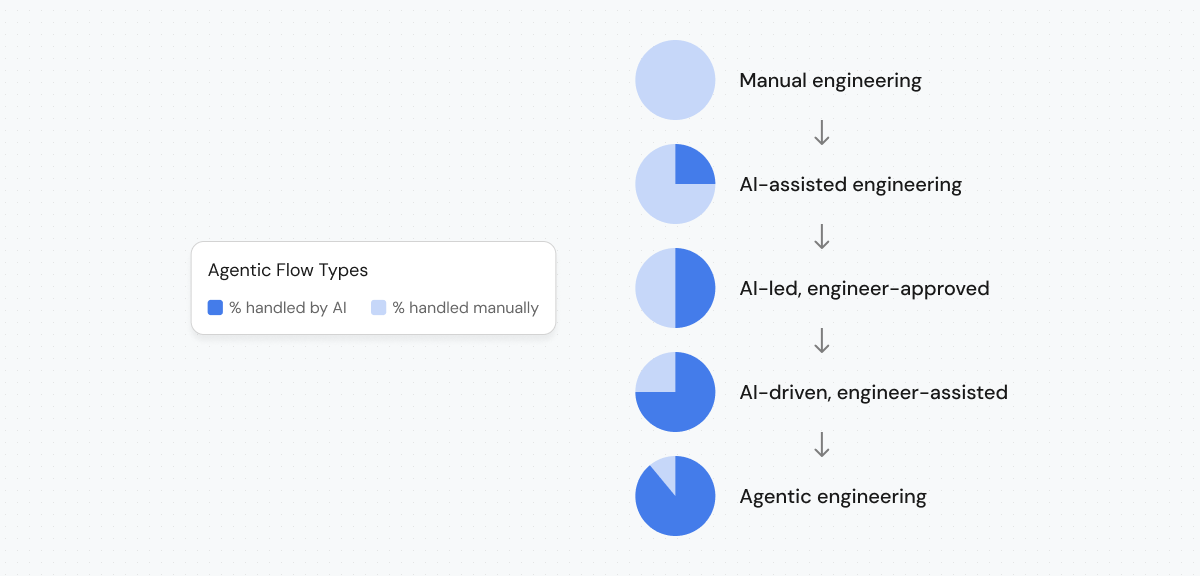
Using Agentic Flow Types to gauge AI engineering maturity
Understanding the ways you can work with AI and how involved it can (or should) be is important. These flow types are not mutually exclusive, nor are they intended to always compound in impact. There are certainly cases that are better handled manually, and those that can be safely transitioned to AI-led processes.
Instead, engineering teams should consider testing a variety of Agentic Flow Types and using those with the best outcomes in production. A mature, sophisticated agentic engineering team will have a combination of Agentic Flow Types, including some that do not involve AI at all. Teams with an understanding of both their pre-AI operational maturity and platform domain maturity — and especially those who have engaged with platform engineering best practices — will likely reach agentic engineering faster than teams without that understanding. What matters most is the quality of your engineering context, the durability of your pipelines and workflows, and the safety of the infrastructure through which your SDLC runs.
Examples of Agentic Flow Types in production
Manual, engineer-driven work
All aspects of engineering are primarily handled manually. Human developers are responsible for:
- Code creation and deployment. Reviewing code, writing documentation, unit testing, and deployments are entirely handled by teams of developers.
- PR review is manual and completed by other developers around their coding work.
- Documentation ends up immediately out of date.
- Deployments are chaotic and can be difficult to orchestrate.
- Organizing domain knowledge and infrastructure. In some cases, advanced practices like DevOps or platform engineering exist in manual engineering environments, especially in large cutting-edge teams.
- Wikis, internal docs, and spreadsheets or CMDBs offer static solutions to dynamic problems. Docs often end up out of date.
- Mitigating chaos and incidents. Less mature organizations often have chaotic engineering environments consisting of many tools, systems, and teams whose internal communications or policies don’t always align.
- Alignment is resolved through meetings, checklists, and spreadsheet documentation of services.
{{cta_2}}
AI-assisted engineering
With tools like GitHub Copilot, ChatGPT, or Cursor, developers can write fewer boilerplate templates, docs, and unit tests by hand. Connecting AI-generated outputs and, in most cases, deploying to production, meetings, and incidents are still handled manually. AI assistance is used primarily to:
- Generate and complete code. AI assists developers in the IDE by:
- Generating new functions or modules from natural language prompts (e.g., “Write a Python function to validate an email address”).
- Autocompleting code intelligently, understanding context better than standard IDE suggestions.
- Adapting code snippets to fit project conventions or frameworks (e.g., A developer types “create a REST API endpoint for user authentication,” and the AI generates route handlers, validation logic, and documentation automatically).
- Automatically run tests and detect bugs. AI can help identify errors and ensure reliability by:
- Generating unit and integration tests automatically from existing code or documentation.
- Detecting potential bugs or security issues by analyzing patterns across large codebases.
- Suggesting fixes for common issues such as memory leaks, concurrency errors, or null pointer exceptions.
- Reviewing code and assisting with refactors. AI can act as a virtual reviewer or pair programmer, helping improve code quality:
- Summarizing and commenting on pull requests automatically.
- Recommending refactors to simplify complex code or improve performance.
- Enforcing style guides and best practices without human reviewers spending time on formatting issues
AI-led, engineer-approved
When AI has access to enough context, you can begin onboarding agents the same way you would junior engineers. With the right infrastructure in place, such as an Agentic Engineering Platform (AEP), you can build workflows that can be invoked by or for AI. Some examples include:
- An automated code refactoring pipeline. AI autonomously scans a repository for code smells, outdated patterns, or security vulnerabilities, then refactors the code automatically. Human engineers review and approve the pull requests before merging. Steps:
- AI runs nightly scans using tools like OpenAI’s Code Interpreter, Amazon CodeWhisperer, or Codiga.
- The AI detects redundant code, unused imports, or inefficient loops.
- It generates optimized refactored code and submits a PR with detailed change logs.
- A human engineer reviews the PR, approves or requests changes.
- Example: The AI identifies inefficient JSON parsing logic across multiple services, rewrites it using a faster library, and explains the performance gain in the PR summary.
- A continuous integration (CI) pipeline with AI quality gates. AI acts as a code quality and test gatekeeper in the CI/CD pipeline, automatically deciding whether a build should proceed based on predictive risk scoring — humans override only when necessary. Steps:
- When new code is pushed, AI models analyze code diffs, commit messages, and past bug data.
- The AI predicts the probability of introducing regressions or performance degradation.
- It automatically blocks or approves the build if it passes the quality threshold.
- Human reviewers can override or audit the AI’s decision.
- Example: The AI halts deployment after detecting that a database migration script could increase query latency, alerting the engineer before production impact.
- An autonomous issue resolution system. AI autonomously identifies recurring bugs or performance anomalies in production logs, generates a fix proposal, and creates a pull request — human engineers only validate. Steps:
- The AI monitors logs and telemetry for anomalies (e.g., failed API calls, slow endpoints).
- It correlates error traces with code commits to pinpoint root causes.
- The AI generates and tests potential patches in a sandboxed environment.
- After passing tests, it opens a PR with the fix and supporting evidence.
- Engineers review, validate, and approve the merge.
- Example: An AI system identifies that a memory leak in a background job stems from an unclosed file descriptor, generates a patch, runs tests, and opens a “ready-to-review” PR automatically.
AI-driven, engineer-assisted
AI needs deep, integrated domain context to lead software development projects. But there are a few places we see customers and others beginning to experiment with AI-led pipelines and see early successes:
- AI-driven feature development (spec-to-code pipelines). AI autonomously interprets business requirements or product specs, generates the initial implementation, and humans refine or contextualize it. Steps:
- The AI ingests natural-language feature specs or user stories (from Jira, Notion, or design docs).
- It generates architecture suggestions, API schemas, and starter codebases.
- Humans review for business logic nuances or edge cases.
- The AI adjusts code and documentation based on feedback.
- Example: A product manager adds a story — “Add OAuth2 login to the mobile API.” The AI drafts backend endpoints, updates configuration files, and writes the docs. Engineers then tweak edge cases (e.g., token expiry or provider-specific quirks).
- Self-healing incidents and automatic Root Cause Analysis. AI continuously monitors system telemetry and alerts, autonomously diagnosing and proposing mitigation steps. Humans step in to confirm actions or handle exceptional cases. Steps:
- The AI detects anomalies (e.g., rising latency, failed builds, API timeouts) via log and metrics analysis.
- It correlates incidents to recent deployments or commits.
- AI proposes remediation — e.g., rollback, scaling change, or cache invalidation.
- Humans confirm or refine the AI’s diagnosis and execute complex fixes.
- Example: An AI model identifies that a specific Kubernetes deployment causes intermittent 502 errors, rolls it back automatically, and pings the on-call engineer with the postmortem summary.
- Continuous learning and codebase optimization loop. AI autonomously analyzes the entire repository for inefficiencies, tech debt, or performance patterns, then proposes or applies optimizations with human validation at key checkpoints. Steps:
- AI continuously studies code repositories, telemetry, and usage analytics.
- It detects performance bottlenecks, poor dependencies, or anti-patterns.
- AI executes safe optimizations (e.g., caching, query tuning) automatically, and flags others for review.
- Human developers inspect and contextualize optimizations that may affect product behavior.
- Example: AI detects slow SQL queries across services, rewrites them for efficiency, runs automated benchmarks, and presents improvements to the lead engineer for sign-off.
Agentic engineering
Much like manual engineering, all software engineering work is handled by AI, with little human involvement. But we don’t foresee humans completely exiting the software development lifecycle any time soon — humans remain the only developers who can reason through problems, design workflows, and approve or permit risk-taking when needed.
Some ideas for what this would look like include:
- AI quality gates involve judge or policy agents. Vertical AI agents, which are specifically trained on particular domains such as Security or Product Management, serve as reviewers and approvers of lower-level coding agents. All of their work is monitored and audited by humans, but requires little intervention.
- Feature development is driven by AI. Combining developer, user, and engineering signals, Product Management agents may identify recommendations or product requirements and scope work automatically. Engineers can still approve and deny ideas, as well as prioritize the roadmap.
- Autonomous ASPM is a reality. AI detects, neutralizes, and protects against security threats and risks in real-time, as agents review and perform maintenance continuously. But humans still remain aware of these threats and how they are neutralized.
Build your agentic engineering future now
Start by unifying your platform domains. A single, unified, holistic domain is one that makes sense to both humans and AI agents.
Then, try creating a software catalog, adopting an internal developer portal, and applying platform engineering best practices to your organization. These first steps toward agentic engineering won’t only make your software development environments more efficient, but they also make it possible to pave the way for AI to adopt new workflows and reduce friction.
Port’s Agentic Engineering Platform is an evolution of the Internal Developer Portal, whose foundation lay in solving engineering chaos. Avoid the risks of agentic chaos with a platform purpose-built to unify environments, data, workflows, people, and systems into a working SDLC.
{{cta_3}}


Get your survey template today
%201.svg)


Download your survey template today


Free Roadmap planner for Platform Engineering teams
Set Clear Goals for Your Portal
Define Features and Milestones
Stay Aligned and Keep Moving Forward
Create your Roadmap


Free RFP template for Internal Developer Portal
Creating an RFP for an internal developer portal doesn’t have to be complex. Our template gives you a streamlined path to start strong and ensure you’re covering all the key details.
Get the RFP template


Leverage AI to generate optimized JQ commands
test them in real-time, and refine your approach instantly. This powerful tool lets you experiment, troubleshoot, and fine-tune your queries—taking your development workflow to the next level.
Explore now
Check out Port's pre-populated demo and see what it's all about.
No email required
LIVE WEBINAR, Aug 18, 2026:
Context-aware Vibe Coding for Platform Engineering
Thursday, October 22 12:00pm EDT⋅6:00pm CET
To learn more about the new capability and to see a live demo, join our upcoming community session with GitHub
Move fast while staying in control
Build governed agentic workflows on one central platform.
See it in action:
Watch this video on generating Terraform with Port, or explore our public demo.
.png)
Check out the 2025 State of Internal Developer Portals report
No email required
Minimize engineering chaos. Port serves as one central platform for all your needs.
Act on every part of your SDLC in Port.
Your team needs the right info at the right time. With Port's software catalog, they'll have it.
Learn more about Port's agentic engineering platform
Read the launch blog
Contact sales for a technical walkthrough of Port
Every team is different. Port lets you design a developer experience that truly fits your org.
As your org grows, so does complexity. Port scales your catalog, orchestration, and workflows seamlessly.
Port × n8n Boost AI Workflows with Context, Guardrails, and Control
Port Builders Session: A Single, Governed Interface for All MCP Servers
Book a demo right now to check out Port's developer portal yourself
Apply to join the Beta for Port's new Backstage plugin


n8n + Port templates you can use today
walkthrough of ready-to-use workflows you can clone
From manual to autonomous engineering
One platform to build, govern, and operate the Agentic SDLC.
Port is open for you to try it
build your first agentic workflow today

.png)

