Why You Need an Incident Management Factory Line in Your AI Software Factory
Learn why AI software factories need an incident management factory line to detect, diagnose, and resolve issues reliably at scale.


An alert fires at 2 AM. Your on-call engineer wakes up and starts hunting: Datadog for logs, GitHub for recent deployments, wikis for runbooks. Thirty minutes later, they're still gathering context instead of fixing the problem.
Being on-call has always been challenging. But it's gotten more challenging as teams ship code faster. GitHub’s Octoverse 2025 report shows developers pushed nearly 1 billion commits in 2025, a 25% year-over-year increase. With agents writing code, you deploy more frequently. But more deployments means more potential incidents. DORA’s 2025 research on AI-assisted software development found that while AI adoption speeds up code delivery, it also increases software delivery instability. Many companies still have a manual incident response process while their deployment rate accelerates. The result is more incidents come in faster than your engineers can respond to them.
To match deployment speed and alleviate the pain of being the on-call engineer, companies are developing incident management factory lines in their AI software factories. An incident management factory line automatically triages, diagnoses, proposes a fix, executes it, verifies it worked, learns from it, so by the time engineers open their laptop, the incident is triaged, diagnosed, and has a fix waiting for approval.
What an incident management factory kline actually does
When an alert fires, the incident management factory line runs through seven stages automatically:
- Detect: An alert, log, or trace signals that something is wrong.
- Triage: Is this a real incident or noise? Who owns this service?
- Diagnose: What's the root cause?
- Propose: What should we do about it?
- Execute: Run the fix automatically, or flag it for human approval.
- Verify: Did it work?
- Learn: How do we prevent this next time?
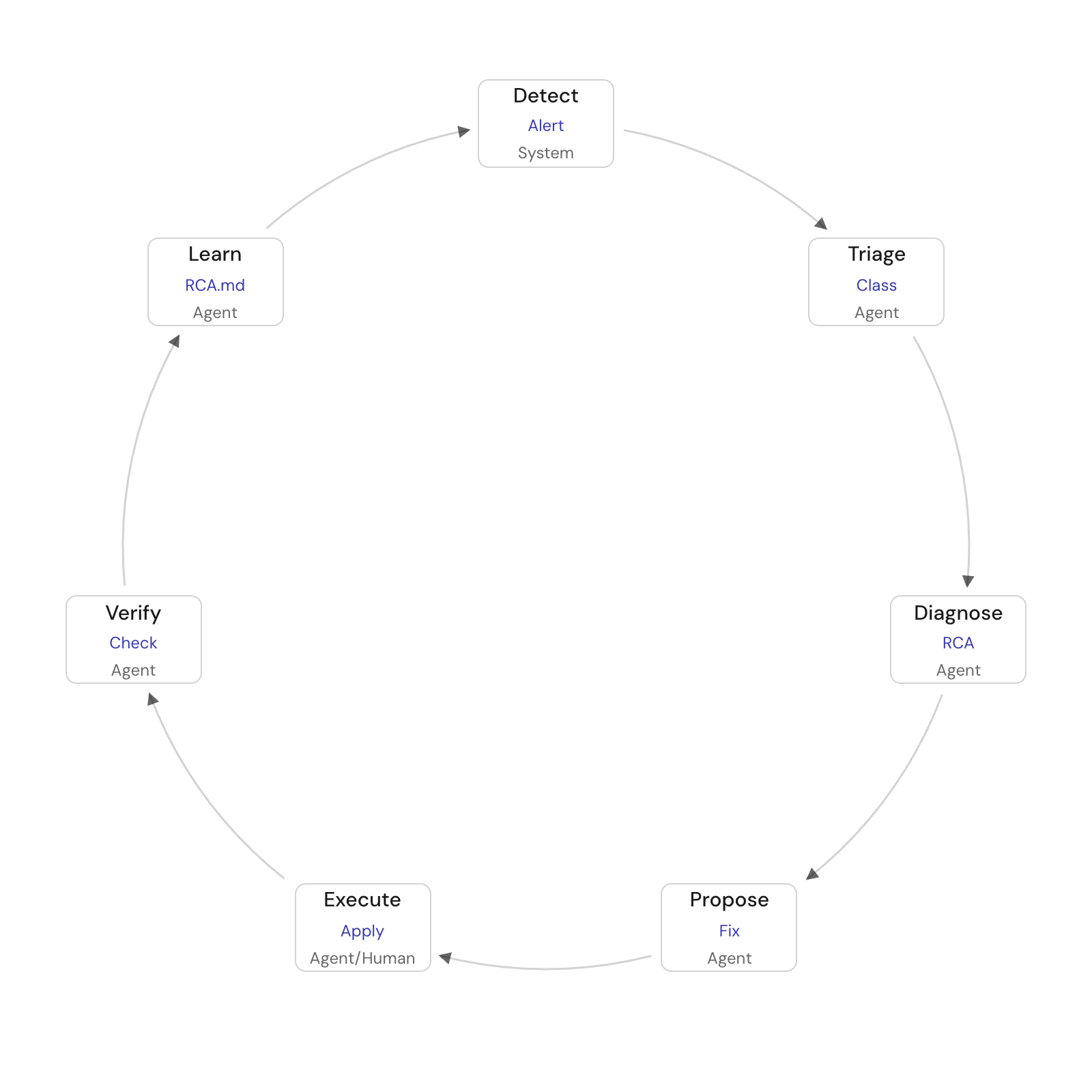
Unlike how incident management is handled today, with an engineer responsible for every stage, in a software factory, each stage can be handed to agents, inside the approval gates your team sets. Instead of handling every aspect of the SDLC, in a software factory, humans either oversee and manage the factory line (human above the loop) or apply their judgement to certain situations (human in the loop), like reviewing a fix for a critical system.
Why context is everything
An agent doesn't know what it doesn't know. Without proper context (ownership data, deployment history, service dependencies) it will misdiagnose. It might identify Service A as the source of the problem when actually Service C failed upstream and cascaded. Or it might suggest a fix that’s completely wrong.
So before an agent starts handling incidents, it has to know what your engineers know. This is where the context lake comes in. It's a central registry that tracks:
Dependency chains and blast radius. When checkout calls payment, which calls billing, that chain matters. An alert fires on checkout at 8:45 AM, but payment failed at 8:20 AM upstream. The agent traces dependencies backward and finds payment first, not the most recent change to checkout. Without the dependency map, the agent might wrongly assume checkout is the culprit. With it, the agent also calculates blast radius: checkout’s failure cascades to checkout-web, sample-checkout-web, and three downstream payment processors. That’s all critical context for deciding if an auto-fix is safe.
Steady state baselines. Checkout’s p99 latency spiked to 4.2 seconds. Without a baseline, the agent can’t tell if that’s abnormal. But when it checks the normal range of 0.8 to 1.1 seconds, it immediately sees: this is 4x worse than normal. This is an incident.
What actions are safe to auto-execute. Restart a pod in staging? Yes. Rollback to a known-good version? Maybe but only if the previous version was tested and the blast radius is small. Shut down a critical service? Never without approval. The catalog tracks which fixes are low-risk and reversible (execute automatically), which need human approval (propose and wait), and which are off-limits entirely (escalate immediately).
Without this context, your incident automation fails. If ownership is incorrect, incidents go to the wrong person. If deployments aren't tracked, agents can't diagnose. If dependencies are unknown, agents can't assess blast radius.
Where to start
Don't start with your highest-volume system. Start with one that's the most mature from an engineering perspective.
Engineering maturity matters more than incident volume. If you have missing metadata, flat telemetry, and tribal knowledge, agents will hallucinate. They'll confidently reach wrong conclusions and erode trust.
But if you've defined who owns what services and have structured signals (well-tuned alerts, not alert spam), defined runbooks, and known dependencies, agents work well.
Pick your system based on maturity. You’re not fixing every incident at once—you’re proving the factory line works before you expand it.
How agents earn trust and how to know if automation is working
Agents earn trust over time.
Set thresholds for blast radius: how bad if the agent messes up? Set thresholds for reversibility: can the fix be undone fast? Start handing over control on actions that are low risk and easily reversible: a service restart you can immediately undo, a config change with a known rollback.
Let the agent run these and prove itself. As it demonstrates success, gradually expand what it's allowed to do.
There's no fixed rule for what needs human approval. It depends on how critical your system is and how complex the fix is. But the principle is the same: you score each action on blast radius and reversibility. The agent starts in the low-risk zone. As it proves itself, you expand its scope.
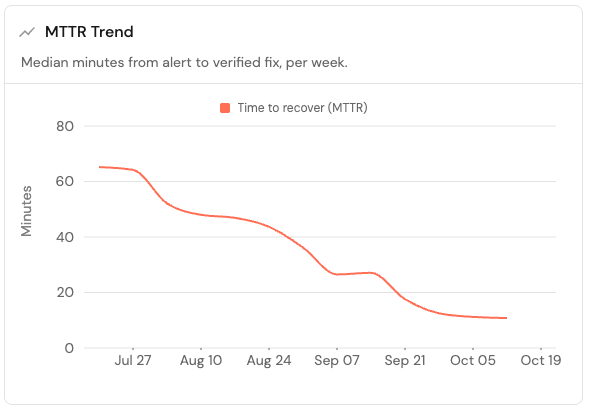
Once automation is running, some metrics to track include:
How many times is a human involved per incident? This tells you whether humans are still doing triage and context-hunting, or if the factory line is handling that. Track before automation and after. The number should drop.
Mean time to resolution, mean time to finding an owner, mean time to diagnosis. Compare before and after. These should improve. If they don't, something's broken.
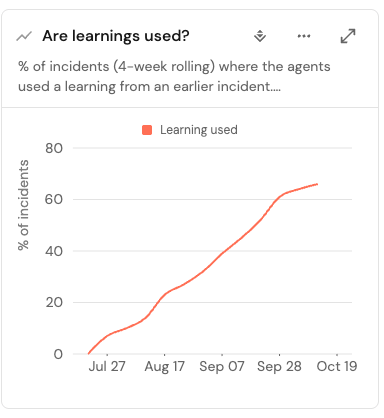
Is learning being used? If the learning stage is working (if the system captures what caused each incident and reuses that knowledge), the percentage of learnings applied to incidents should increase. This tells you the factory line is getting smarter.
How often do people accept vs. reject agent fixes? Ideally, more fixes are accepted then rejected so the percentage of AI fixes picked by an engineer should increase. If a majority of the proposals aren’t picked, something's wrong with the agent's logic or the information it's working with.
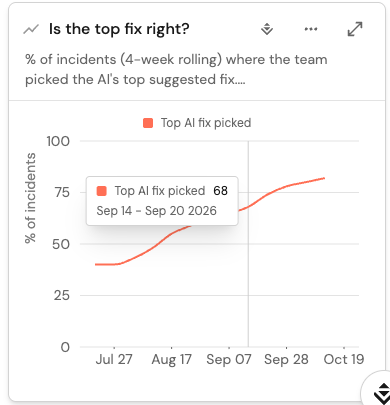
These metrics show you whether automation is working, and they surface where it's failing so you can debug.
When an agent gets something wrong, companies blame the agent. Usually, that's wrong. The fault is in the prompt, or the data, or the guardrails. Debug the information before you blame the agent.
Also, don’t assume that agent benchmarks apply to your environment. Lab tests use clean data and well-defined scenarios. Your production environment has siloed knowledge, outdated org charts, and messy reality. Benchmarks don’t account for that.
The payoff
A factory line moves humans above the loop. You become the architect. The one who makes sure the operation runs smoothly. You don't handle every incident. You get called in when something goes wrong that the system can't handle. Instead of waking at 2 AM to hunt logs, you wake up to a dashboard showing what was fixed while you slept.
Start with your healthiest system. Prove it works. Expand from there.
Use Port to build your incident management software factory line. Book a demo or try Port, free.
FAQs
What are the stages of an incident management process?
The incident management process has seven stages:
- Detect: An alert, log, or trace signals that something is wrong.
- Triage: Is this a real incident or noise? Who owns this service?
- Diagnose: What's the root cause?
- Propose: What should we do about it?
- Execute: Run the fix automatically, or flag it for human approval.
- Verify: Did it work?
- Learn: How do we prevent this next time?
Some organizations debate whether "Learn" is part of the incident management lifecycle itself or a post-incident activity. Either way, capturing what caused each incident and reusing that knowledge is how you prevent repeat incidents.
Who owns incident management in an engineering organization?
Usually SRE or ops runs the process and on-call, while platform teams build the tooling and guardrails.
That said, ownership varies by organization size and structure. What matters is that someone is explicitly responsible for it, not scattered across teams.
What is a severity level and who sets it?
A severity level is how bad an incident is. It captures the blast radius: how many customers are affected, how critical is the service, how quickly it's degrading.
Severity levels are set either organization-wide (a standard playbook everyone follows) or by individual teams (each team defines what "critical" means for their services).
Does incident management require a separate on-call tool?
Not strictly, but it's helpful. A tool that can page engineers, route incidents to the right owner, and track the incident timeline is valuable, especially as incident volume grows.
Open source paging tools exist and work fine for smaller teams. But enterprise organizations usually benefit from enterprise-level incident management tools that handle the full lifecycle: paging, response coordination, post-incident review, and integration with your existing monitoring and communication systems.
The right tool depends on your scale and complexity. But some tool for routing and paging is worth having.
Download the RFP guide


Get your survey template today
%201.svg)


Download your survey template today


Free Roadmap planner for Platform Engineering teams
Set Clear Goals for Your Portal
Define Features and Milestones
Stay Aligned and Keep Moving Forward
Create your Roadmap


Free RFP template for Internal Developer Portal
Creating an RFP for an internal developer portal doesn’t have to be complex. Our template gives you a streamlined path to start strong and ensure you’re covering all the key details.
Get the RFP template


Leverage AI to generate optimized JQ commands
test them in real-time, and refine your approach instantly. This powerful tool lets you experiment, troubleshoot, and fine-tune your queries—taking your development workflow to the next level.
Explore now
Check out Port's pre-populated demo and see what it's all about.
No email required
LIVE WEBINAR, Aug 18, 2026:
Context-aware Vibe Coding for Platform Engineering
Thursday, October 22 12:00pm EDT⋅6:00pm CET
To learn more about the new capability and to see a live demo, join our upcoming community session with GitHub
Move fast while staying in control
Build governed agentic workflows on one central platform.
See it in action:
Watch this video on generating Terraform with Port, or explore our public demo.
.png)
Check out the 2025 State of Internal Developer Portals report
No email required
Minimize engineering chaos. Port serves as one central platform for all your needs.
Act on every part of your SDLC in Port.
Your team needs the right info at the right time. With Port's software catalog, they'll have it.
Learn more about Port's agentic engineering platform
Read the launch blog
Contact sales for a technical walkthrough of Port
Every team is different. Port lets you design a developer experience that truly fits your org.
As your org grows, so does complexity. Port scales your catalog, orchestration, and workflows seamlessly.
Port × n8n Boost AI Workflows with Context, Guardrails, and Control
Port Builders Session: A Single, Governed Interface for All MCP Servers
Book a demo right now to check out Port's developer portal yourself
Apply to join the Beta for Port's new Backstage plugin


n8n + Port templates you can use today
walkthrough of ready-to-use workflows you can clone
From manual to autonomous engineering
One platform to build, govern, and operate the Agentic SDLC.
Port is open for you to try it
build your first agentic workflow today